使用说明书 Operation Instruction
1.使用图案键( )进行缝制 Performing sewing using the pattern keys( )
P1 P2 P3 P4 P5
P1 P2 P3 P4 P5
P1 P2 P3 P4 P5
选择键 选择键 P-NO. 选择键
P1
P1 P 10 P2+P3 P19 P1+P3 +P4
P2
P2 P 11 P2+P4 P20 P1+P3 +P5
P3 P3 P 12 P2+P5 P21 P1+P4 +P5
P4 P4 P 13 P3+P4 P22 P2+P3 +P4
P5 P5 P 14 P3+P5 P23 P2+P3 +P5
P6 P1+P2 P15 P4+P5 P24 P2+P4 +P5
P7
P1+P3 P16 P1+P2 +P3 P25 P3+P4 +P5
P8 P1+P4 P17 P1+P2 +P4
P9 P1+P5 P18 P1+P2 +P5
Patterns (No.1 to 200) which have been already registered
can be registered to P1 to P50. It is possible to change and
register the scale, max. speed limitation, thread tension and
sewing position Same as the patterns (No.1 to 200), P1 to
P50 are used by the selection by scrolling the pattern Nos.
The pattem calling from P1 to P25 can be made by one-touch
as well.
* When selecting P6 to P25, perform the selection by
combination (simultaneous pressing) of and keys
as shown in the table below.
[6].缝纫机的操作(应用篇) OPERATION OF THE SEWING MACHINE(ADVANCED)
把已经登记的图案(NO.1-200)可以登记到P1-P50上。
变更扩大缩小率、最高转速限制、线张力、缝制位置
就可以登记,用图案NO.的滚动窗口选择同样可以登
记图案,可以一次的叫出P1-P25。
*选择了P6-P25时,用下所标示的 键的组
合(同时按)进行缝制。
P1 P2 P3 P4 P5
M
P2
NO.
X
Y
X
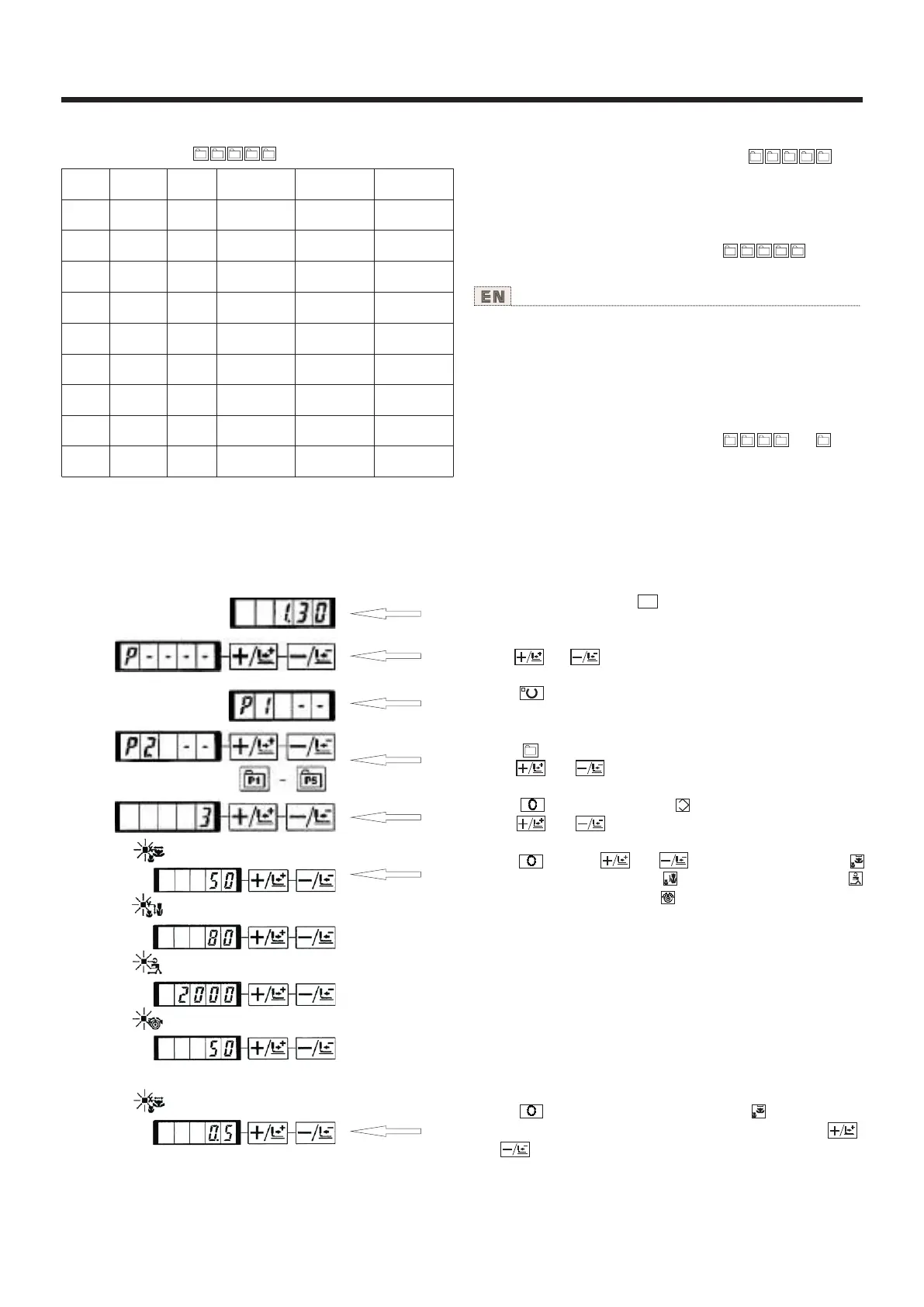
7)按 键之后,变为[X扩大缩小率 ]显示0.0。X
方向的移动量可以以0.1mm为单位进行设定。用
键、 键设定为0.5。
(1)往图案键上的登记 Register to the pattern key
1
设定例:把图案NO.3、X扩大缩小率50%、最高速
度限制2000rpm、线张力“50”、图案位置右移
0.5mm、前移1mm的设定登记到P2。
1)打开(NO)电源,按 键。(缝制LED应该灭灯)
进入方式设定(存储器开关设定)。
2)用 键、 键显示出图案登记模式。
3)按 键。
进入图案登记方式。
4)按 键。(选择登记的P-NO.)
用 键、 键也可以选择。
5)按 键,显示图案NO. 。
用 键、 键设定为图案NO."3"。
6)按 键,用 键、 键设定为X扩大缩小率
“50”%、Y扩大缩小率 “80”%、最高速度限制
“2000”rpm、线张力 “50”。
24



 To Next Page