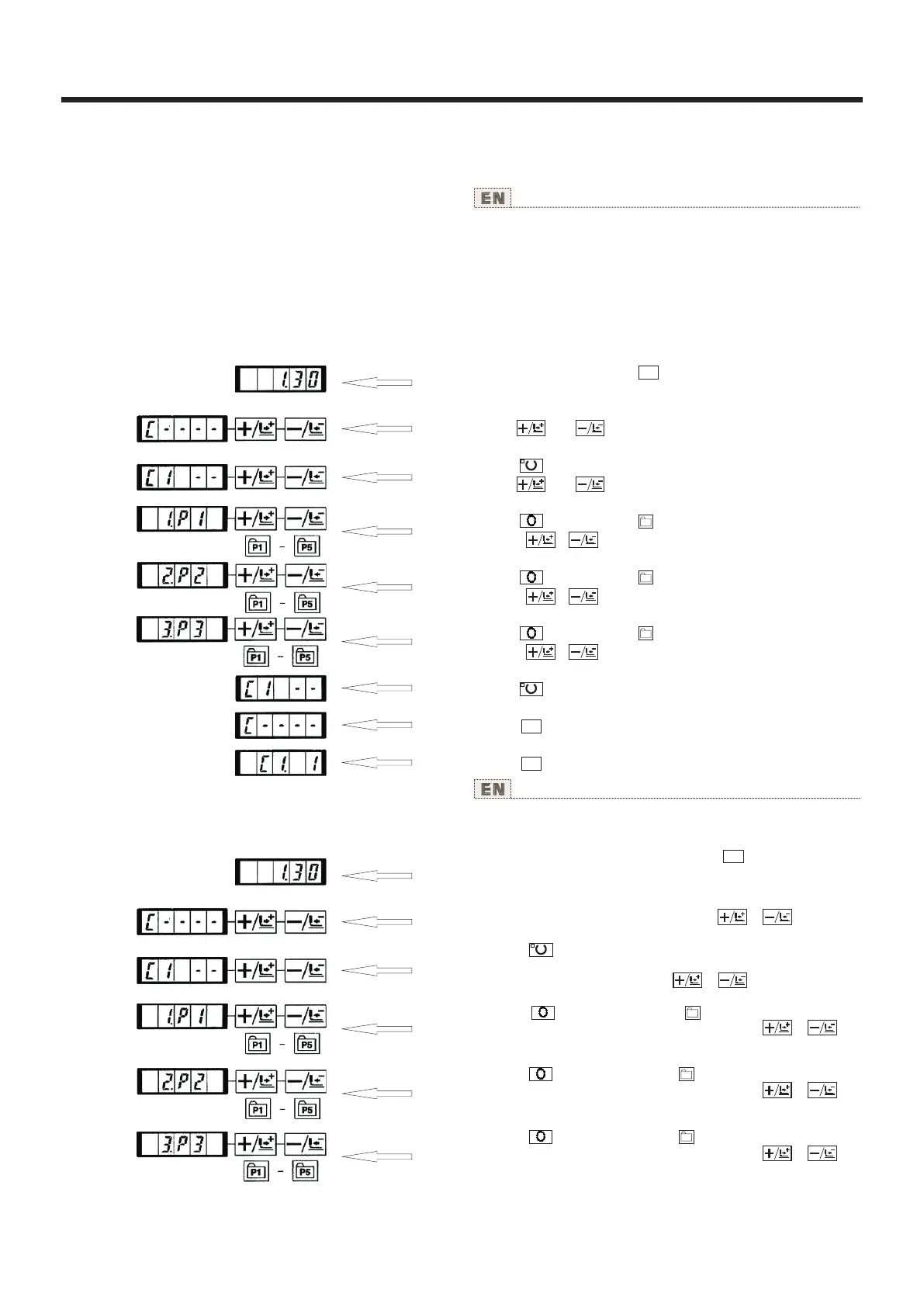
2.使用组合功 能(复合)的缝制 Performing sewing using the combination function
使用说明书 Operation Instruction
Setting example : Combine in the order of Pl, P2 and P3, and
register them in the C1.
1) Tum ON the power switch and press key to enter the
mode setting (memory switch setting): (Sewing LED should be
put out.)
2) Indicate the combination mode With or key.
3) Press key. Sewing LED lights up to enter the combinat-
ion mode.
C1 to C20 can be selected with or key.
4) Press key, and then press key. P1 is set to the first
pattern of C1. P1 to P50 can be selected with or key
as well.
5) Press key, and then press key. P2 is set to the second
pattern of C1. P1 to P50 can be selected with or key
as well.
6) Press key, and then press key. P3 is set to the third
pattern of C1. P1 to P50 can be selected with or key
as well.
M
P1
P2
P3
M
M
M
P1
P2
P3
(1)组合的登记 Register of the combination
按顺序排列已经登记的图案登记(P1-P50),登记到
C1-C20,每缝制之后按顺序变换缝制图案。
By arranging in the order of use of the pattern register (P1 to
P50) which have been already registered and registering in C1
to C20. the sewing pattern will change in the order every time
the sewing machine finishes the sewing. Every one combinat-
ion No. can be registered up to the maximum 30 patterns.
设定例:按P1、P2、P3的顺序组合进行登记。
1)打开(NO)电源,按 键。(缝制LED应该灭灯)
进入方式设定(存储器开关设定)。
2)用 键、 键显示组合模式。
3)按 键。缝制LED亮灯,进入组合方式。
用 键、 键可以选择C1-C20。
4)按 键,然后按 键。P1被设定到C1的第1个图
案。用 、 选择P1-P50。
5)按 键,然后按 键。P2被设定到C1的第2个图
案。用 、 选择P1-P50。
6)按 键,然后按 键。P3被设定到C1的第3个图
案。用 、 选择P1-P50。
7)按 键结束登记。
8)按 键。结束组合登记模式。
9)按 键,结束方式设定,返回通常方式。
27



 To Next Page