使用说明书 Operation Instruction
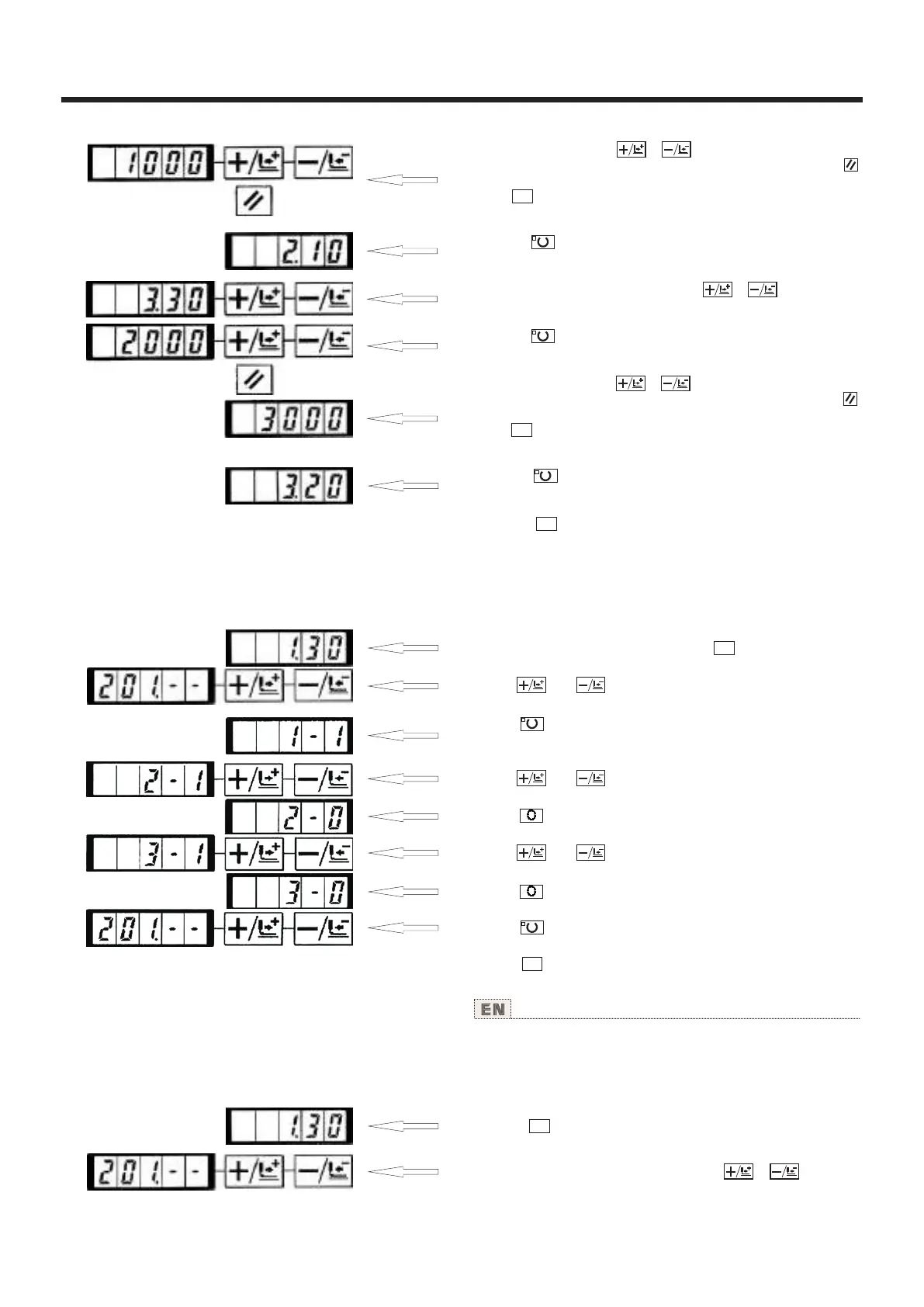
4) Indicate "1000" with or key, The value returns to
the initial value at the time of delivery from the factory with
key.
Press key to cancel the operation here and return to the
state of step 2).
5) Press key. The sewing LED goes off and the set value
of the first stitch is ragistered.
6) Indicate memory switch No.3 with or key.
Here, set the sewing speed of the second stitch.
7) Press key The sewing LED lights up and the set value
of the second stitch is indicated.
8) Indicate "2000" with or key. The value returns to
the initial value at the time of delivery from the factory with
key.
Press key to cancel the operation hare and return to the
state of step 6).
9) Press key. The sewing LED goes off and the set value
of the second stitch is registered.
10) Press key. The memory switch setting mode is finalized
and the mode returns to the normal mode
M
M
M
(3).是否可以呼出图案数据的设定 Setting whether the calling of pattern data is operative or not
设定为不要的图案不能呼出,防止错误的图案呼出。
另外,可以呼出可以使用的需要图案。
设定例:把图案NO.2、3设定为不能呼出。
1)在缝制LED灭灯的状态下,按 键。
2)用 键、 键显示出存储器开关NO.201。
3)按 键。缝制LED亮灯,图案NO.1的设定值被显
示出来。设定值1:可以读出,0:不能读出。
4)用 键、 键设定为图案NO.2。
5)按 键,把设定值设定为0。
6)用 键、 键设定为NO.3。
7)按 键,把设定值设定为0。
8)按 键,登记设定值。缝制LED灭灯。
9)按 键,结束存储器开关设定方式,返回通常
状态。
M
M
By making inoperative the calling of the unnecessary pattern,
this
se
tting
prevents
the
different pattern from calling by mistake.
Also, it is possible to call and use the necessary pattern.
Setting example:Make the calling of pattern Nos. 2 and 3
inoperative.
1) Press key in the state that the sewing LED is put out.
2) Indicare memory switch No. 201 with or key.
M
41



 To Next Page