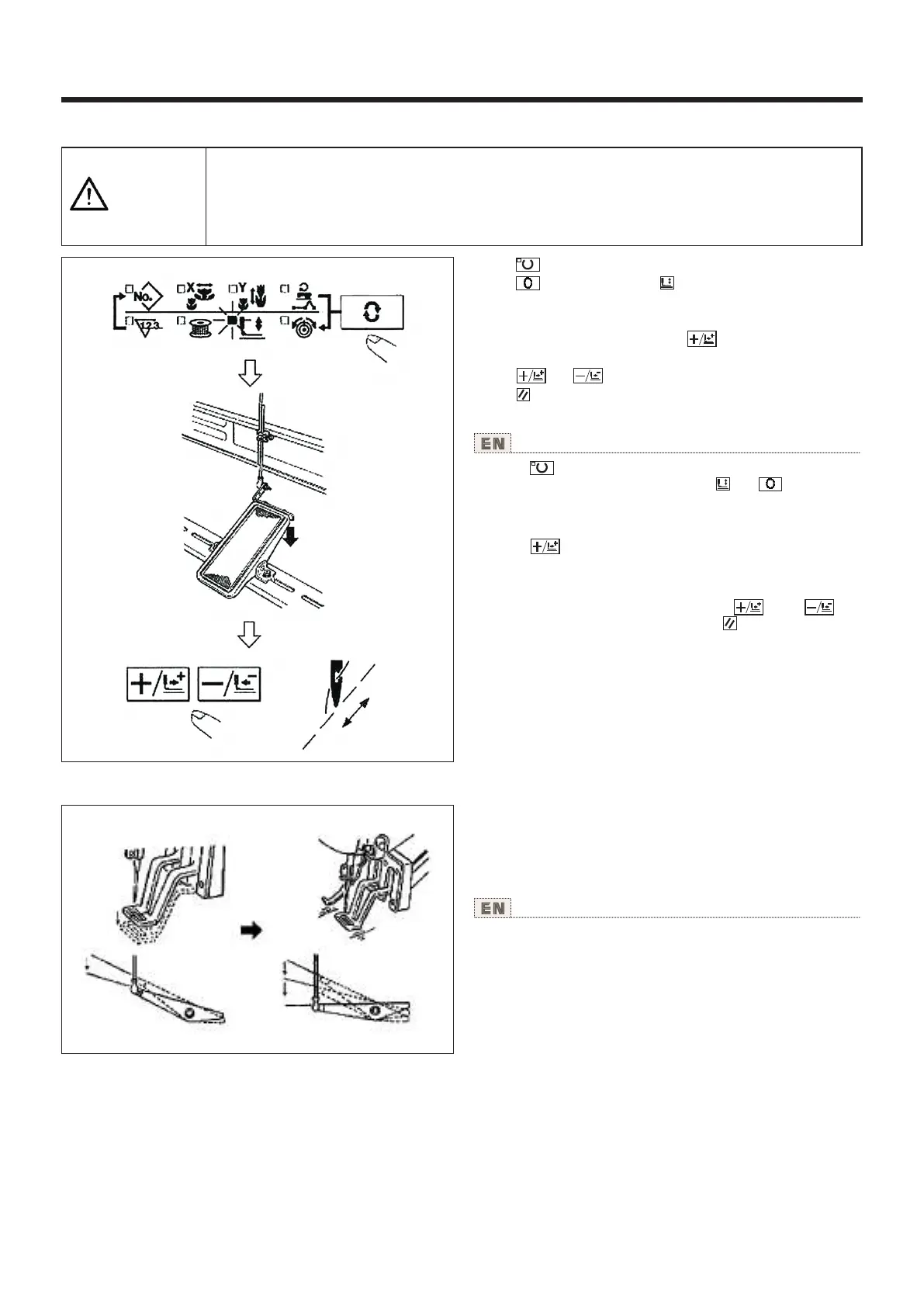
2.图案 形状的确认 Checking the contour of a sewing pattern
注意
CAUTION
选择图案后,请一定确认图案的形状。
万一图案远离压脚,缝制途中机针会碰到压脚,弄断机针。
Make sure without fail of the contour of the sewing pattem after selection of the sewing pattern.
If the sewing pattern extends outside the work clamp feet, the needle wlll interfere with the work
clamp feet during Sewing, causing dangerous troubles including needle breakage.
1)按 键,让准备LED亮灯。
2)用 键选择压脚下降 。
3)踩脚踏开关让压脚下降。
(此方式时,踩脚踏开关缝纫机也不启动)
4)在压脚下降后的状态,按 键。
(离开脚踏开关之后压脚也不上升)
5)用 键、 键确认形状。
6)按 键让压脚上升。
(注意)打开(NO)电源后,压脚不下降。
1) Press key lo make the READY LED light up.
2) Select the work clamp foot lowering with key.
3) Lower the work clamp feel with the foot switch.
(The sewing machine does not start even when the foot switch
is depressed under this mode.)
4) Press key in the state that the work clamp feet are
lowered.
(The work clampfeet do not go up even when the foot switch
is detached.)
5) Conlirm the contour of the pattern with key or key.
6) The work clamp feet will go up when key is pressed.
(NOTE) The presser does not come down immediately after
turning ON the power.
使用说明书 Operation Instruction
3.缝制 Sewing
1)把缝制品放到压脚部。
2)把踏板开关踩到第一级,压脚下降,脚离开踏板
以后,压脚上升。
3)把压脚下降一级,踩到第二级之后开始缝制。
4)缝制结束后,压脚上升返回到原始位置。
1) Set a workpiece on the work clamp foot section.
2) Depress the pedal switch to the first step, and the work
clamp feet Will come down. lf you detach your foot from the
pedal switch, the work clamp feet will go up.
3) Depress the pedal switch to the second step after
descending the work clamp feet at the first step, and the
sewing machine will start sewing.
4) After the sewing machine completes sewing, the work
clamp feet will go up, and return to the sewing start position.
19



 To Next Page