FC8000-UM-251-9370 8-16
8. TROUBLESHOOTING
8.5 Service mode
8.5.1 Sensor Test Mode & Panel Switch Test Mode
Thismodechecksthesensorstatusandthecontrolpanelswitchstatus.Ifthereisabadsensoryouwill
observeoneofthesymptomsinthetablebelow.
Pleasechecktherelevantsensor(s).
Sensor Symptom
Yhomesensor Thepenblockhitstherightsideplate.
Camsensor Theplotterdisplays“LOADMEDIA!”whenmediaisalreadyloaded.
Pinchrollersensor Thepenblockhitstheleftsideplate.
+X,-Xmediasensor Mediadropsoutoftheplotter.
How to test the sensors
(1) LoadanA2orlargersizesheetofpaperintheplotter.
(2) Entertheadjustmentmenu(seeSection7.3.4).
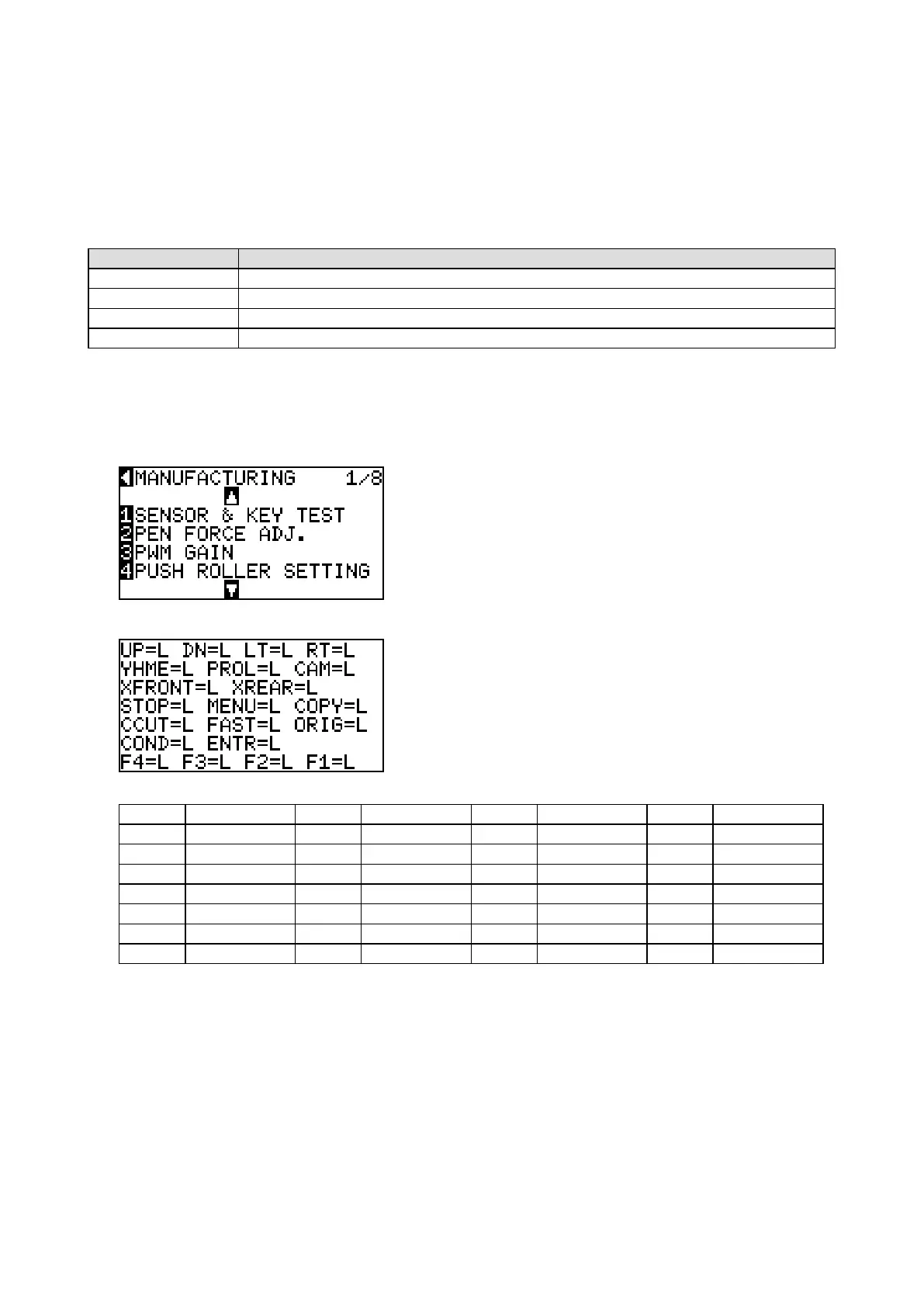
(3) PresstheMENUkeytodisplaythemenushownbelow.
(5) PresstheF1keytodisplaythemenushownbelow.
Eachshortformsarecorrespondingtothesensorsandthecontrolpanelswitchesasshownbelow.
Shortform Sensororkey Shortform Sensororkey Shortform Sensororkey Shortform Sensororkey
UP Uparrowkey DN Downarrowkey LT Leftarrowkey RT Rightarrowkey
YHME Yhomesensor PROL Pinchrollersensor CAM Camsensor
XFRONT Frontmediasensor XREAR Rearmediasensor
STOP STOPkey MENU Menukey COPY Copykey
CCUT CrossCutkey FAST Fastkey ORIG Originkey
COND Conditionkey ENTR Enterkey
F4 4key F3 3key F2 2key F1 1key
(6) Coverthefrontmediasensorwithapieceofpaper.
ThestatusofXFRONTchangesfrom“L”to“H”.
(7) Covertherearmediasensorwithapieceofpaper.
ThestatusofXREARchangesfrom“L”to“H”.
(8) Movethepenblocktothefarright.Whenthepenblockreachesthehomepositionag,thestatusof
YHMEchangesfrom“L”to“H”.
(9) Lowerthemediasetlevertoraisethepinchrollers.ThestatusofCAMchangesfrom“L”to“H”.
(10)Movethepenblocktotheleftandright.Whenthepenblockcrossesthepinchroller,thestatusofPROL
changesfrom“L”to“H”.









 To Next Page