FC8000-UM-251-9370 7-24
7. ADJUSTMENT
7.3.12 Adjusting the Offset of the Light Pointer Position
Ifyoureplacethelightpointerorthemainboard,youneedtoadjusttheoffset.
How to adjust the offset of the light pointer position
(1) Entertheadjustmentmenu(seeSection7.3.4).
(2) LoadanA2orlargersizesheetofpaperintheplotter.
(3) Mountabertippeninthepenholder.
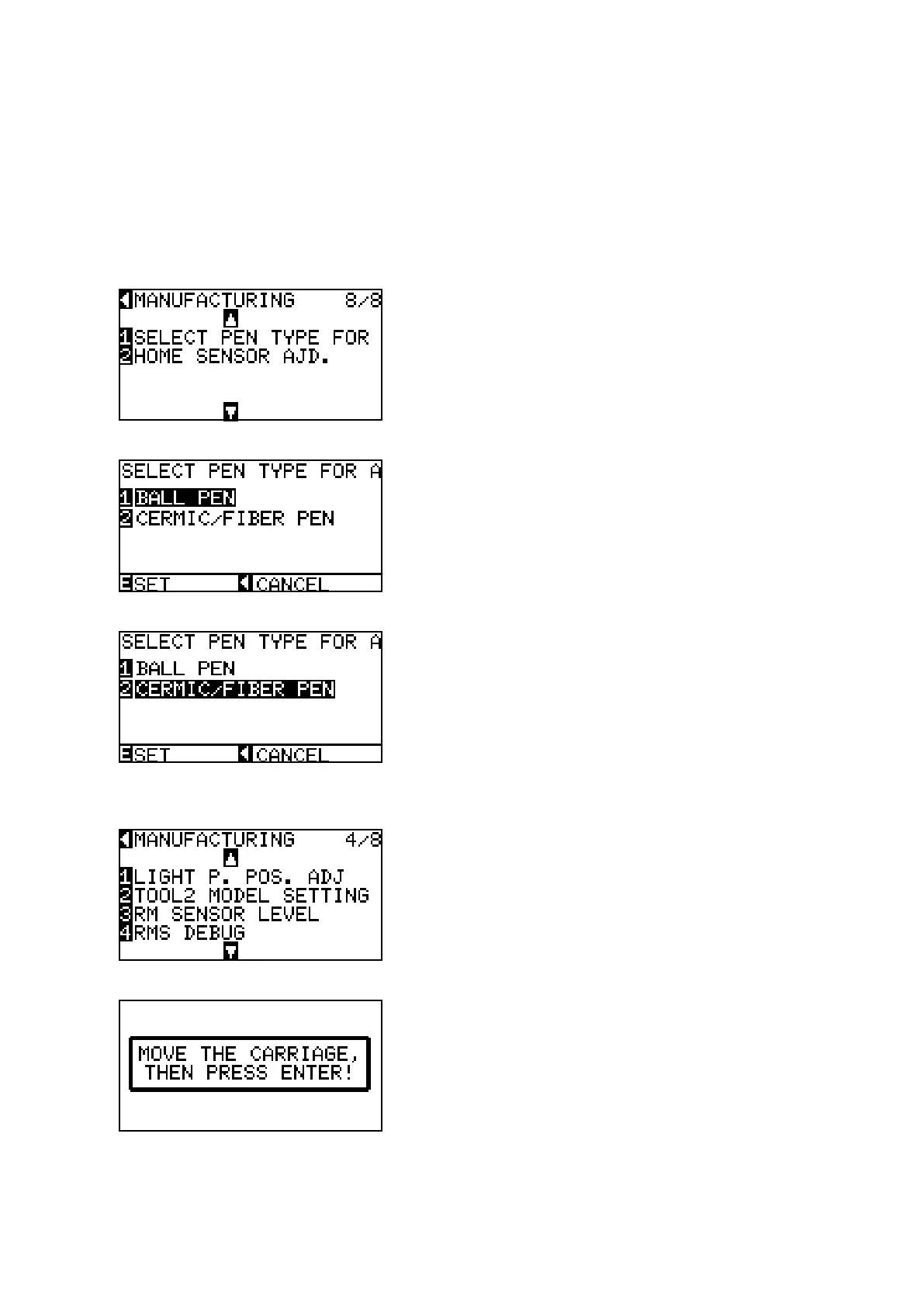
(4) PresstheUParroworDownarrowkeyuntilthemenushownbelowisdisplayed.
(5) PresstheF1keytodisplaythemenushownbelow.
(6) PresstheF2keytoselectthebertippenthemenushownbelow.
(7) PresstheENTERkeytosetthebertippen.
(8) PresstheUParroworDownarrowkeyuntilthemenushownbelowisdisplayed.
(9) PresstheENTERkeytodisplaythemenushownbelow.
(10)UsethePOSITIONkeystomovethepentoanopenareatoplottheadjustmentpattern.









 To Next Page