FC8000-UM-251-9370 6-7
6. DISASSEMBLY AND REASSEMBLY
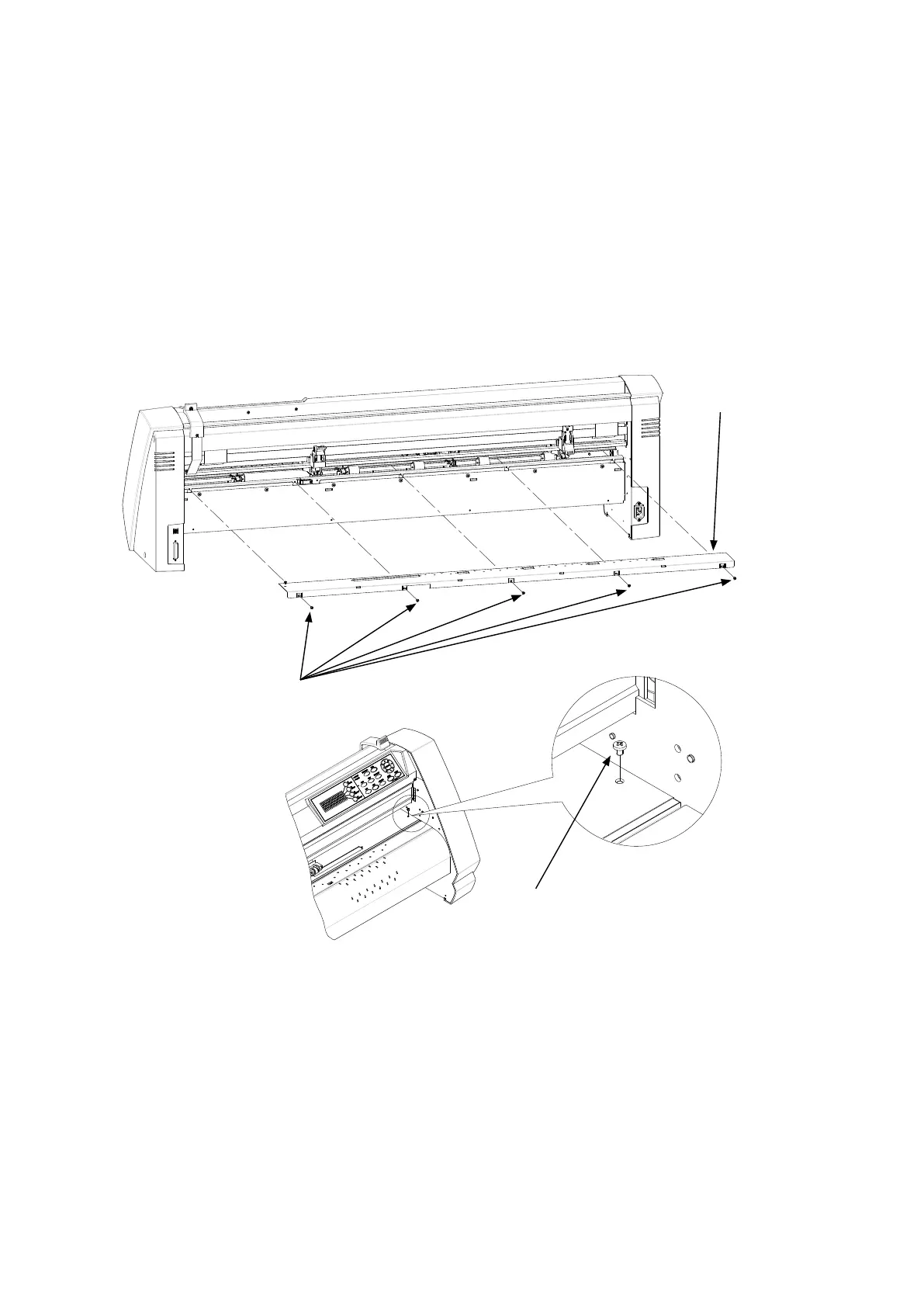
6.1.7 How to Replace the Rear Writing Panel
How to detach the rear writing panel
(1) Detachtherearguide(seeSubsection6.1.6).
(2) RemovetheM3L6bindingheadscrewfromthetopoftherearwritingpanel.
(3) RemovetheveM3L6bindingheadscrewsfromtherearoftherearwritingpanelfortheFC8000-60/75.
(RemovetheveM3L6bindingheadscrewsfromtherearoftherearwritingpanelfortheFC8000-100.
RemovethesixM3L6bindingheadscrewsfromtherearoftherearwritingpanelfortheFC8000-130.
RemovethesevenM3L6bindingheadscrewsfromtherearoftherearwritingpanelfortheFC7000-
160.)
(4) Detachtherearwritingpanel.
Rearwritingpanel
M3L6bindingheadscrew
M3L6bindingheadscrew
How to reinstall the rear writing panel
(1) Reattachtherearwritingpanelinthereverseorderinwhichitwasdetached.









 To Next Page