FC8000-UM-251-9370 6-17
6. DISASSEMBLY AND REASSEMBLY
6.2.7 How to Replace the Pinch Roller Sensor
How to detach the pinch roller sensor
(1) Detachthecentercover(seeSubsection6.1.4).
(2) Detachthepenblock(seeSubsection6.2.5).
(3) DisconnectthepinchrollerexiblecablefromtheY-relayboard.
(4) Removethepinchrollerexiblecablethatisattachedwithdouble-sidedadhesivetapetotheY-slider.
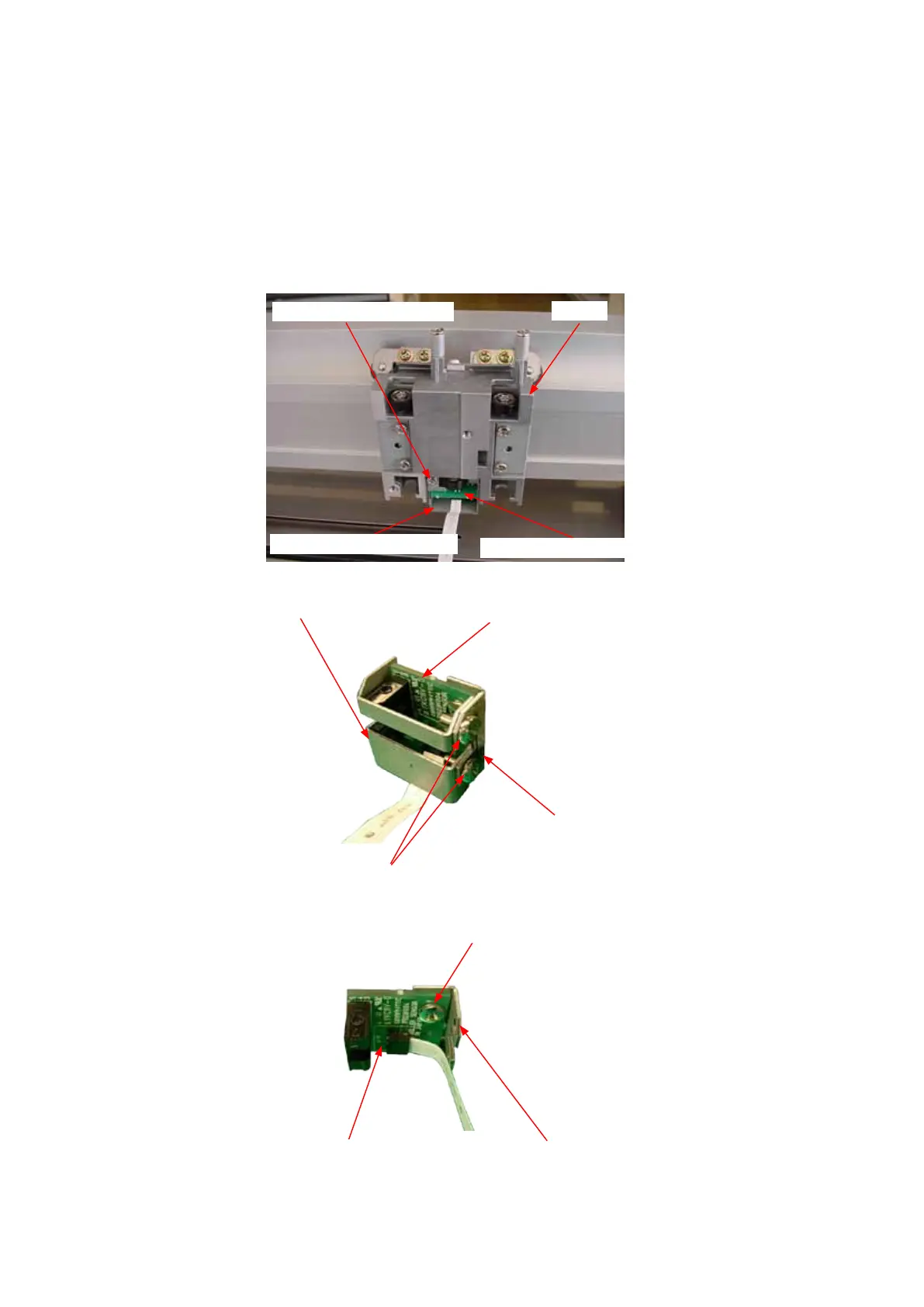
(5) RemovetheM3L6bindingheadscrewattachingthepinchrollersensorbrackettotheslider.
Yslider
M3L6bindingheadscrew
Pinchrollersensorbracket
Pinchrollersensorboard
(6) RemovethetwoM3L6bindingheadscrewsattachingthepinchrollersensorguard.
Pinchrollersensorguard
M3L6bindingheadscrew
Pinchrollersensorbracket
Pinchrollersensorboard
(7) RemovetheM3L6bindingheadscrewattachingthepinchrollersensorboard.
M3L6bindingheadscrew
PinchrollersensorbracketPinchrollersensorboard
(8) Disconnectthepinchrollerexiblecablefromthepinchrollersensorboard.









 To Next Page