FC8000-UM-251-9370 8-18
8. TROUBLESHOOTING
8.5.2 Printing the Setting of the Plotter
Conditionsettinglistcanbeprintedwhenyouneedtocheckthecurrentsettingoftheplotter.
Operation
(1) SetapaperlargerthanA3size.
(2) Setthepentooltothetoolcarriageandselecttheconditionwherethepentoolisset.
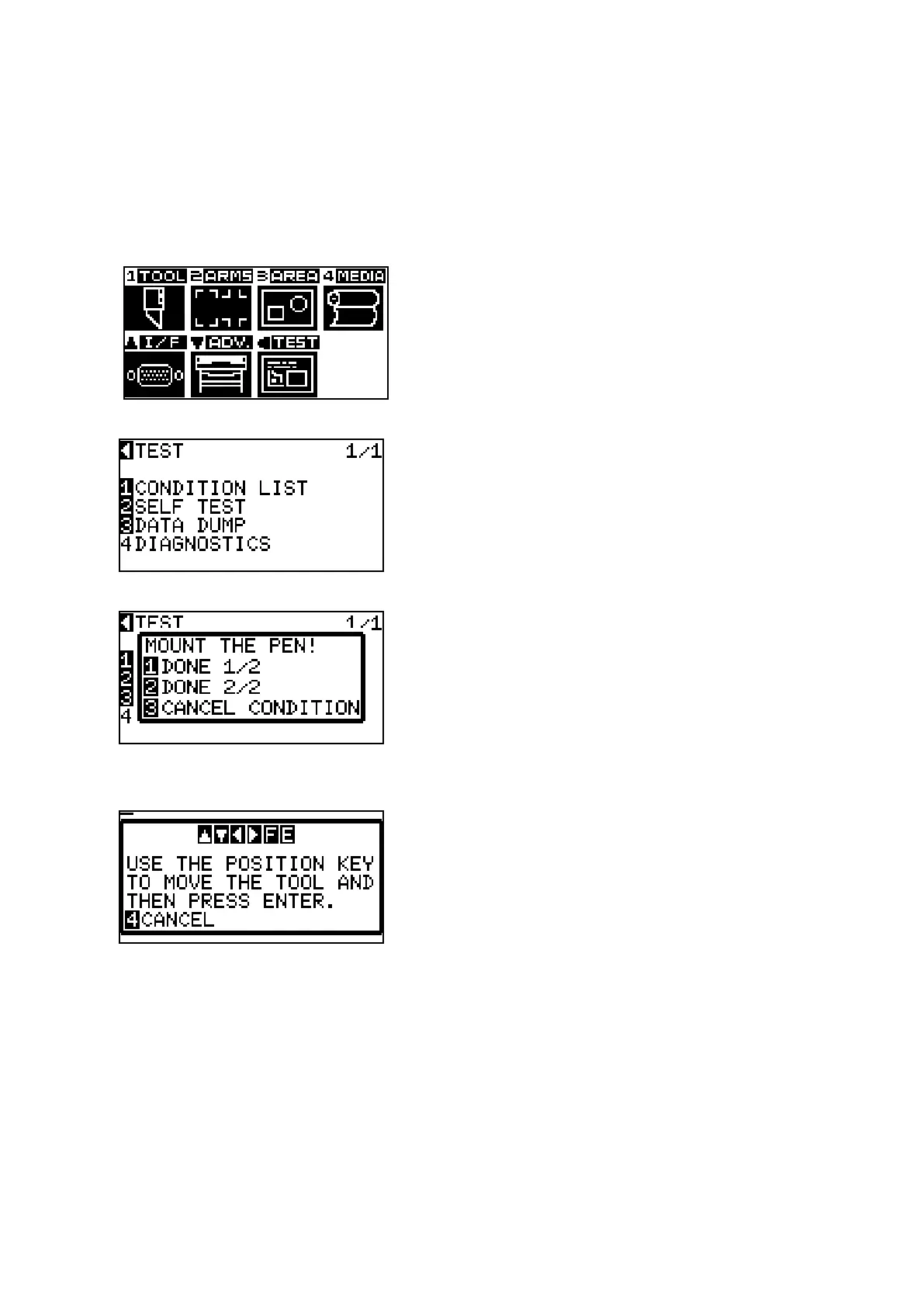
(3) Pressthe[MENU]keytodisplaythemenubelow
.
(4) PressthePOSITION(t)key(TEST)todisplaythemenubelow.
(5) Pressthe[1]key(CONDITIONLIST)todisplaythemenubelow.
(6) Pressthe[1]key(DONE1/2)orthe[2]key(DONE2/2).
Messagetoconrmtoolpositionisdisplayed.
(7) MovethetoolcarriagetoprintstartpositionbyusingthePOSITIONkey.
(8) PresstheENTERkeytostartprintingtheconditionlist.
ItwillreturntoREADYstatuswhentheprintingiscompleted.









 To Next Page