FC8000-UM-251-9370 6-12
6. DISASSEMBLY AND REASSEMBLY
6.2.4 How to Replace the Control Panel Board and the LCD
How to detach the control panel board ant the LCD
(1) Detachthecontrolpanelassembly(seeSubsection6.1.3).
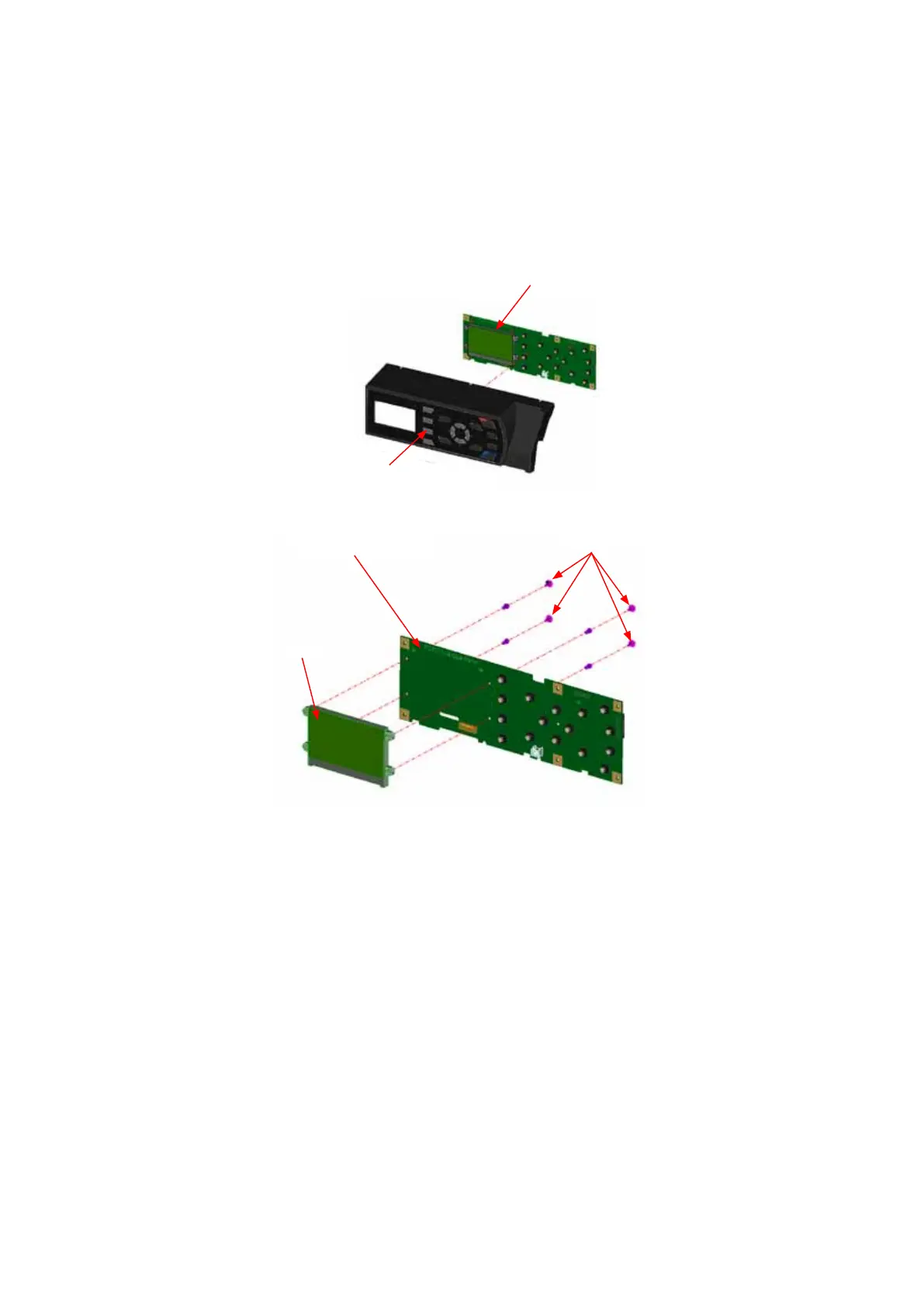
(2) Detachthecontrolpanelboardfromthecontrolpanelcoverassembly.
Releasethehooksholdingthecontrolpanelboard,andthendetachthecontrolpanelboardfromthe
controlpanelcover.
Controlpanelcover
Controlpanelboard
(3) RemovethefournylonrivetsholdingtheLCDfromthecontrlpanelboard.
Controlpanelboard
LCD
Nylonrivet
(4) DetachtheLCDfromthecontrolpanelboard.
How to reinstall the control panel board and the LCD
(1) ReattachthecontrolpanelboardandtheLCDinthereverseorderinwhichtheyweredetached.









 To Next Page