FC8000-UM-251-9370 7-28
7. ADJUSTMENT
7.3.14 Adjusting the Pen Exchange Y Direction Value (2-pen model)
ThisadjustmentwillsetthepenexchangeYdirectionvalue.
Thisvalueisusedforthe2ndpenpenexchange.
Ifyoureplacethemainboard,usethefollowingproceduretoinputtherecordedadjustmentvalues.
(1) ConrmthattheDIPswitch7ofSW1isOFF.(2-penmodelmode)
(2) Entertheadjustmentmenu(seeSection7.3.4).
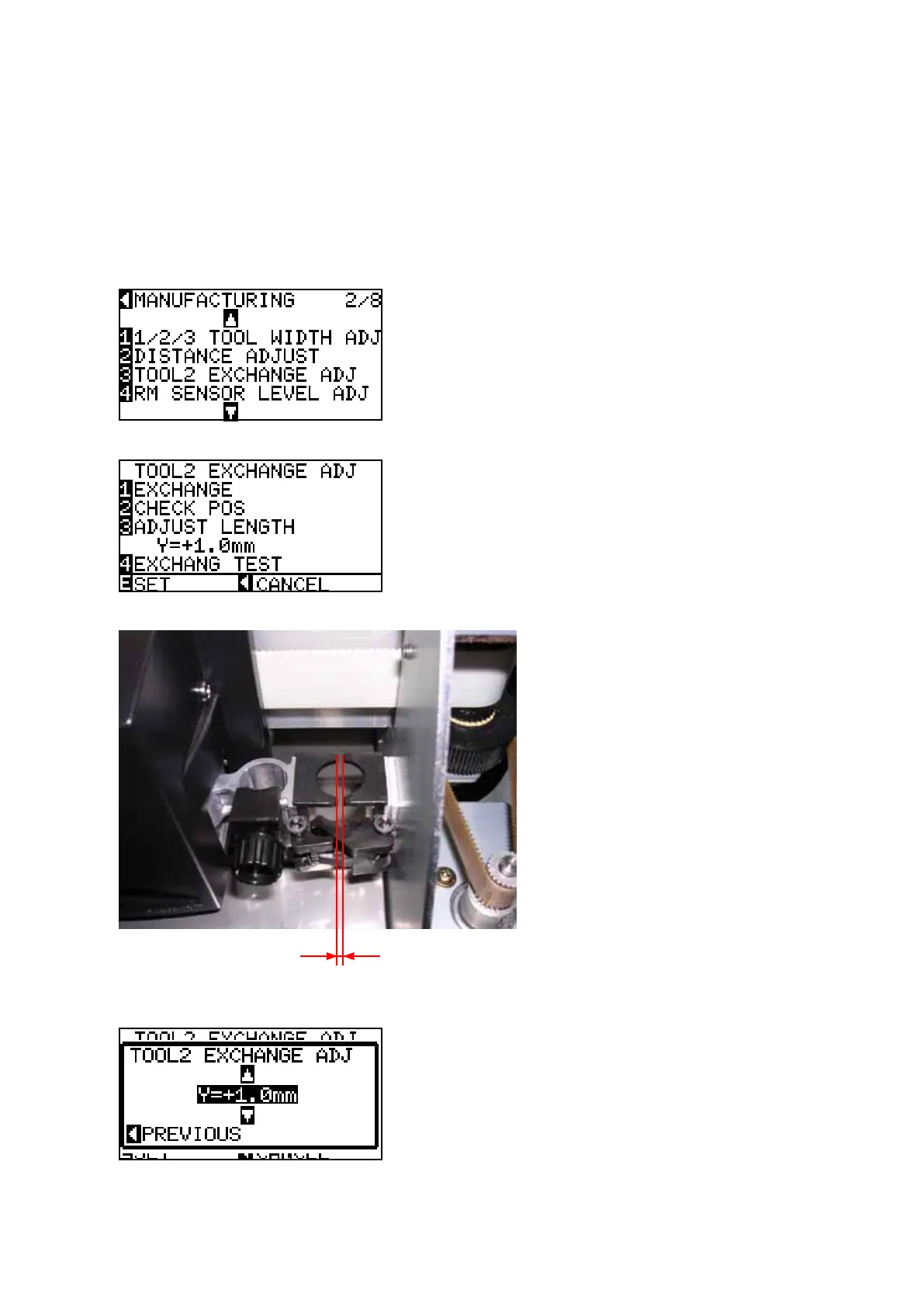
(3) PresstheUportheDownpositionkeyuntilthemenushownbelowisdisplayed.
(4) PresstheF3keytodisplaythemenushownbelow.
(5) PresstheF2keytomovethepencarriagetotheexchangeposition.
Thisgapshouldbe1.1mm.
(6) PresstheF3keytodisplaythefollowingmenutoadjustthegap.
(7) Adjustgapusingtheuporthedownpositionkey.
(8) Measurethegapbetweenthe2ndpenholderandthe2ndpenstation.









 To Next Page