7-2 7. CHINO
7.1.1 DP1000
Communication Setting
Editor
Communication setting
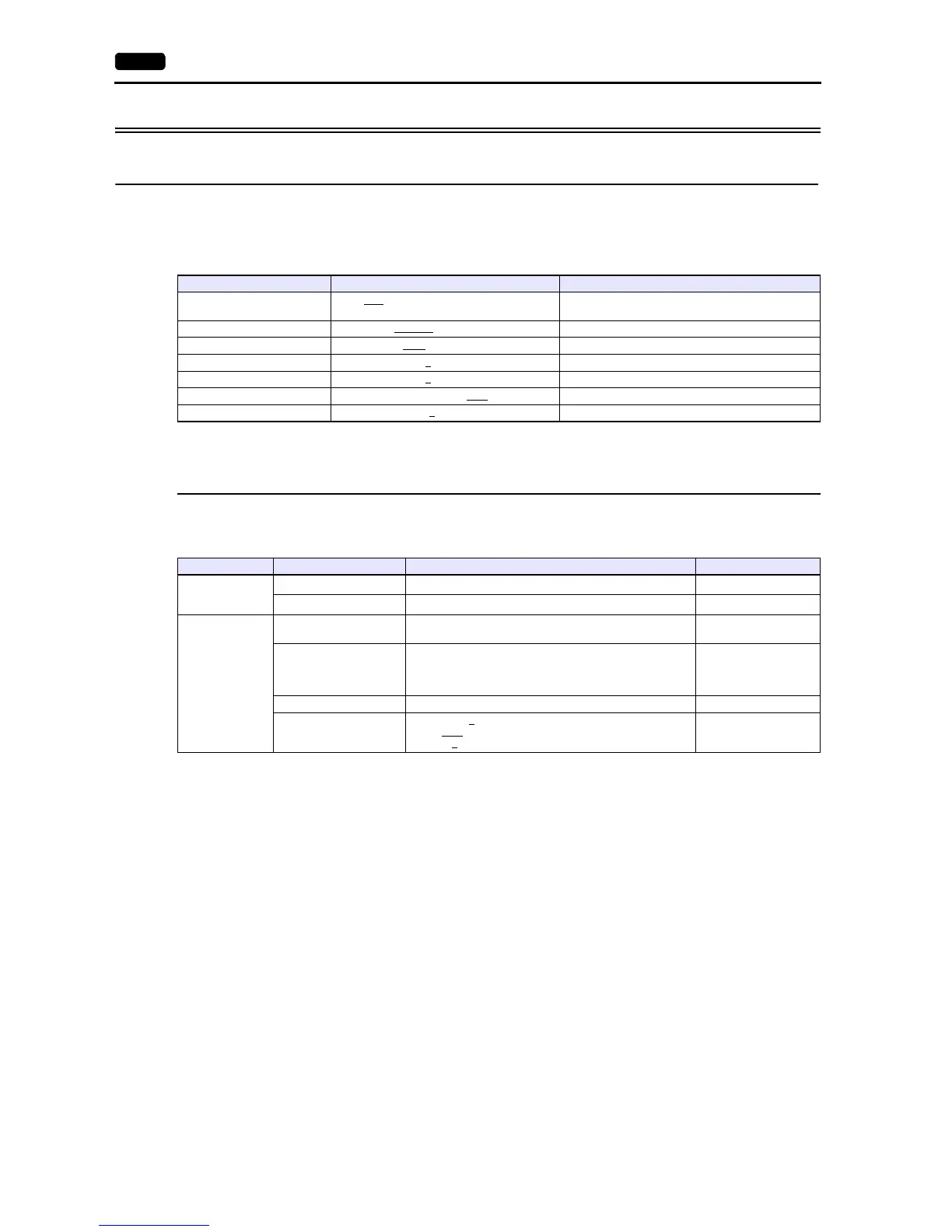
(Underlined setting: default)
Digital Program Controller
DP1000
The communication parameters can be set using keys attached to the digital program controller.
Be sure to match the settings to those made under [Communication Setting] of the editor.
(Underlined setting: default)
* To start program operation from the V series, select “MASTER COM.” for program start method. To select a pattern number from the V
series, select “COM” for pattern selection method.
Item Setting Remarks
Connection Mode
1:1 / 1:n
/ Multi-link2 / Multi-link2 (Ethernet) /
1:n Multi-link2 (Ethernet)
Signal Level RS-232C
/ RS-422/485
Baud Rate 4800 / 9600
/ 19200 / 38400 bps
Data Length 7
/ 8 bits
Stop Bit 1
/ 2 bits
Parity None / Odd / Even
Targe t Por t N o. 1 to 99
Mode No. Item Setting Remarks
Mode 1
(Operation status
selection)
Program start method
*
MASTER COM.: Start by communication
Pattern selection method
*
COM: Selection by communication
Mode 8
(Communication
setting)
Communication function,
type
COM: Host communication
Device No. 01 to 99
Invalid during RS-232C
communication
00: Communication not
possible
Baud rate 4800 / 9600 bps
Communication characters
(Data length, parity,
stop bit)
Data length: 7
/ 8 bits
Parity: Even
/ Odd / None
Stop bit: 1
/ 2 bits



 To Next Page