7.1 Temperature Controller/Servo/Inverter Connection 7-3
DP1000G
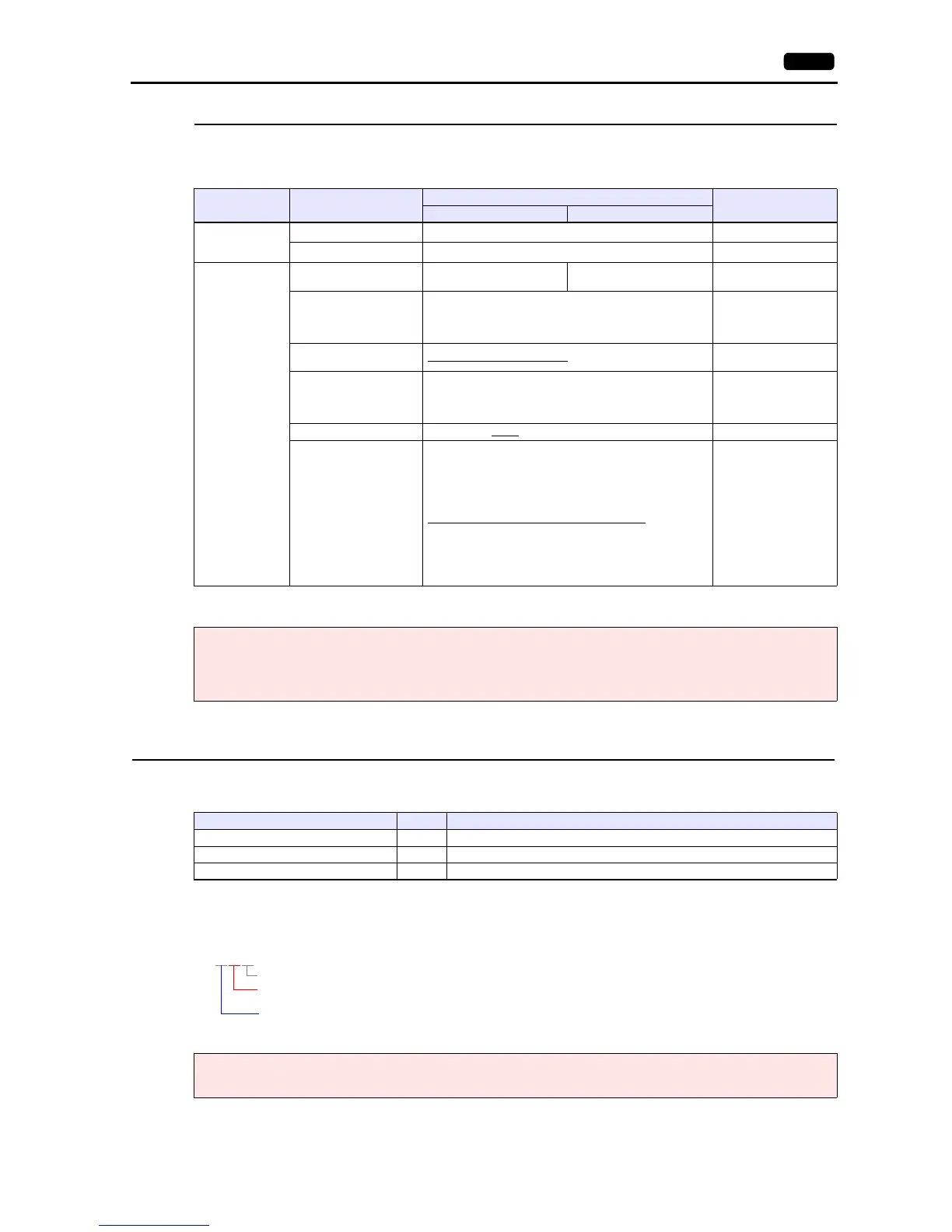
The communication parameters can be set using keys attached to the digital program controller.
Be sure to match the settings to those made under [Communication Setting] of the editor.
(Underlined setting: default)
* To start program operation from the V series, select “COM” for program start method. To select a pattern number from the V series, select
“COM” for pattern selection method.
Available Device Memory
The available setting range of device memory varies depending on the model. Be sure to set within the range available for the
model to be used. Use [TYPE] when assigning indirect device memory for macro programs.
Address denotations
The assigned device memory is expressed as shown below when editing the screen.
aabbcc
Mode No. Item
Setting
Remarks
COM1 COM2
Mode 1
(Operation status
selection)
Program start method
*
COM: Start by communication
Pattern selection method
*
COM: Selection by communication
Mode 8
(Communication
setting)
Communication type
Fixed according to
communication specification
PORT2
Protocol PRIVATE: CHINO’s conventional protocol
When establishing a
connection by using
MODBUS RTU format,
refer to “25. MODBUS”.
Communication function,
type
COMM: Host communication
Device No. 01 to 99
Invalid during RS-232C
communication
00: Communication not
possible
Baud rate 4800 / 9600 / 19200
/ 38400 bps
Communication characters
(Data length, parity,
stop bit)
7N1: data length 7 bits, without parity, stop bit 1
7N2: data length 7 bits, without parity, stop bit 2
7E1: data length 7 bits, even parity, stop bit 1
7E2: data length 7 bits, even parity, stop bit 2
7O1: data length 7 bits, odd parity, stop bit 1
7O2: data length 7 bits, odd parity, stop bit 2
8N1: data length 8 bits, without parity, stop bit 1
8N2: data length 8 bits, without parity, stop bit 2
8E1: data length 8 bits, even parity, stop bit 1
8E2: data length 8 bits, even parity, stop bit 2
8O1: data length 8 bits, odd parity, stop bit 1
8O2: data length 8 bits, odd parity, stop bit 2
Notes on parameter change from the V series
Before changing parameters from the V series, function keys and the related mode in the setting menu must be locked
using keys on the digital program controller.
For more information, refer to the instruction manual for the controller issued by the manufacturer.
Device Memory TYPE Remarks
D (data) 00H Double-word
DN (individual data) 01H Double-word
PG (program) 02H Double-word
Note on device memory setting
Do not access addresses that are not assigned in the device memory map.



 To Next Page