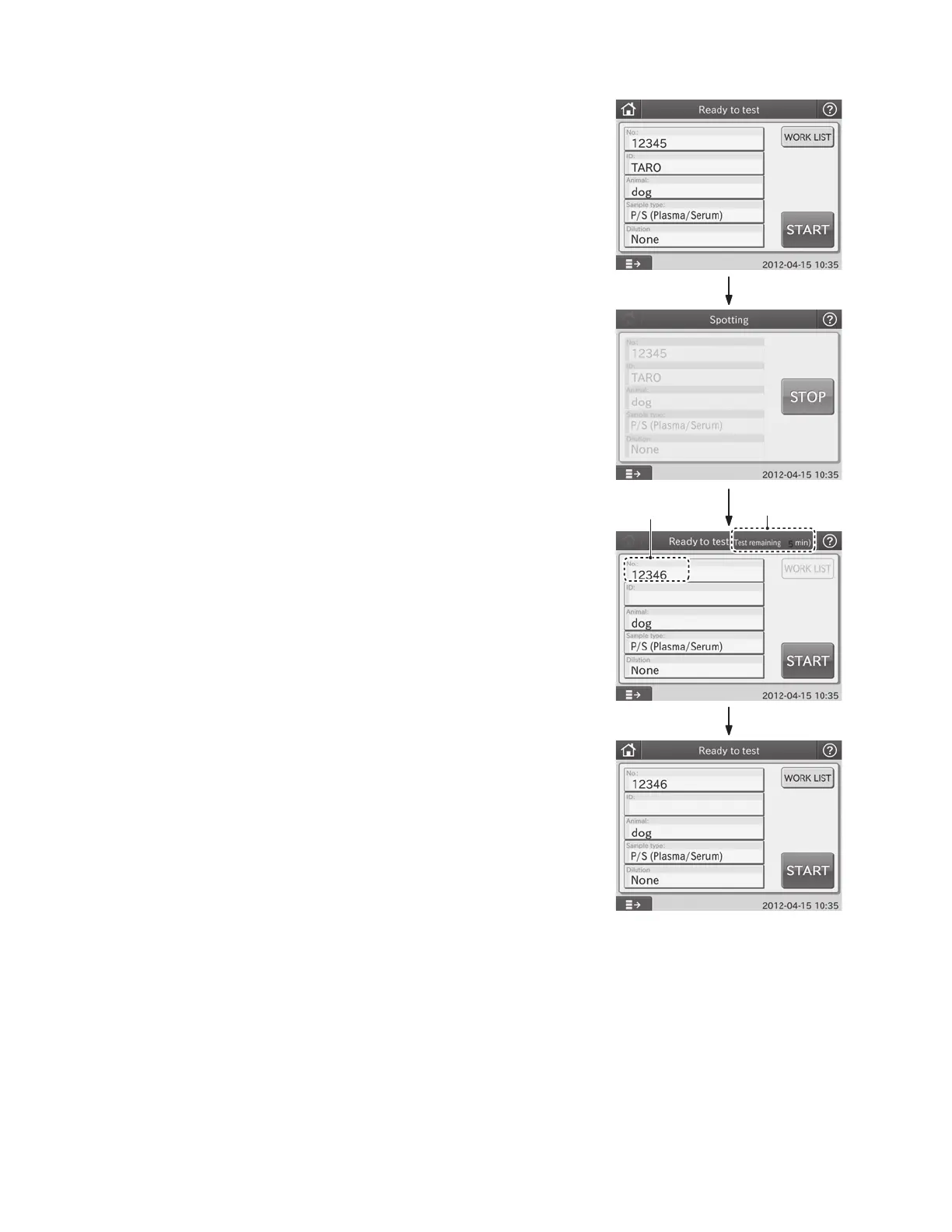
③
④
②
Basic
The next sample
No. is displayed.
Remaining time until all test
results are ready.
Operation Steps and Screen Displays for Basic Dialogue
1. Before Testing
Make sure [Ready to test] is displayed.
Input the sample information.
If the device is connected to PMS, you can obtain test
requests by touching WORK LIST in the test preparation
dialogue before performing tests.
Place sample rack, slide cartridge, tips, and sample.
Close and lock the sampler cover with the key.
Touch START to start a test.
2. Being Spotted
[Spotting] dialogue is displayed.
The dialogue is displayed until all sides are spotted.
Touch STOP to cancel spotting.
Spotted slides are measured.
3. Being Tested (After Spotting Process)
Test preparation dialogue for the next sample will be
displayed as soon as spotting complete for all slides.
When multiple samples are being measured, an approximate
remaining time to complete all tests is displayed as a guide,
not the remaining time to complete each test.
A new sample can be placed and measured before all tests
are complete.
Open the sampler cover, and replace a sample with the
preliminary preparation for the measurement, and touch
START.
4. End of Testing
After all tests are completed, the remaining time disappears
from the LCD touch panel.
A measurement for the new sample can be started.
15



 To Next Page