d. Touch REGISTER.
The host I/F setting is set to [Serial Connection], and then the display
returns to the BASIC/EXTERNAL I/F SETTING menu dialogue.
NOTE: To cancel setting, touch CANCEL.
5. To use the LAN connection
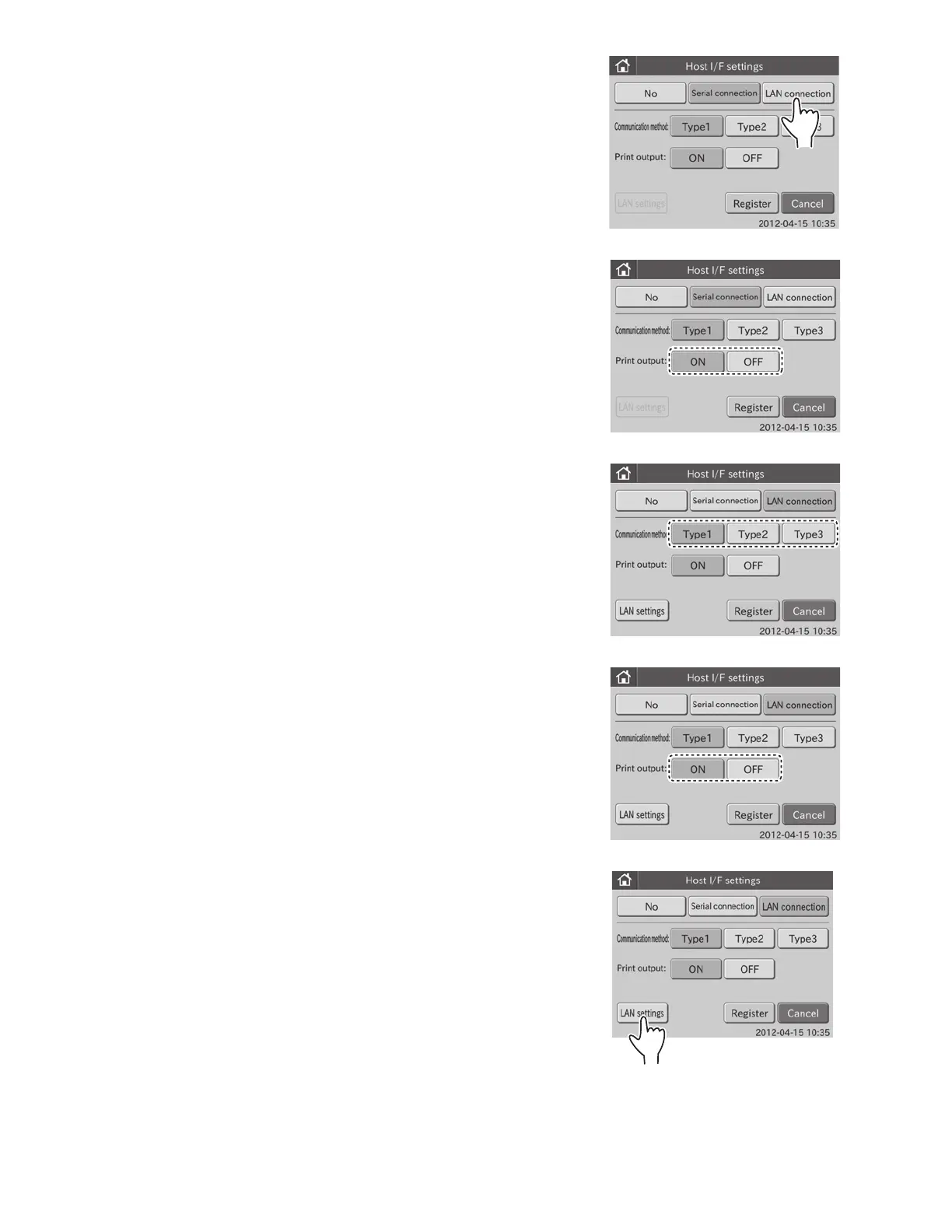
a. Touch LAN CONNECTION.
b. Select a communication method.
NOTE: The following 3 communication methods are selectable.
Type 1: two-way communication
Type 2: one-way transmission (bidirectional format)
Type 3: one-way transmission (standard format)
c. Select ON or OFF for print output.
Select ON to use the printer. Select OFF to not use the printer.
d. Touch LAN SETTINGS.
The LAN settings dialogue is displayed.
NOTE: The LAN settings’ defaults are as follows.
Element DC settings
IP address: 192.168.100.1
Port No.: 65535
PC settings
IP address: 192.168.100.2
Port No.: 65535
90



 To Next Page