5.1 Timing Control Functions
92
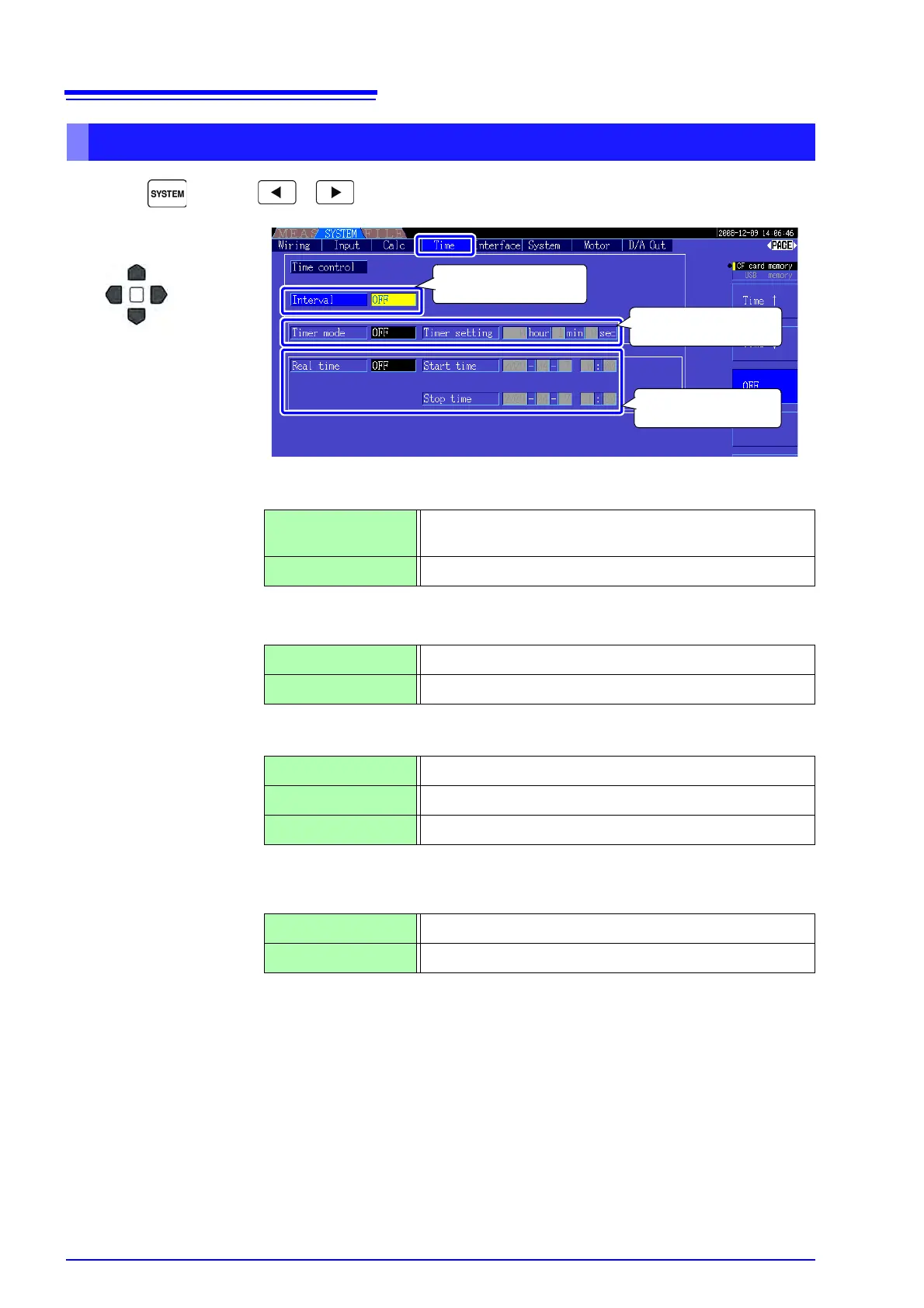
Press and the keys to display the [Time] page.
Interval (The interval setting is also available on the [Interface] page.)
Timer mode/
Real time
Timer setting
Set the count-down timer. Settable range is 10 s to 9999 h 59 m 59 s.
Start time
Stop time
Set start and stop times for clock timing. Select the year and the 24-hour time
(e.g., 16 December, 2009 10:16 PM → [2009/12/06 22:16])
Setting Method
Interval control setting
Timer control setting
Clock control settings
1
2
Use F keys to set.
Select the
item
Time↑/ Time↓
Select an interval time from 50, 100, 200, or 500 ms; or 1, 5,
10, 15, or 30 s; or 1, 5, 10, 15, 30, or 60 min.
OFF Interval time control is disabled.
ON Timer control / clock control is enabled.
OFF Timer control / clock control is disabled.
+1↑/ -1↓ Increments/decrements by 1.
+10↑/ -10↓ Increments/decrements by 10.
Digit←/ Digit→ Moves to the [hour] digits.
+1↑/ -1↓ Increments/decrements by 1.
+10↑/ -10↓ Increments/decrements by 10.



 To Next Page