Body Quick Guides 105 Section - 15
Operator’s - Manual # 99906363
Operating Settings
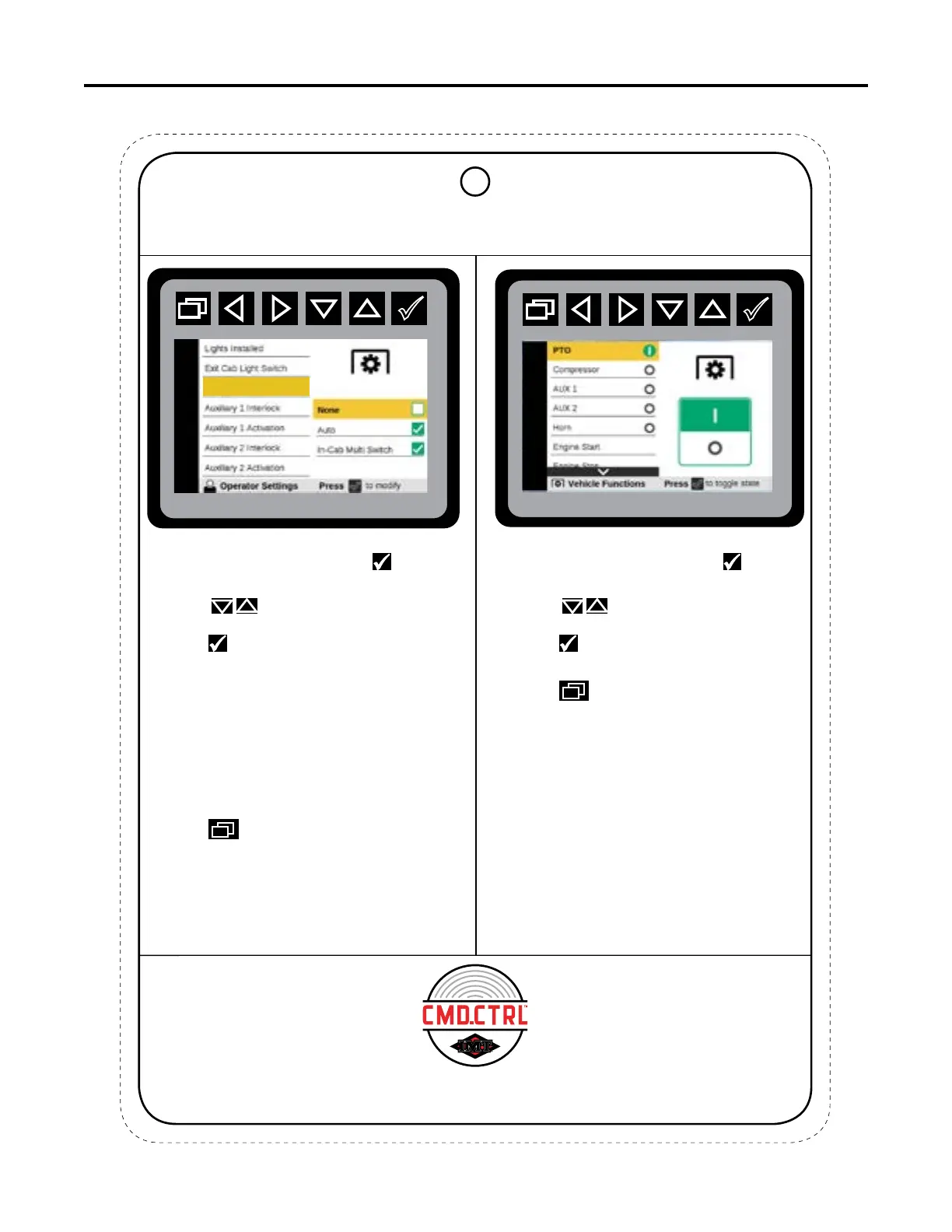
PTO Activation
If the operator chooses None, PTO power
must be activated manually through the
switch on the dash, or through one of the
other menus.
OPERATING SETTINGS - PTO VEHICLE FUNCTIONS - AUTO PTO
4. Press to return to Main Menu
In Cab Multi-Switch: The PTO power is engaged
from the switch on the dash, or through one of
the other menus.
Auto: Functionality is set to come on
automatically when requiring PTO power.
None: Operator DOES NOT want the PTO
to come on automatically.
3. Press to iniate PTO
Activation states.
2. Press to navigate to
PTO Activation.
1. From the Main Menu press the to
navigate to Operator Settings.
3. Press to power ON or power OFF
PTO switch.
2. Press to navigate to
PTO.
1. From the Main Menu press the to
navigate to Vehicle Functions.
4. Press to return to Main Menu
☛
If the chassis type is set to “IPU” or
“Paccar Engine”, the Crane Power
and PTO will not be shown.
Auto PTO has no user interaction,
and most will be configured for Auto
PTO before it leaves the factory.
This chart is to be used as a “quick reference” guide only.
It should not be substituted for a thorough review of the manual.
70490137
4



 To Next Page