Navigation 6 Section - 2
Operator’s - Manual # 99906363
Menu Screen (Display Settings)
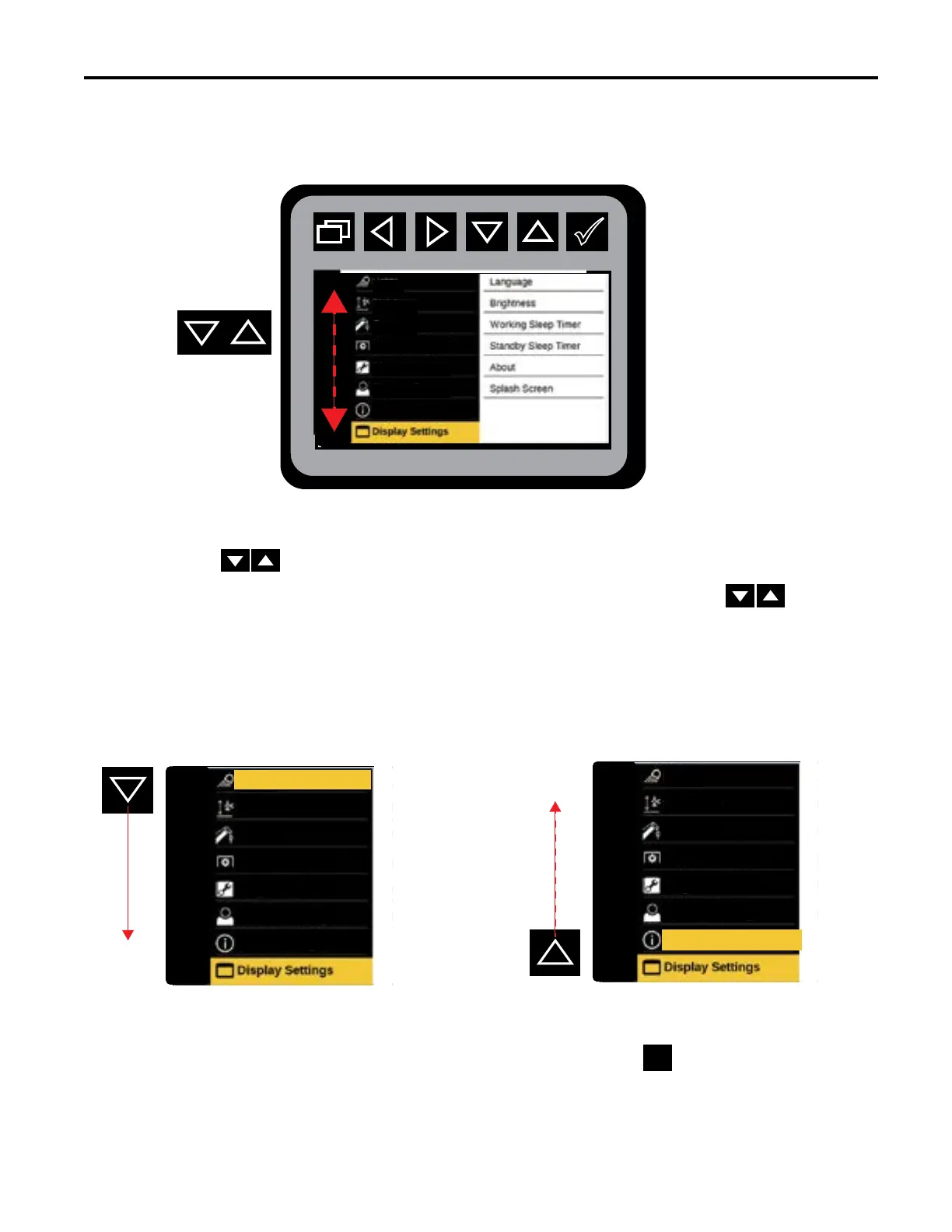
Using the will navigate through the Menu Screen Display Settings. The down arrow moves the
selection towards the bottom of the display settings, and the up arrow moves the selection towards the
top of the display settings. When “Navigate to” is listed on the step-by-step instructions, the icon need to
be used to move up and down the Menu Screen Display (left sidebar). To reduce redundancy, the up and down
arrow icons will not be shown in the step-by-step instructions found throughout this manual when “From The Main
Menu Navigate to” is referred to.
Once you have navigated to your desired selection on the Menu Screen, use the to move to the Preview
Screen. This process is the same throughout all of the screens in the Body instructions.
IPU
em ipsum
LIGHTS
STABILIZER
CRANE
VEHICLE FUNCTIONS
DIAGNOSTIC
OPERATION SETTINGS
VEHICLE CONFIGURATION
IPU
em ipsum
STABILIZER
CRANE
VEHICLE FUNCTIONS
DIAGNOSTIC
OPERATION SETTINGS
VEHICLE CONFIGURATION
LIGHTS
IPU
em ipsum
STABILIZER
CRANE
VEHICLE FUNCTIONS
DIAGNOSTIC
OPERATION SETTINGS
LIGHTS
VEHICLE CONFIGURATION



 To Next Page