Body Quick Guides 109 Section - 15
Operator’s - Manual # 99906363
Stabilizers
STABILIZERS
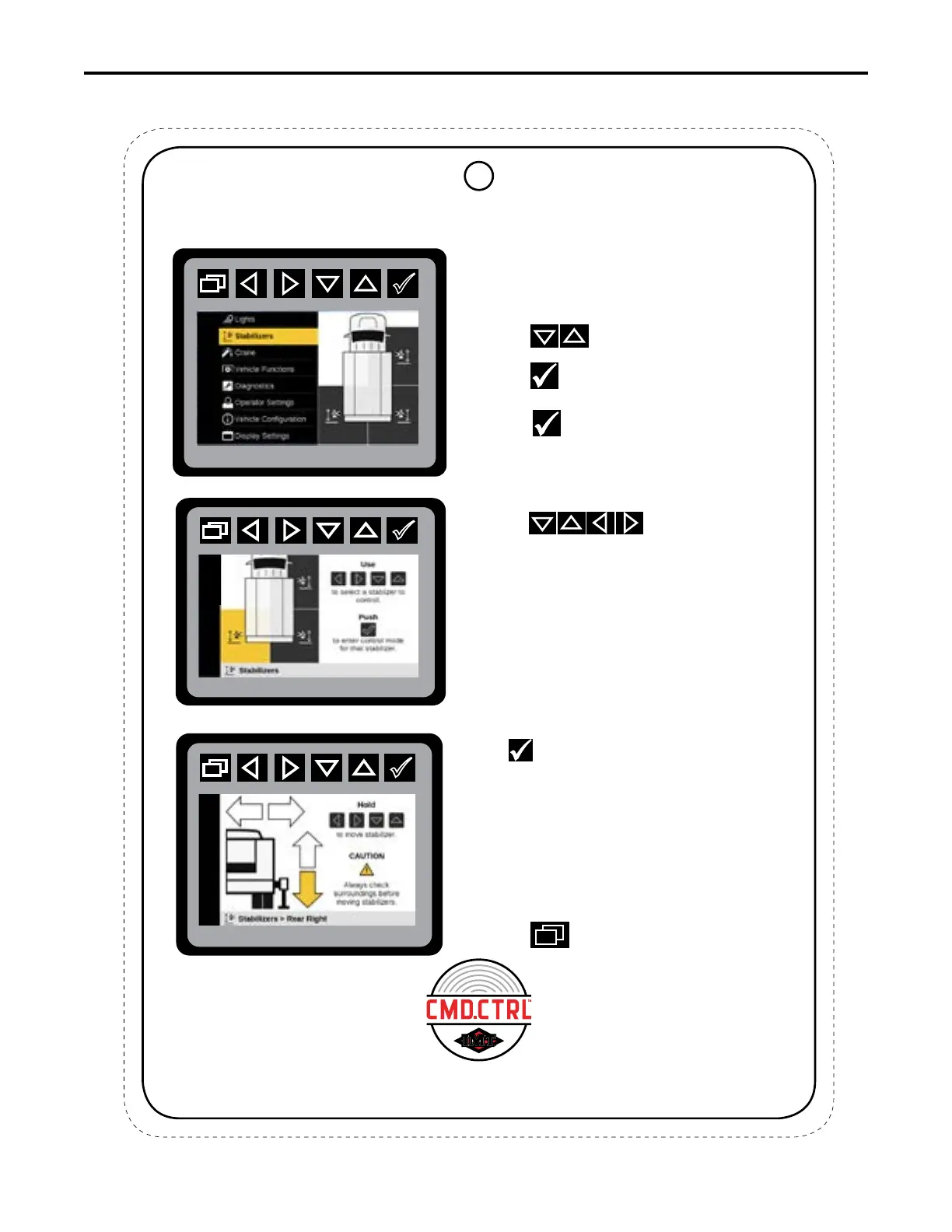
Main Menu: Stabilizer Preview
Stabilizer Selection Mode
The Stabilizer menu allows the operator to
maneuver selected stabilizers from the control
screen in a two-step process.
1. Press
to select Stabilizer Mode.
Press
to initiate Stabilizer states.
3. Press
Lo
to operate the Stabilizer
selected.
This illustration shows the highlighted
stabilizer location in the Stabilizer Selection
Mode.
4. Once the requested stabilizer is highlighted,
press
to enter the stabilizer control mode
to move the stabilizer up and down or extend the
stabilizers back and forth. The requested
stabilizer’s active movement is highlighted.
Only the directional arrows for the installed
stabilizer options will be displayed. If the
stabilizers are not extendable, only the
up / down status arrows will be displayed.
Only one stabilizer will operate / function at
a time. Verify correct stabilizer placement.
to return to Stabilizer or Main Menu.
Stabilizer: Control Mode
☛
2. Press to initiate Stabilizer.
5. Press
This chart is to be used as a “quick reference” guide only.
It should not be substituted for a thorough review of the manual.
70490137
8



 To Next Page