Lights 16 Section - 3
Operator’s - Manual # 99906363
Lights
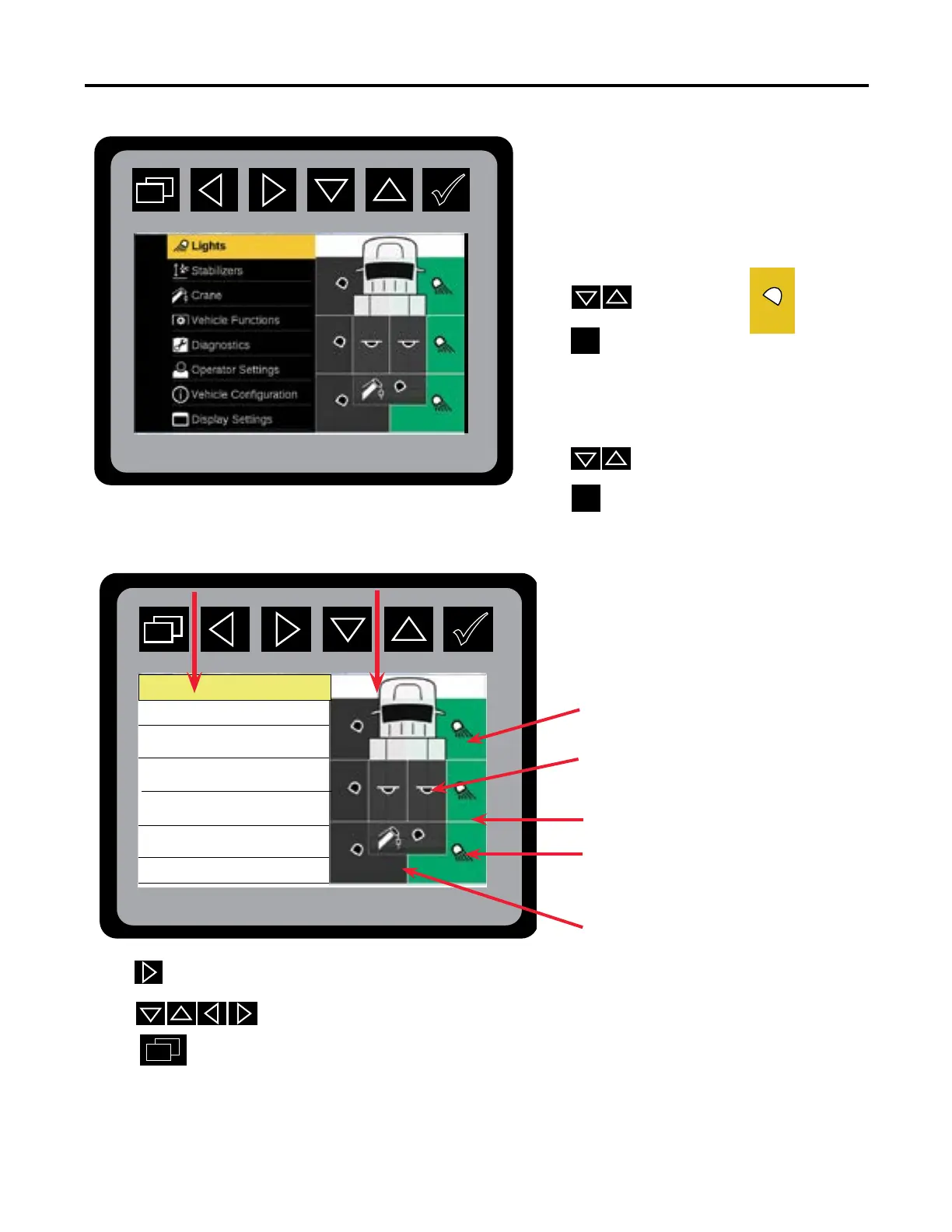
The Lighting Screen will be split into two
areas:
• Light Group (left sidebar),
• Status and Individual Selection
(right sidebar).
From the Main Menu:
Press
to highlight
Lights Mode.
Press to enter Light
Mode.
When choosing lights the illustration
will turn yellow.
Press to select a light group.
Press
to turn on/o a light group.
Press to enter individual light selection
Press to select individual lights.
Press to return to Main Screen.
Your display screen will only show the lights that are congured for your vehicle.
All
Compartment Lights
Front
Rear
Left
Right
Boom Tip Lights
Left sidebar
Light Group
Right sidebar
Status and Individual Selection
Front Left / Right Flood
Lights
Rear Left / Right Flood
Lights
Middle Left / Right Flood Lights
Boom Tip Lights
Main Menu: Lights Preview
Compartment Lights



 To Next Page