CEAST 9340 - Instructions for Use and Maintenance 7510.000MN1r ed. 1 rev. 1 - Page 111
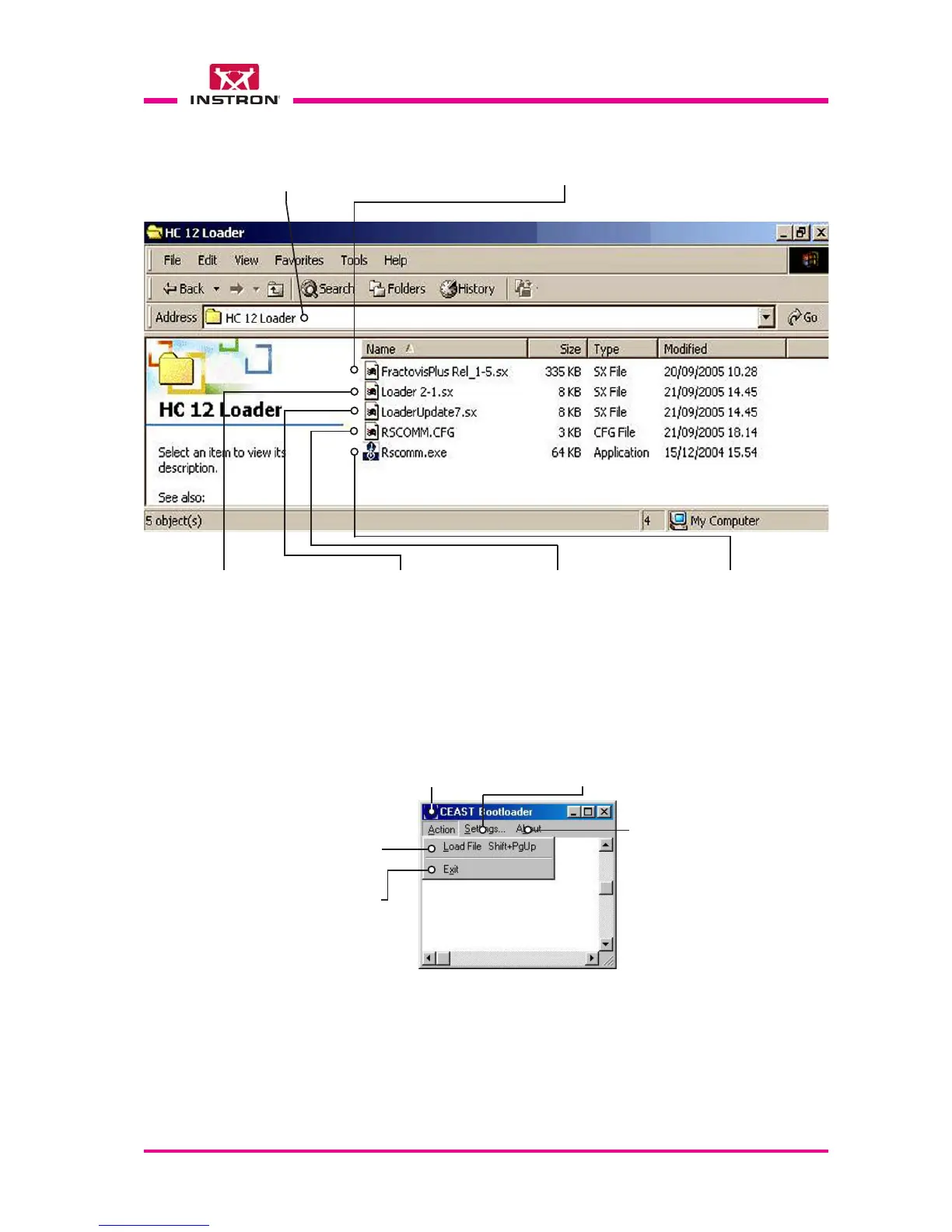
Fig. 1
Version of FW contained in the update
file (e.g.: 1-5 corresponds to 1.5)
Temporary file to be loaded for
carry out the new Loader.
Loader version contained in
the update file (e.g.: 2-1 corre-
sponds to 2.1)
Folder sent by e-mail from ITW Test and Measurement Italia
S.r.l. - INSTRON CEAST Division and copied by the user
onto one of the PC locations (ex. C:\, A:\, Desktop ...)
Updated program (start with double
click on the left mouse button).
Configuration file used
from the loading program.
Fig. 2
X
FW Update
Loading program file
Function used to access the serial
port configuration window.
Information about
the version of the
loading program
Function used to access
the loading window
To close the FW
loading program
e) Activate the Setting configuration menu (Fig. 2).
X
d) Start the application RSCOMM.EXE with a double click on the name of file.



 To Next Page