CEAST 9340 - Instructions for Use and Maintenance 7510.000MN1r ed. 1 rev. 1 - Page 113
9.4.3 LOADING
X
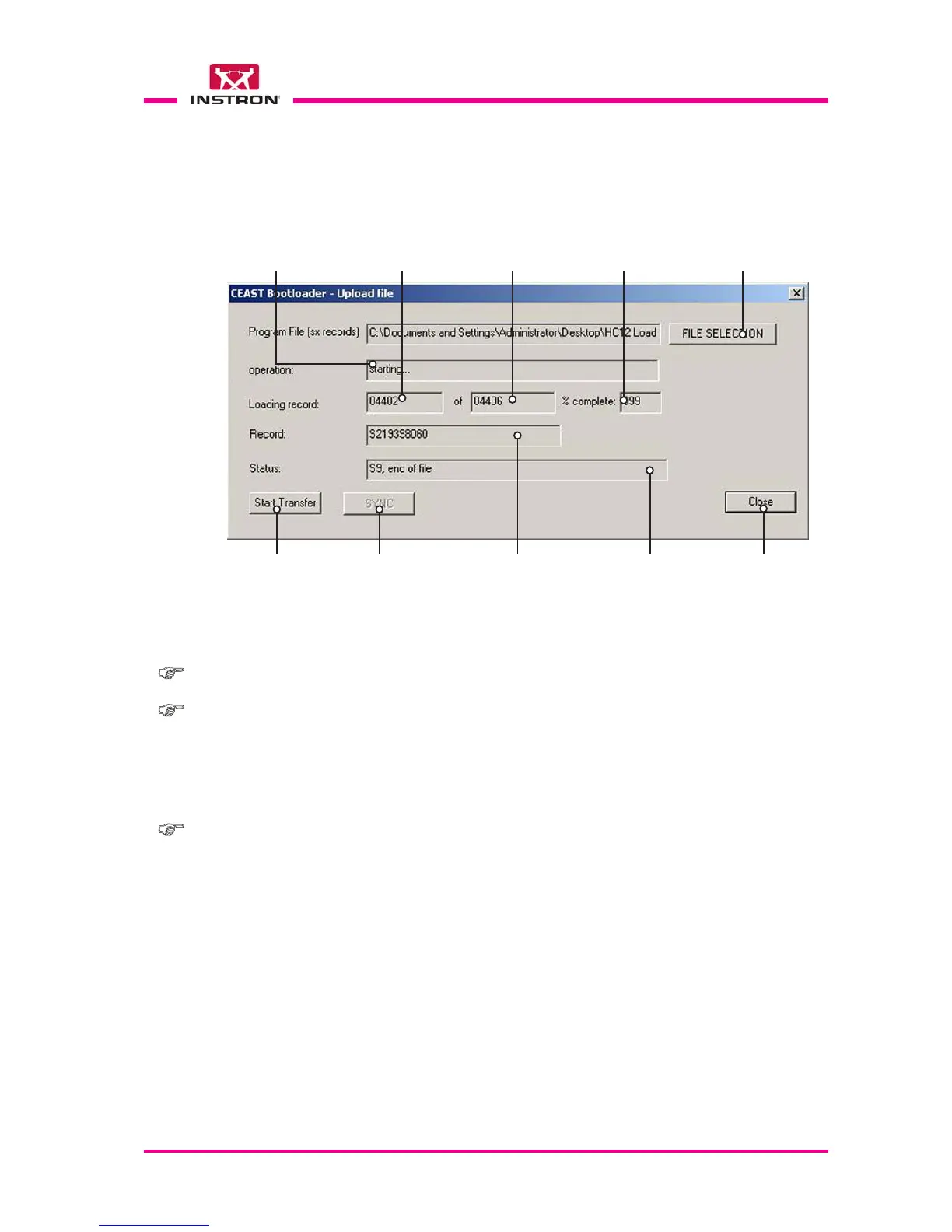
Fig. 4
a) Activate the Load file operation from the Action menu (see Fig. 2).
Start Loading
Button to select the path where
load the chosen update file
Record currently
being loaded (*)
Status of loading
(completed or failed) (*)
Operation
being performed (*)
Percentage
completed (*)
Close the
loading window
Total number of
records to load (*)
Identification of the record
and its destination (*)
(*) These fields cannot be edited, they are automatically updated during program execution.
Note: Order to be followed for the complete update operations:
1. Loading of the Loader Update (file LoaderUpdateX.SX) (**)
2. Loading of the Loader version (file Loader X_X.SX) (**)
3. Loading of the FW update (file FW X-XX.SX)
(**) In case of the firmware update only, do not perform these operations.
Used for
Loader Updates only



 To Next Page