Page 34 - CEAST 9340 - Instructions for Use and Maintenance 7510.000MN1r ed. 1 rev. 1
7.2 ELECTRICAL SERVICE CONNECTION
O OFF
I ON
Main switch
Power cord
with plug
Authorized Personnel: Electricians
a) Verify that the voltage and frequency of the line conform to those indicated on the
instrument tag (see chapter 1).
b) Verify that the main switch of the instrument is in the "O" position (OFF).
c) Insert plug of power cord into the laboratory mains outlet and close mains safety
switch (wall mounted).
X
X
X
7. START-UP
7.1 INSTRUMENT, CEAST DAS 8000 JUNIOR/CEAST 16000 AND
PC CONNECTION
X
This chapter provides the instructions that must be followed to make the instrument
operative before starting any testing.
Authorized Personnel: Operator
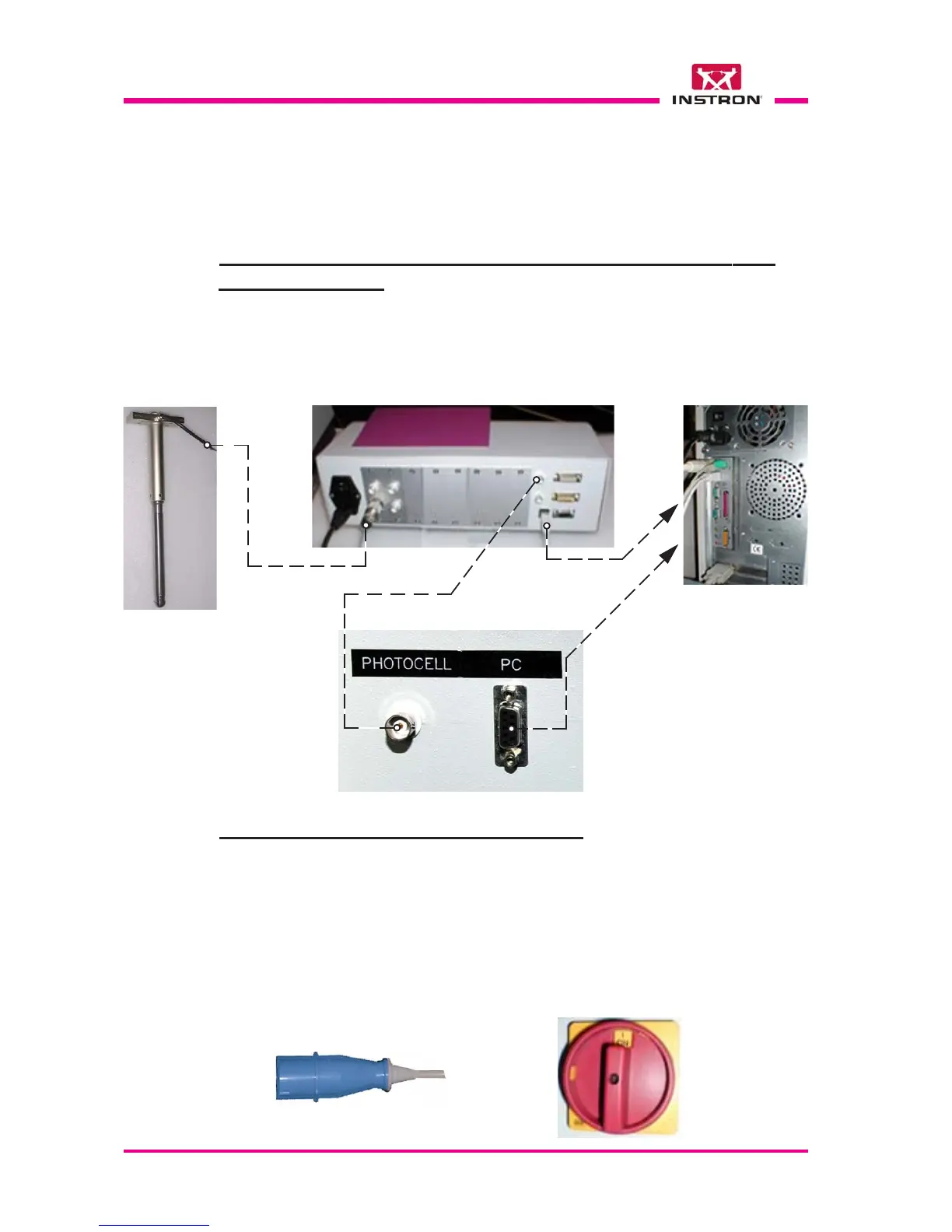
Connect the cables as shown in the figures below.
CEAST 9340,
rear view, left side
CEAST DAS 16000,
rear view
Personal Computer,
rear view
Instrumented Striker
(Strain-gauge sensor)
Photocell output
signal cable
To the USB port
Striker
signal cable
CEAST 9340
movements
signal cable
To the RS 232
serial port
To the trigger
connector



 To Next Page