Page 90 - CEAST 9340 - Instructions for Use and Maintenance 7510.000MN1r ed. 1 rev. 1
8.7.3 REPLACEMENT OF THE PIEZOELECTRIC FORCE SENSOR
Authorized Personnel: Operator
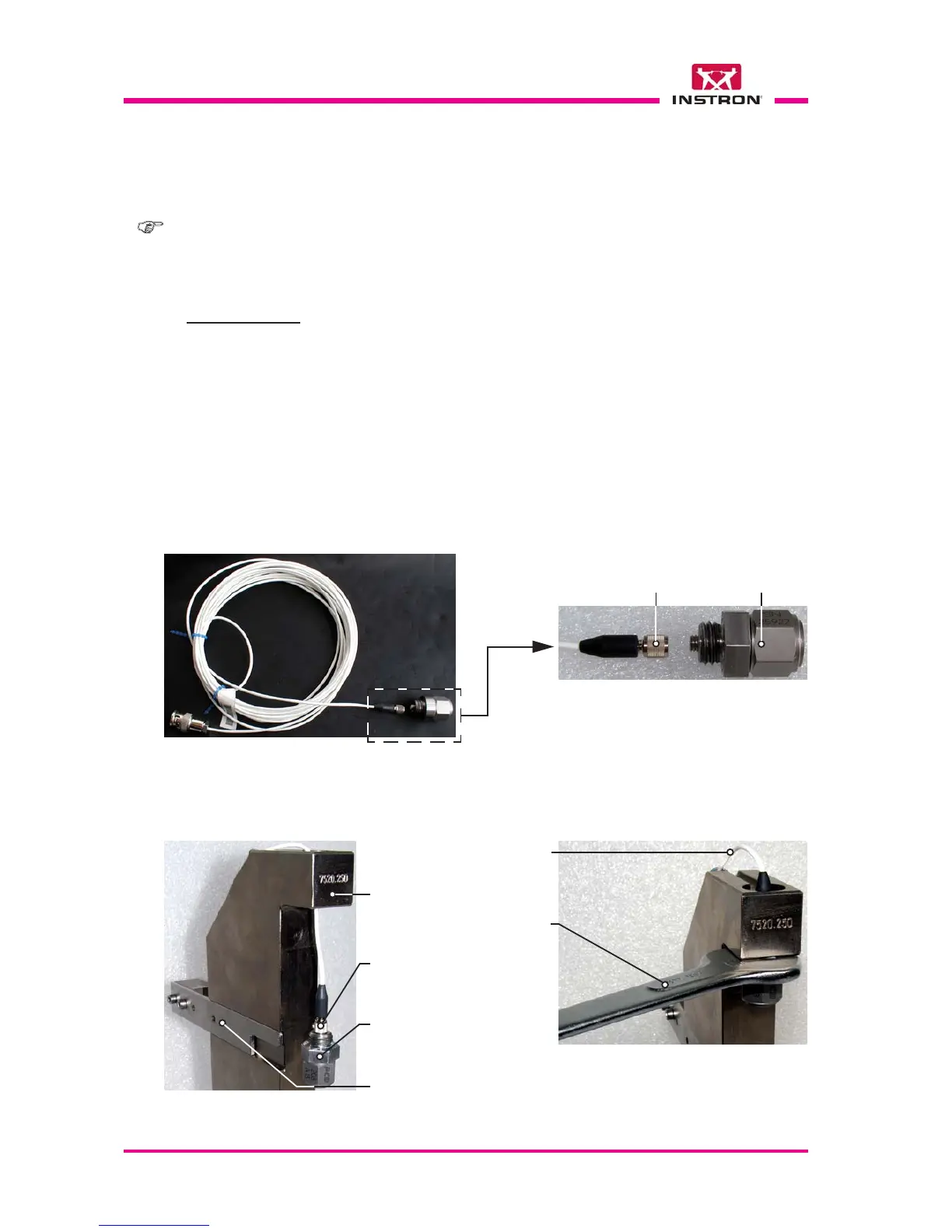
Fig. 1 - Piezoelectric force sensor with signal cable
Fig. 2 - Piezoelectric force sensor assembly
Signal cable
connector
Piezoelectric
force sensor
Fixed height vice
support stand
(upper part)
A
B
Note: the replacement of a piezoelectric force sensor with another one having different
force range (e.g.: from 2.2 N to 0.45 N or vice versa) can be done without removing the
signal cable from the chamber.
X
X
a) Push the sliding stop plate backward as shown in the Fig. 2A.
b) Loosen the screws, turn the clamps and free the signal cable (Fig. 3).
c) Loosen the piezoelectric force sensor using the open wrench (Fig. 2B).
d) Unscrew the force sensor by hand and in the mean time turn the signal cable togheter
with the sensor, avoiding to damage it.
e) Unscrew and disconnect the force sensor from the signal cable (Fig. 2A). The cable
must remain in place as shown in the Fig. 2A.
DISASSEMBLY
Signal cable
connector
Piezoelectric
force sensor
Sliding stop plate
17 mm
open
wrench
(supplied)
Signal
cable
X
X
X



 To Next Page