bizhub C652/C552 5-46
5.4 Application
5
Stamp
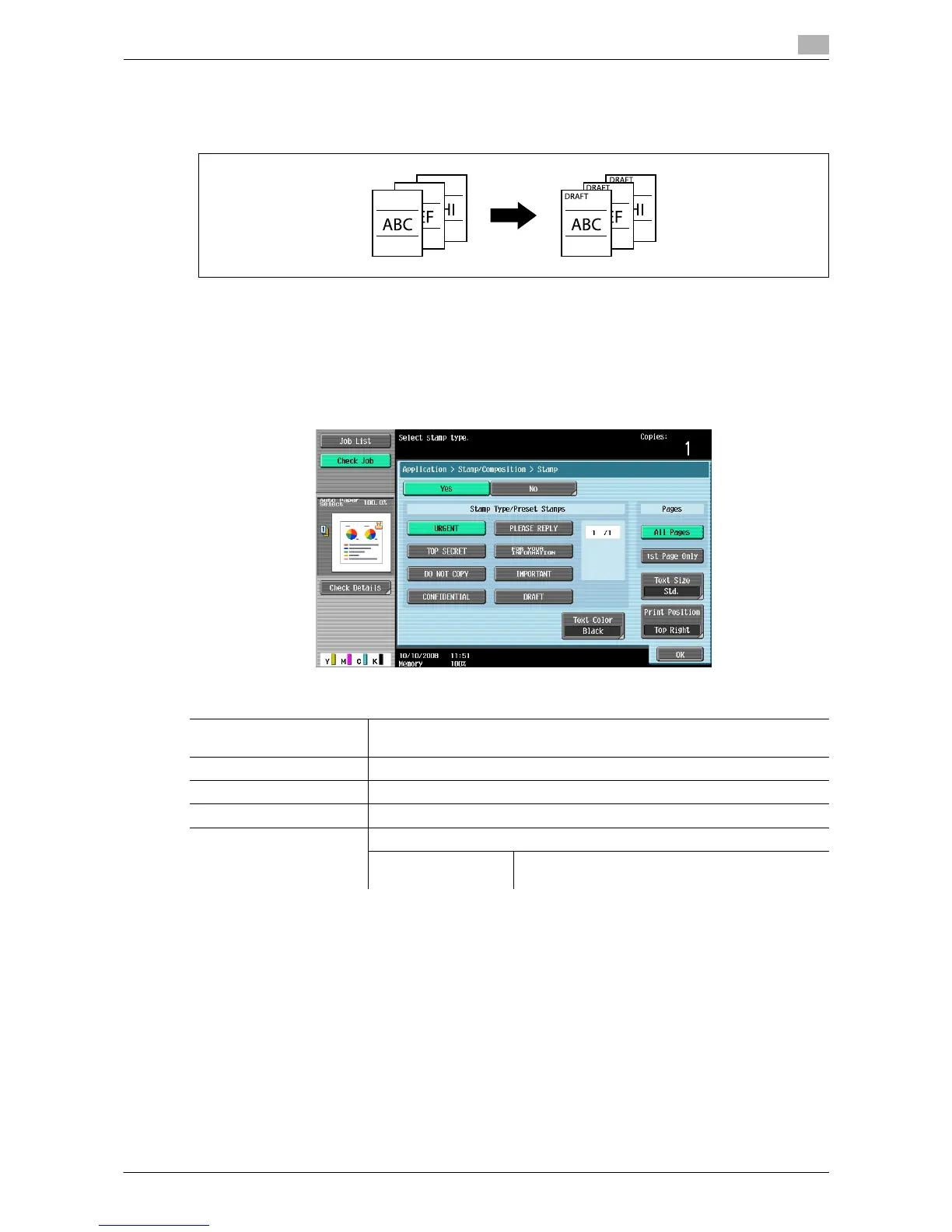
You can select the print position and notation format to print the stamp. Select printing on all pages or only
on the first page.
0 A stamp refers to text with printing contents fixed and preset. You can also select a stamp registered
with the Copy Protection Utility.
0 Stamps cannot be printed on blank pages inserted using the Cover Sheet, Insert Sheet and Chapters
functions. Change the setting for printing on blank pages in Administrator Settings to enable blank page
printing.
% Press [Application] ö [Stamp/Composition] ö [Stamp].
d Reference
To enable printing on blank pages:
Press the [Utility/Counter] key ö [Administrator Settings] ö [System Settings] ö [Blank Page Print Settings].
Settings
Stamp Type/Preset
Stamps
Select a stamp to be printed from the eight types available.
Pages Select to print the stamp on all pages or only on the first page.
Text Size Select the character size used for the stamp.
Text Color Select the text color for the stamp.
Print Position Select a position from the nine print position options.
Adjust Position Adjust horizontal and vertical positions between
1/16 inch and 1-15/16 inch.














 To Next Page