bizhub C652/C552 7-10
7.1 System Settings
7
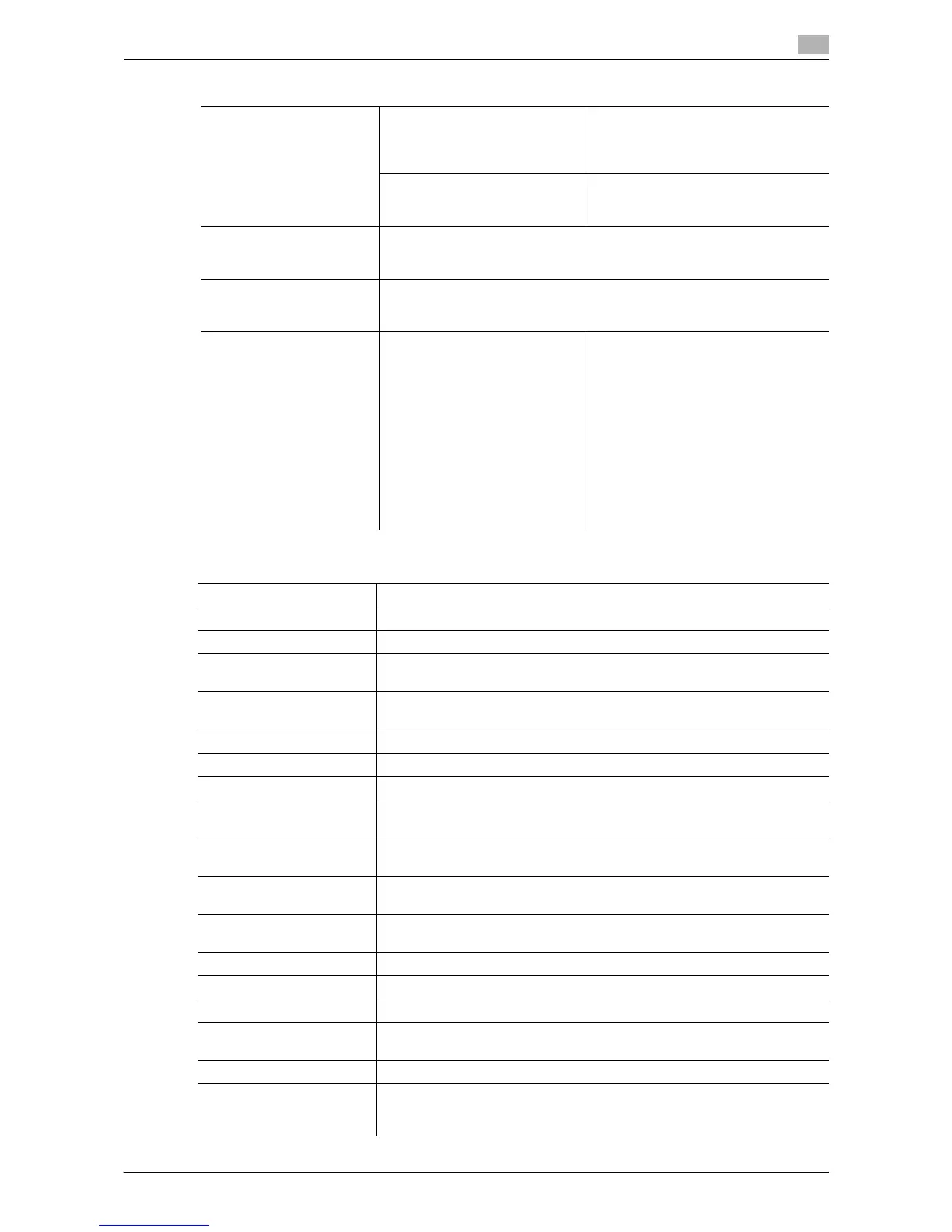
Line Detection Prior Detection Setting Configure whether to issue an alert
when the original glass is dirty.
• Select an alert display format and
contamination detection level.
Detection While Feeding Setting Configure whether to remove dust and
dirt on the original glass when scan-
ning an original using ADF.
Trail Edge Adjust Correct a shift if it is detected at the trailing edge of the print result.
Place, 11 e 17 w, 8-1/2 e 11 v, A3 w, or A4 v on the bypass tray, and
then press the [Start] key to print a test pattern.
User Paper Settings Configure special paper settings for User Paper 1 through 6. Settings to
configure include Basic Weight and Media Adjustment.
For details on displaying this item, contact your service representative.
Erase Adjustment Non-Image Area Erase Opera-
tion Settings
Configure Non-Image Area operation
settings.
[Auto]:
Automatically detects the background
density of the original, and selects ei-
ther "Bevel" or "Rectangular" accord-
ingly.
[Specify]:
Allows you to manually specify an
erase method and original density. As
an erase method, select "Bevel" or
"Rectangular". Specify an original
density from five levels.
Factory default
AE Level Adjustment Standard (2)
Leading Edge Adjustment 0.0 mm
Centering 0.0 mm
Leading Edge Adjustment
(Duplex Side 2)
0.0 mm
Centering (Duplex 2nd
Side)
0.0 mm
Media Adjustment Auto
Center Staple Position 0.0 mm
Half-Fold Position 0.0 mm
Tri-Fold Position Adjust-
ment
0.0 mm
Punch Vertical Position Ad-
justment
0.0 mm
Punch Horizontal Position
Adjustment
0.0 mm
Punch Regist Loop Size
Adjustment
0.0 mm
Density Adjustment 0
Image Stabilization Only Image Stabilization Only
Image Stabilization Setting Standard
Paper Separation Adjust-
ment
0.0 mm
Color Registration Adjust 0 dot
Prior Detection Setting Yes
Warning Display: TYPE2
Detection Level: Std.
Settings














 To Next Page