bizhub C652/C552 4-2
4
4 Control Panel Keys and Authentication Unit
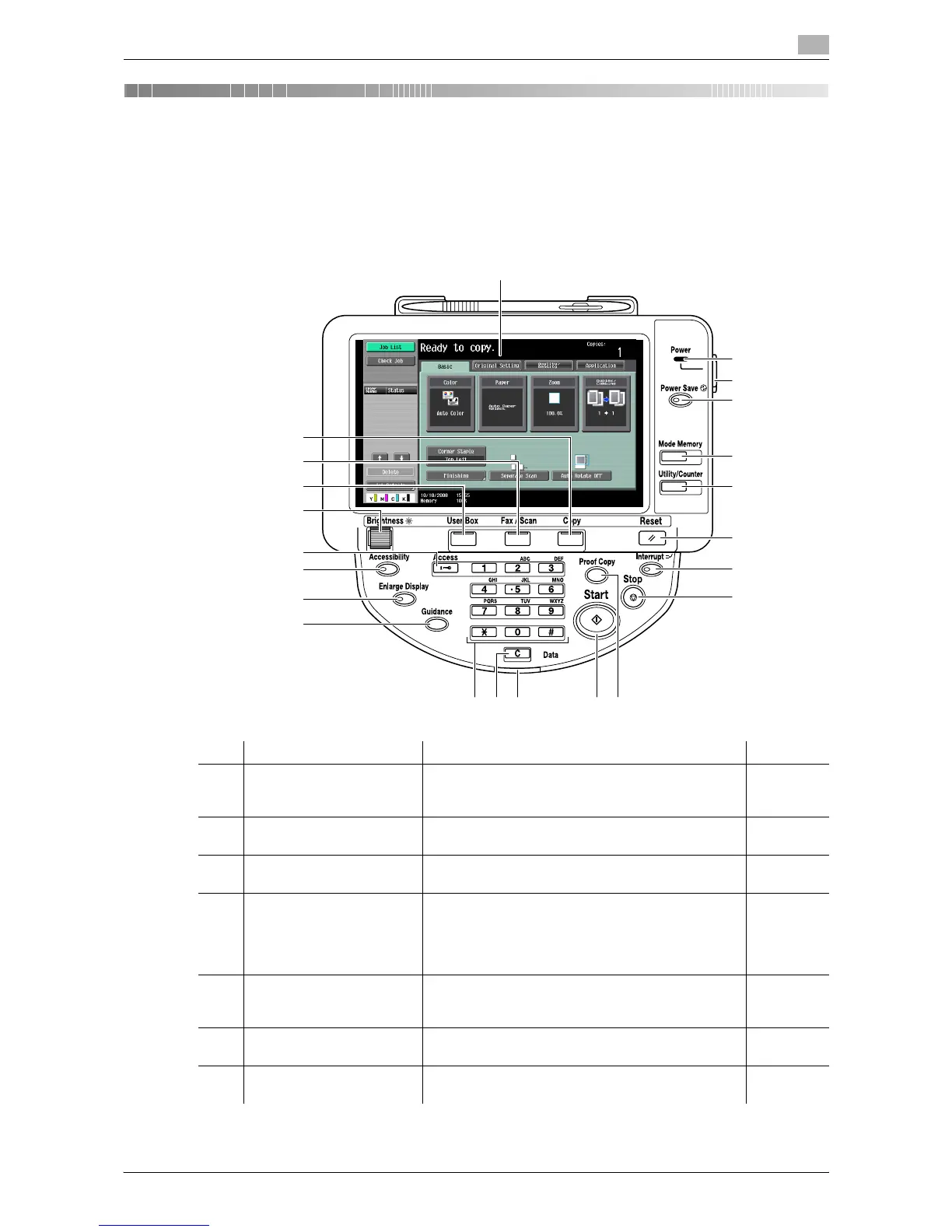
This section describes the functions of the keys on the operation panel.
Control panel and functions
Press the keys on the operation panel to use the Copy, Fax/Scan, User Box or other functions.
No. Name Description Page
1 Touch panel Displays various screens and messages. You can
configure various settings by directly touching the
touch panel.
-
2 Main power indicator Lights up in green when the machine is turned on
with the [main power switch].
-
3 [Sub power switch] Turns on or off machine operations. When turned off,
the machine is in the power-saving mode.
-
4 [Power Save] Enters Power Save mode. While the machine is in
Power Save mode, the indicator on the [Power Save]
key lights up in green and the touch panel goes off.
To exit from Power Save mode, press the [Power
Save] key again.
p. 4-12
5 [Mode Memory] Allows you to register (store) the desired
copy/fax/scan settings as a program or to recall a
registered program.
p. 4-8
6 [Utility/Counter] Switches to the Utility screen or the Meter Count
screen.
p. 4-7
7 [Reset] Resets all settings (except programmed settings)
entered using the control panel or touch panel.
p. 4-5
1
2
5
4
6
3
7
8
9
14
13 10
15
16
17
18
12 11
19
20
21
22














 To Next Page