bizhub C652/C552 7-44
7.10 Security Settings
7
7.10.3 Administrator Security Levels
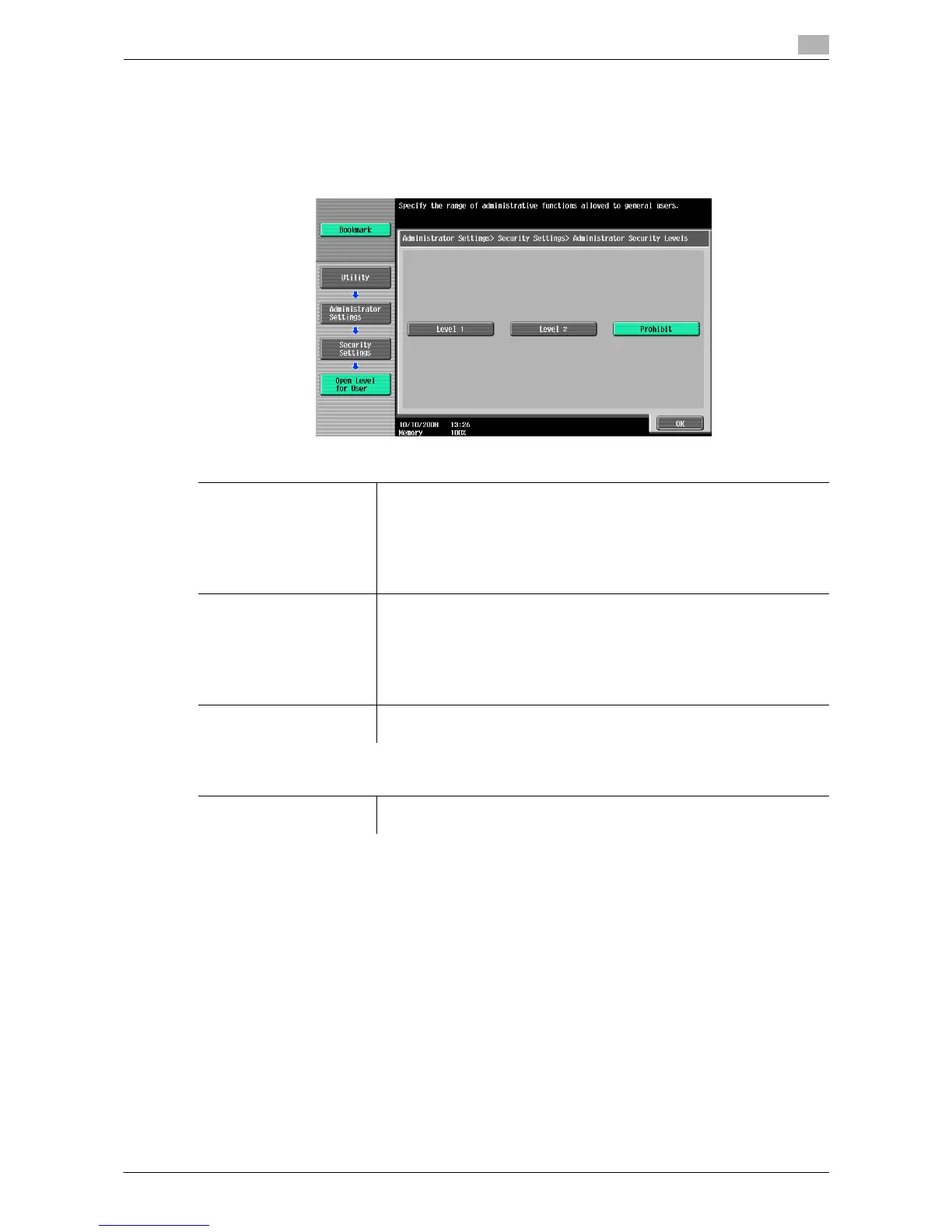
Configure settings so that the user can change some of the settings accessible only to the administrator.
Settings allowed to the user appear in User Settings.
% Press the [Utility/Counter] key ö [Administrator Settings] ö [Security Settings] ö [Administrator
Security Levels].
Settings
Level 1 Allows the user to change the following settings.
• Power Save Settings
• Auto Zoom (Platen)
• Auto Zoom (ADF)
• Specify Default Tray when APS Off
• Select Tray for Insert Sheet
• Automatic Image Rotation
Level 2 Allows the user to change the following settings.
• All settings allowed in Level 1
• Output Settings
• AE Level Adjustment
• Blank Page Print Settings
• Change E-Mail Address
• Print Jobs During Copy Operation
Prohibit Does not allow the user to change the settings allowed in Level 1 and Level
2.
Factory default
Administrator Security Lev-
els
Prohibit






 To Next Page