bizhub C652/C552 5-8
5.1 Basic
5
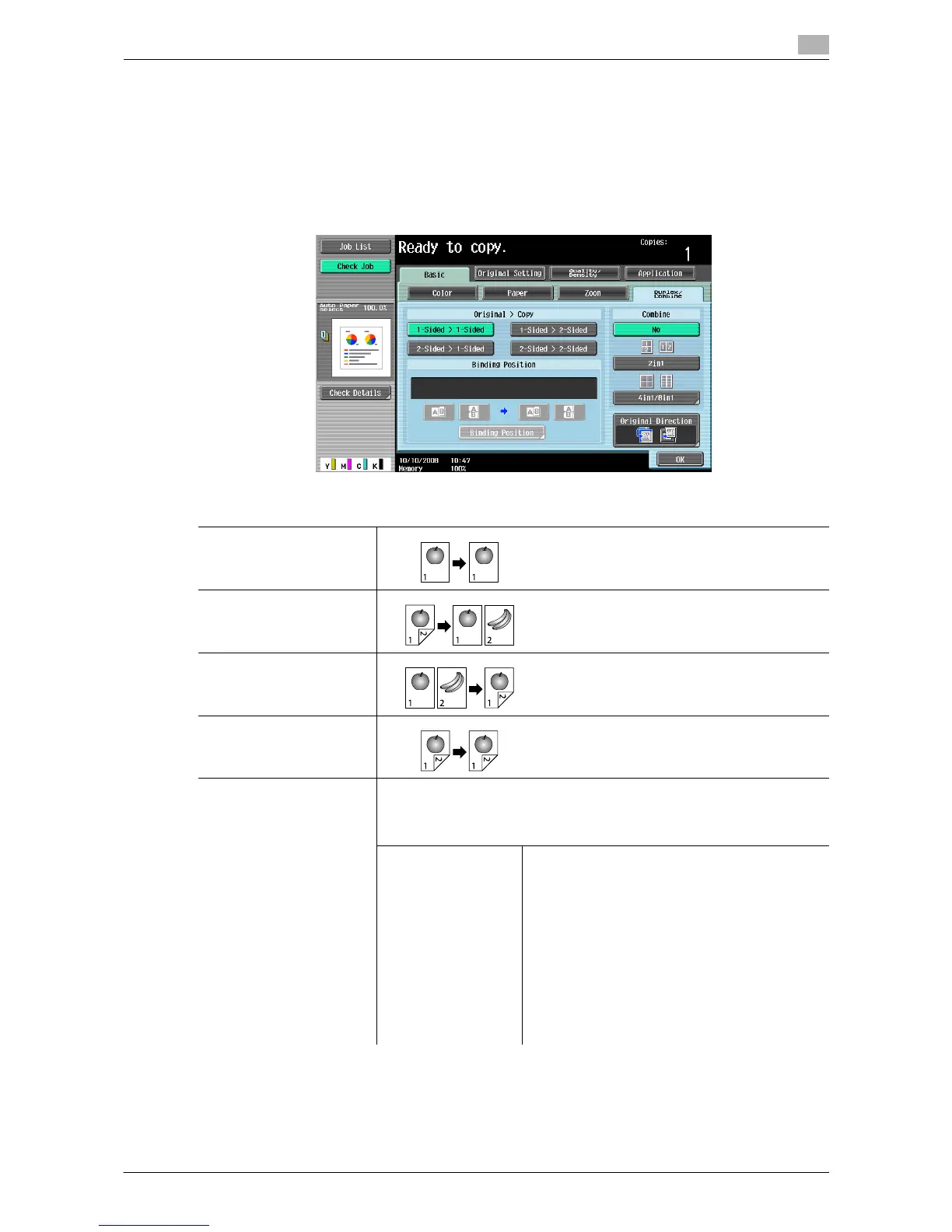
5.1.4 Duplex/Combine
Configure whether to scan one side or both sides of the originals and whether to print on one side or both
sides of the paper. Multiple (2, 4 or 8) pages of original images can be reduced in size and printed on a single
page.
Using the Duplex/Combine function, you can save paper sheets for copying.
% Press [Basic] ö [Duplex/Combine].
Settings
1-Sided > 1-Sided
2-Sided > 1-Sided
1-Sided > 2-Sided
2-Sided > 2-Sided
Binding Position Configure the binding position of the original and copies to be output.
Without setting the Binding Position, the resulting copy may not be what
you intended.
When [1- Sided > 1- Sided] is selected, the binding position cannot be set.
Original Binding
Position
Select the original binding position from [Left-
Bind], [Right-Bind], [Top] and [Auto].
• If the binding position for the original is set to
[Auto], the position of the binding margin is
automatically selected. A binding margin
along the long side of the paper is selected if
the original length is 11-11/16 inch or less. If
the original length is more than 11-11/16 inch,
a binding margin along the short side of the
paper is selected.
• If [Auto] is selected for the original binding po-
sition, the binding margin is set at the top or
on the left.














 To Next Page