bizhub C652/C552 7-46
7.10 Security Settings
7
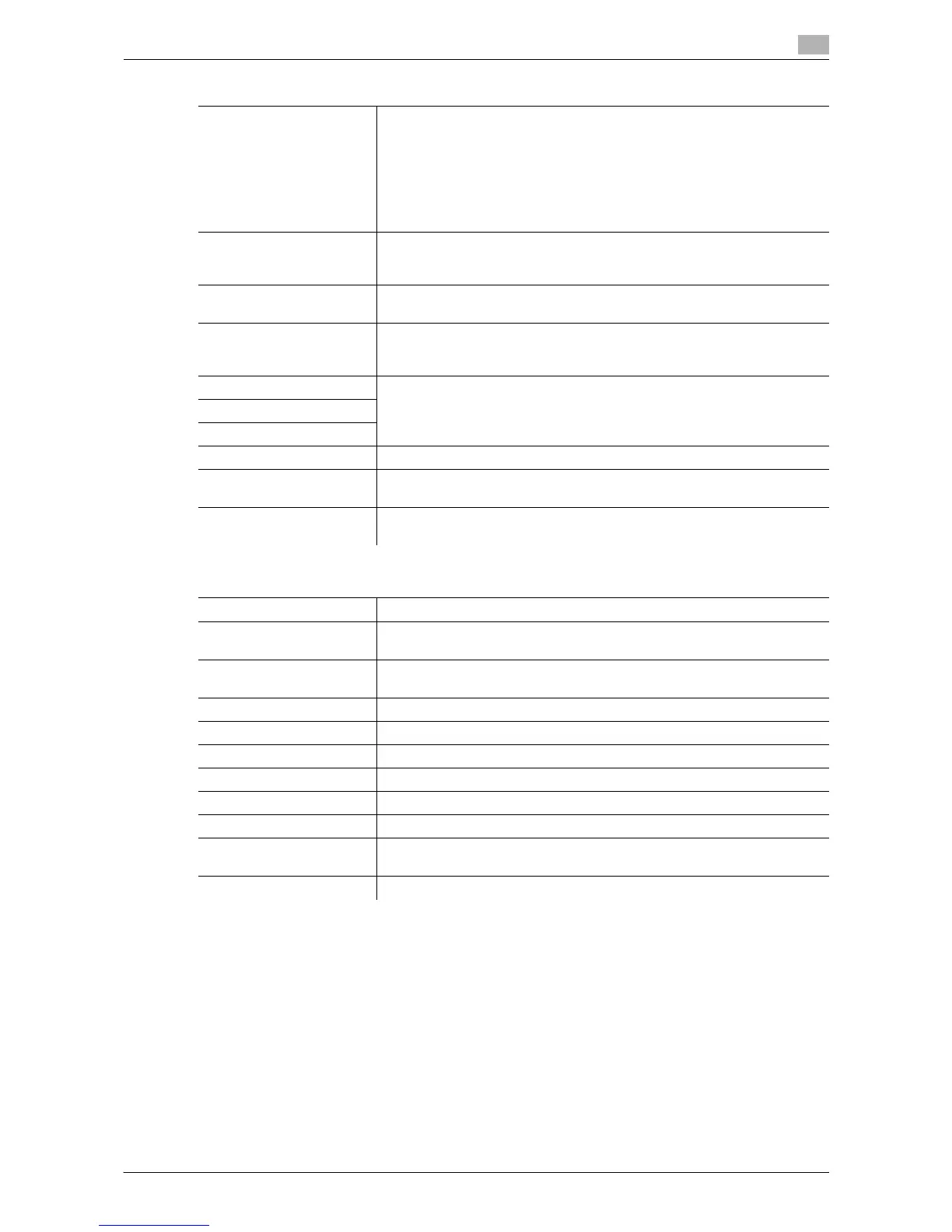
Confidential Document Ac-
cess Method
Synchronizes with the settings for "Prohibited Functions When Authentica-
tion Error", automatically changes it.
•Mode 1
Requires entering security document ID and password before selecting
a security document from a User Box.
•Mode 2
Performs authentication based on the password after you enter the se-
curity document ID and select a security document from a User Box.
Manual Destination Input This setting is for the network scan, fax, and network fax operations. For
details, refer to the "User's Guide [Network Scan/Fax/Network Fax Opera-
tions]".
Print Data Capture This setting is for the print operations. For details, refer to the "User's
Guide [Print Operations]".
Job Log Settings Configure job log settings to be obtained when power is turned off and on.
Specify the type of obtain log and whether to permit overwriting.
Pressing [Erase Job Log] erases the job log.
Restrict Fax TX This setting is for the fax and network fax operations. For details, refer to
the "User's Guide [Network Scan/Fax/Network Fax Operations]".
Hide Personal Information
Display Activity Log
Initialize Clears all data for the selected items.
Job History Thumbnail Dis-
play
Configure whether to perform thumbnail display when displaying the job
history.
Secure Print Only This setting is for the print operations. For details, refer to the "User's
Guide [Print Operations]".
Factory default
Password Rules Invalid
Prohibited Functions When
Authentication Error
•Mode 1
• Release Time Settings: 5 min.
Confidential Document Ac-
cess Method
Mode 1
Manual Destination Input Allow
Print Data Capture Allow
Job Log Settings No
Restrict Fax TX OFF
Hide Personal Information OFF
Display Activity Log ON
Job History Thumbnail Dis-
play
OFF
Secure Print Only No
Settings














 To Next Page