bizhub C652/C552 4-10
4.5 The [Access] key
4
d Reference
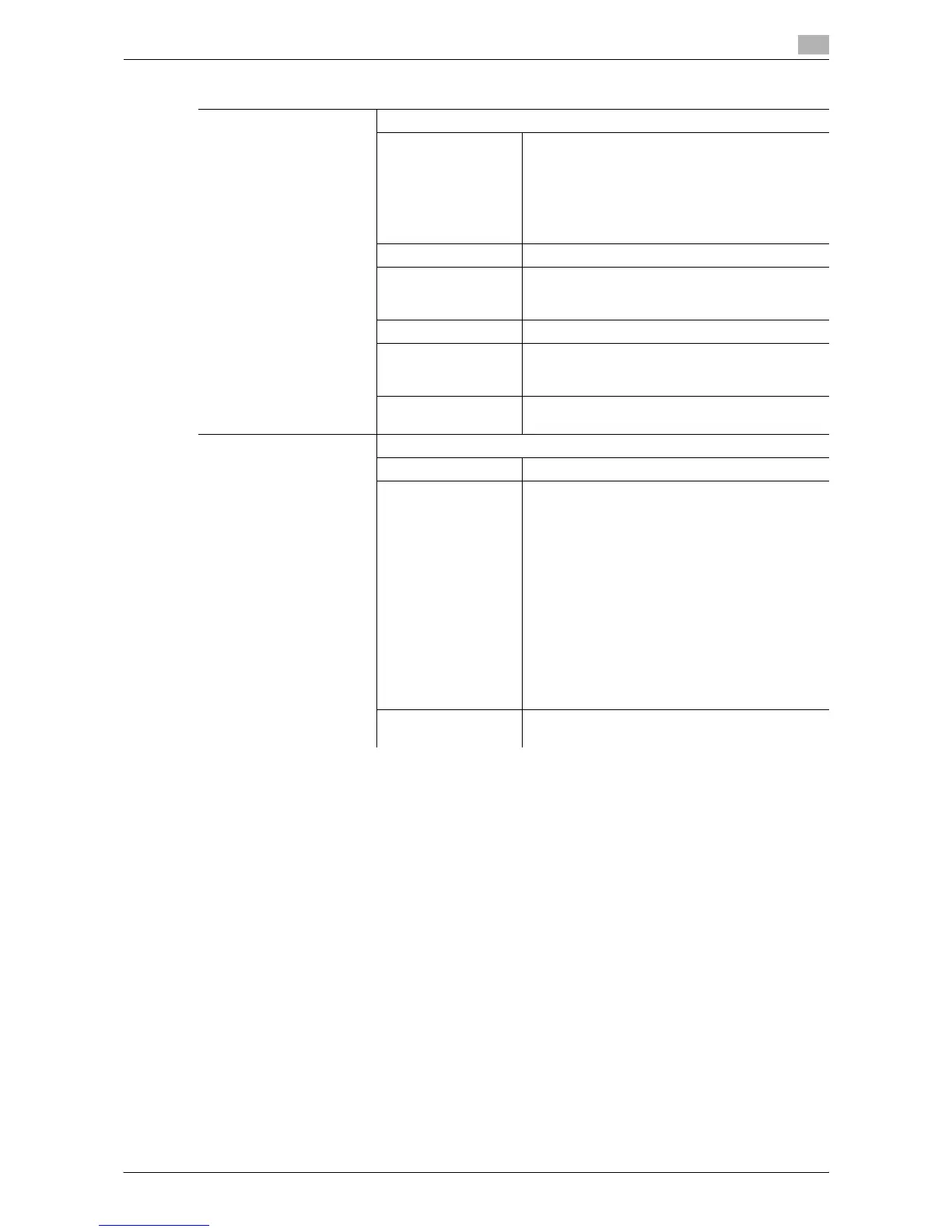
To configure user authentication/account track:
Press the [Utility/Counter] key ö [Administrator Settings] ö [User Authentication/Account Track].
Settings
User Authentication Performs the user authentication procedure to use this machine.
Public User Access Allows users who have no access to the user
name or password to use this machine.
This item is not displayed when [Public User Ac-
cess] is set to [Restrict] in the General Settings of
Administrator Settings.
If enhanced security mode has been enabled,
[Public User Access] is not displayed.
User Name Enter the user name.
User Name List Select a user name from a displayed list.
If enhanced security mode has been enabled,
[User Name List] is not displayed.
Password Enter the password.
Server Name Indicates the name of the default server. Press
[Server Name] to display the names of the regis-
tered servers. Select the desired server.
Login Displays the basic settings screen, enabling you
to use this machine.
Account Track Performs the account track procedure to use this machine.
Account Name Enter the account name.
Password Enter the password.
When the account track input method is set to
[Password Only] in Administrator Settings, the
authentication screen displays only [Password].
The user can directly enter the password in the
authentication screen from the keypad. For an all-
number password, the user can log in without
displaying the keyboard screen, simply by press-
ing [Login], or the [Access] key.
• For a password containing alphabets, num-
bers and/or symbol characters, press [Pass-
word] and then enter the password.
• After entering numbers from the keypad,
press [Password] to enter alphabets and sym-
bols in succession.
Login Displays the basic settings screen, enabling you
to use this machine.














 To Next Page