LDI Intellectual Property.
Not for secondary distribution or replication, in part or entirety.
DIGISONDE-4D
SYSTEM MANUAL
VERSION 1.2.11
SECTION 3 - OPERATING INSTRUCTIONS 3-13
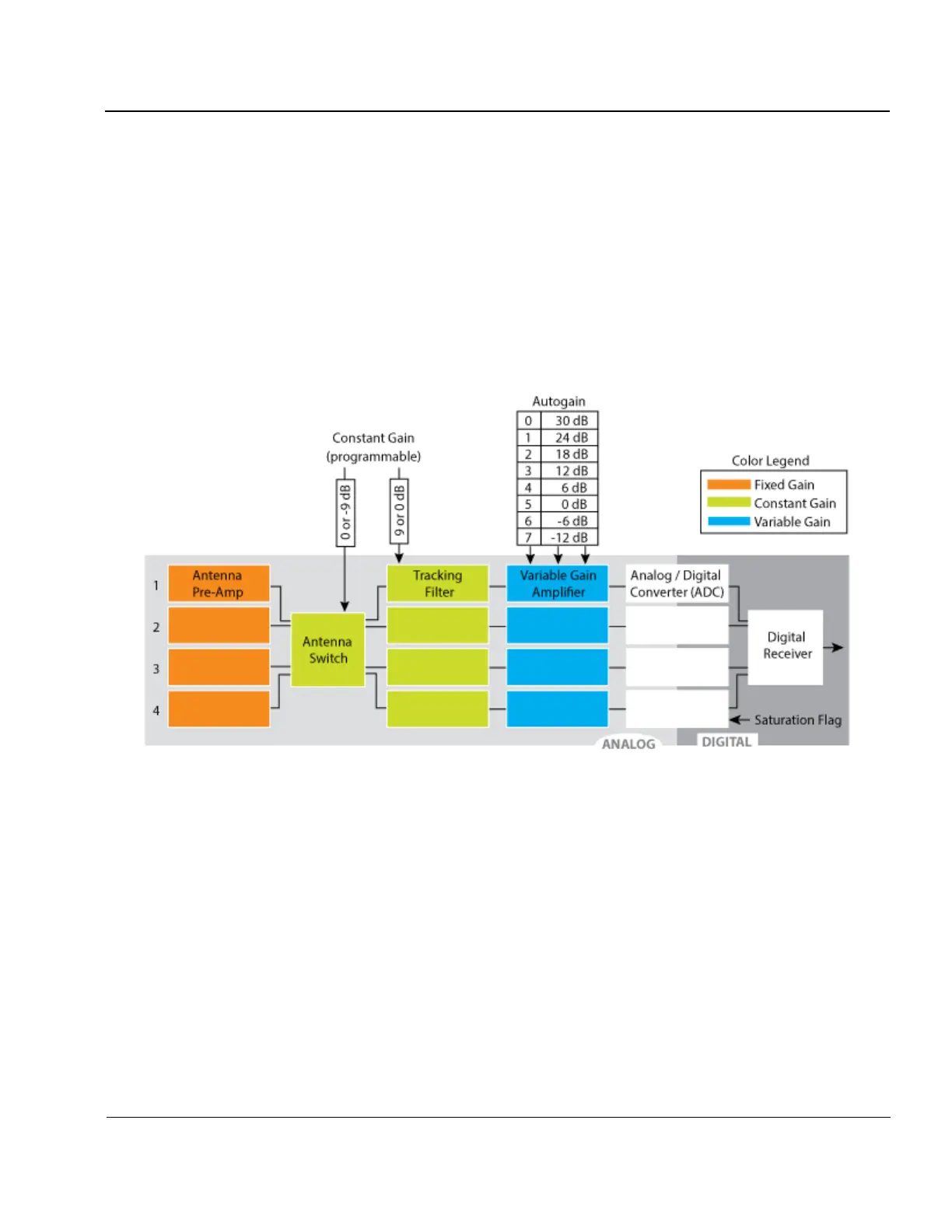
3:21. Figure 3-6 shows a diagram of the Receiver path in the Digisonde-4D indicating gain stages. Wide
band circuitry is exposed to the cumulative environment where dynamics of the individual sources of interfer-
ence is smeared out. The Digisonde-4D implements three kinds of gain control,
a. Fixed Gain in antenna preamplifiers (site-specific, adjusted manually in response to RF noise environ-
ment at installation time)
b. Constant Gain in antenna switch and tracking filters (does not change during the measurement, but can
be programmed to adapt to the larger time scale changes such as day/night)
c. Auto Gain which adjusts the gain of the receiver’s variable gain amplifier (VGA) that changes from
frequency to frequency
Figure 3-6: Gain Control Steps in Digisonde-4D
3:22. Automatic gain control in the Digisonde-4D is arranged prior to digitization to prevent A/D converters
from under/over voltage conditions. At this stage of the receiver, the signal bandwidth continues to be large
(varying for different operating bands of the tracking filters, but in the order of ~1 MHz) and therefore less sen-
sitive to fast changes in characteristics of the individual interferers. To keep measurement run time predictable,
all Digisonde measurements are performed with a pre-determined table of the automatic gain settings, gain
evaluation is not made prior to each frequency transmission.
3:23. The autogain table shall be periodically refreshed, typically once per schedule, which is accomplished
by running an ionogram measurement with “create gain table” option. Such ionogram starts with the process of
table creation that takes varying time, depending on the number of optimization steps needed on each frequen-
cy, usually in the order of 10-20 sec. If precise time synchronization of measurements is not important for the
Digisonde
®
observations, then every ionogram can be configured to start with the gain table creation. However,
it is quite acceptable to schedule gain creation to run only periodically, e.g., once a schedule. Such “gain table



 To Next Page