LDI Intellectual Property.
Not for secondary distribution or replication, in part or entirety.
DIGISONDE-4D
SYSTEM MANUAL
VERSION 1.2.11
3-48 SECTION 3 - OPERATING INSTRUCTIONS
Table 3-4. Display Options for Doppler Spectra Real-Time Window
Represent amplitudes in dB scale or linear scale
“Adjust to max amp” checkbox
Adjust the Y axis to fit maximum amplitude across 4
channels
Open options window to select Doppler image prefer-
ences, see Figure 3-36 and explanations below
Select O or X polarization for display
Option to pick height for display at which signal is the
strongest, or specific “Height” index for display
Height index for display if not in AutoHeight mode
“No of heights” text field
Number of height in the waterfall representation (see Fig-
ure 3-36 for selection of the waterfall representation)
Refresh rate spinner field
Refresh rate of the screen in ms
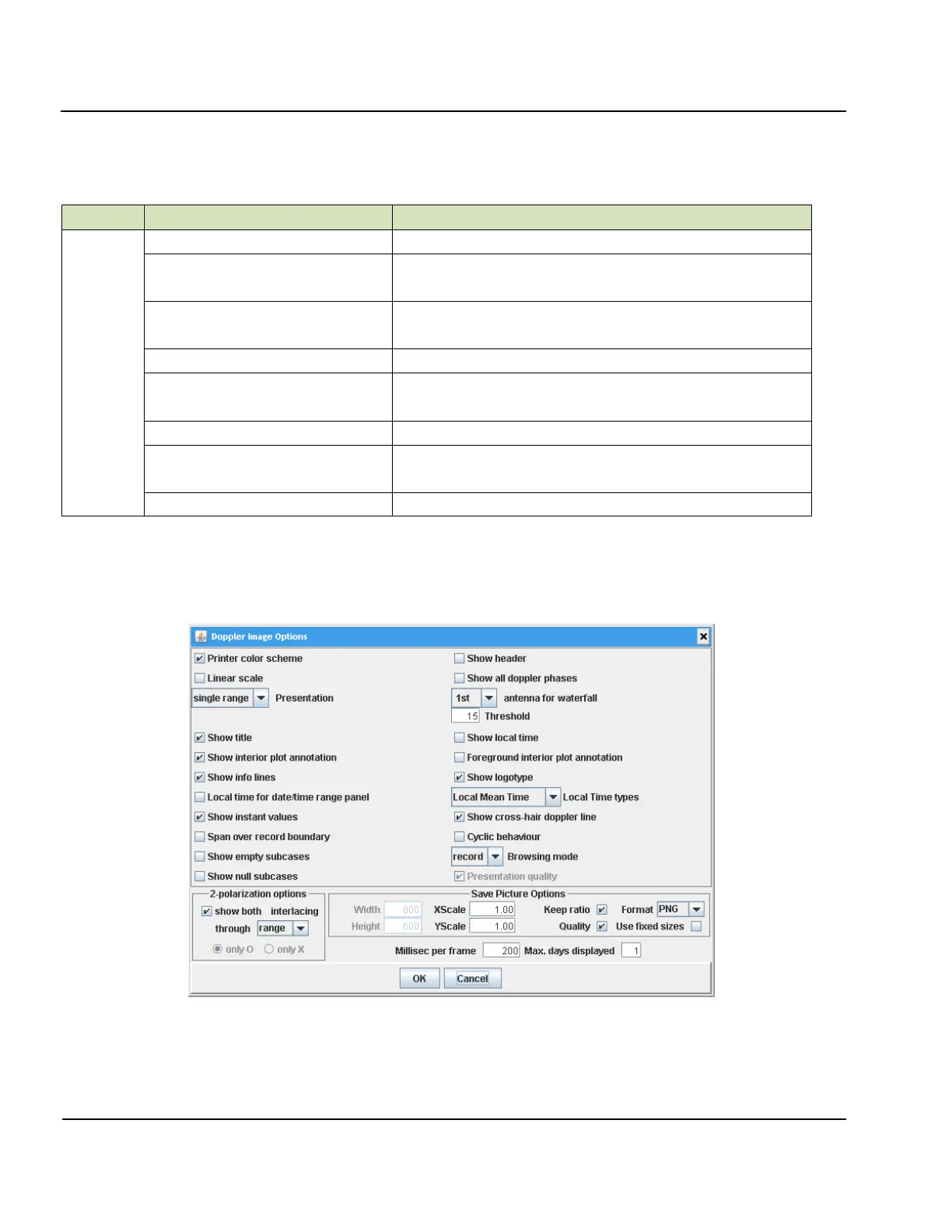
3:87. Doppler Image Options which can be found within the main Options button (Figure 3-36) has a num-
ber of options for display of the Doppler spectra in the sounding mode display window of DCART. The win-
dow layout and contents is re-used from the LDI Drift Explorer project libraries. Certain options are not appli-
cable for real-time visualization.
Figure 3-36: Doppler Image Options for the Real-Time Doppler Spectra Plot


 To Next Page