LDI Intellectual Property.
Not for secondary distribution or replication, in part or entirety.
DIGISONDE-4D
SYSTEM MANUAL
VERSION 1.2.11
SECTION 6 - MAINTENANCE 6-11
6:31. Click STOP in the upper left to put the system in Manual / Diagnostic mode.
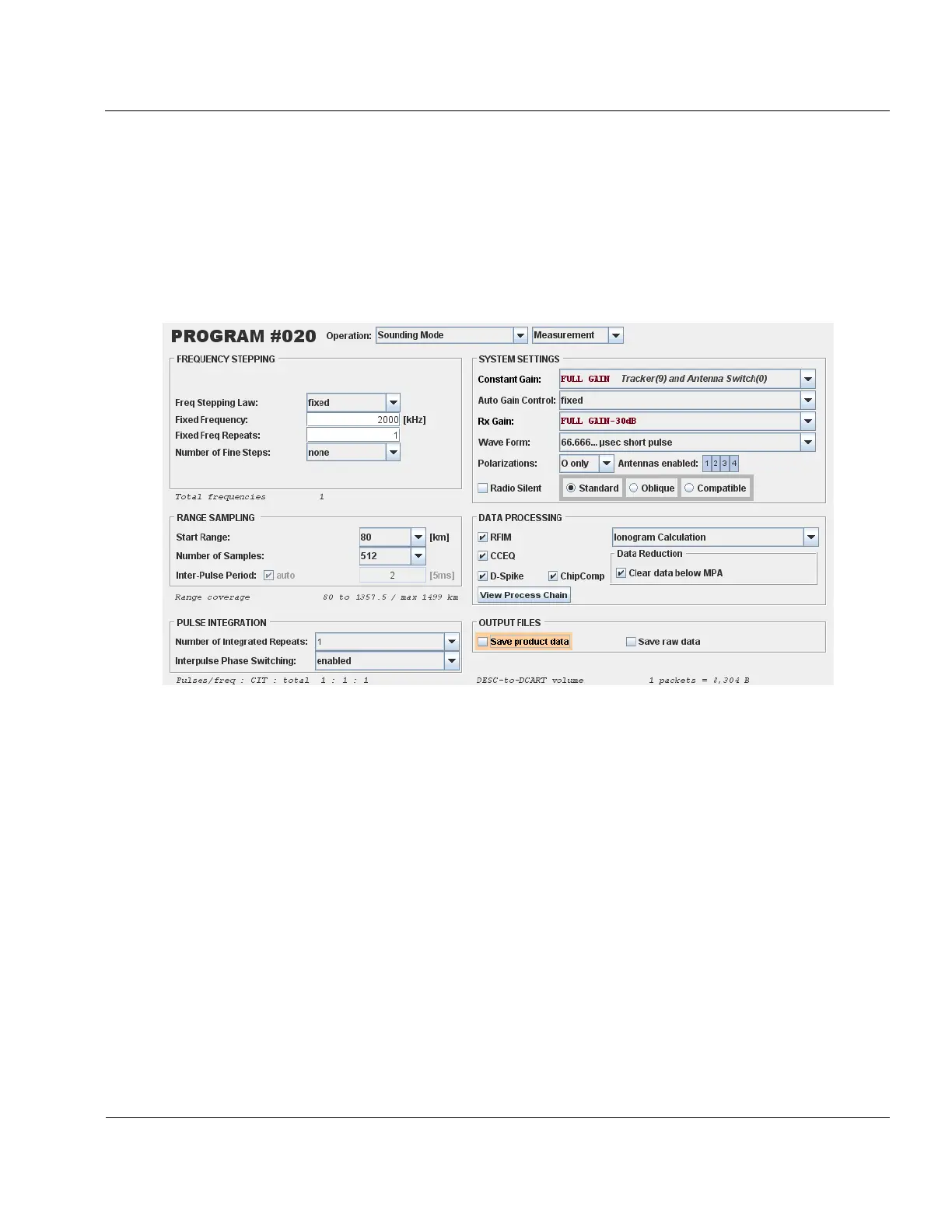
6:32. Within the DCART EDITED PROGSCHED / Programs tab create the following Sounding Mode, program
shown in Figure 6-9, and name it Osc Tuning.
6:33. It is important to remember that the goal of this program is to simply produce a single pulse. It is pos-
sible to create many different program definitions all which produce a single pulse. To this end, many settings
of this program do not matter; Fixed frequency, start range, number of samples, Rx Gain, etc all do not affect
the program length and so can be set arbitrarily. It is useful to keep that fact in mind when creating such a pro-
gram.
6:34. Next, a two second schedule should be created that contains the Osc Tuning program. Within the
DCART EDITED PROGSCHED / Schedules tab create the following two second duration schedule shown in Fig-
ure 6-10, and name this schedule Osc Tuning. This schedule may already exist from previous oscillator adjust-
ment in which case check that the duration is set to 2 seconds, not 1 second. The name of the program may not
be exactly Osc Tuning.
Figure 6-9: Single pulse program



 To Next Page