EasyManua.ls Logo

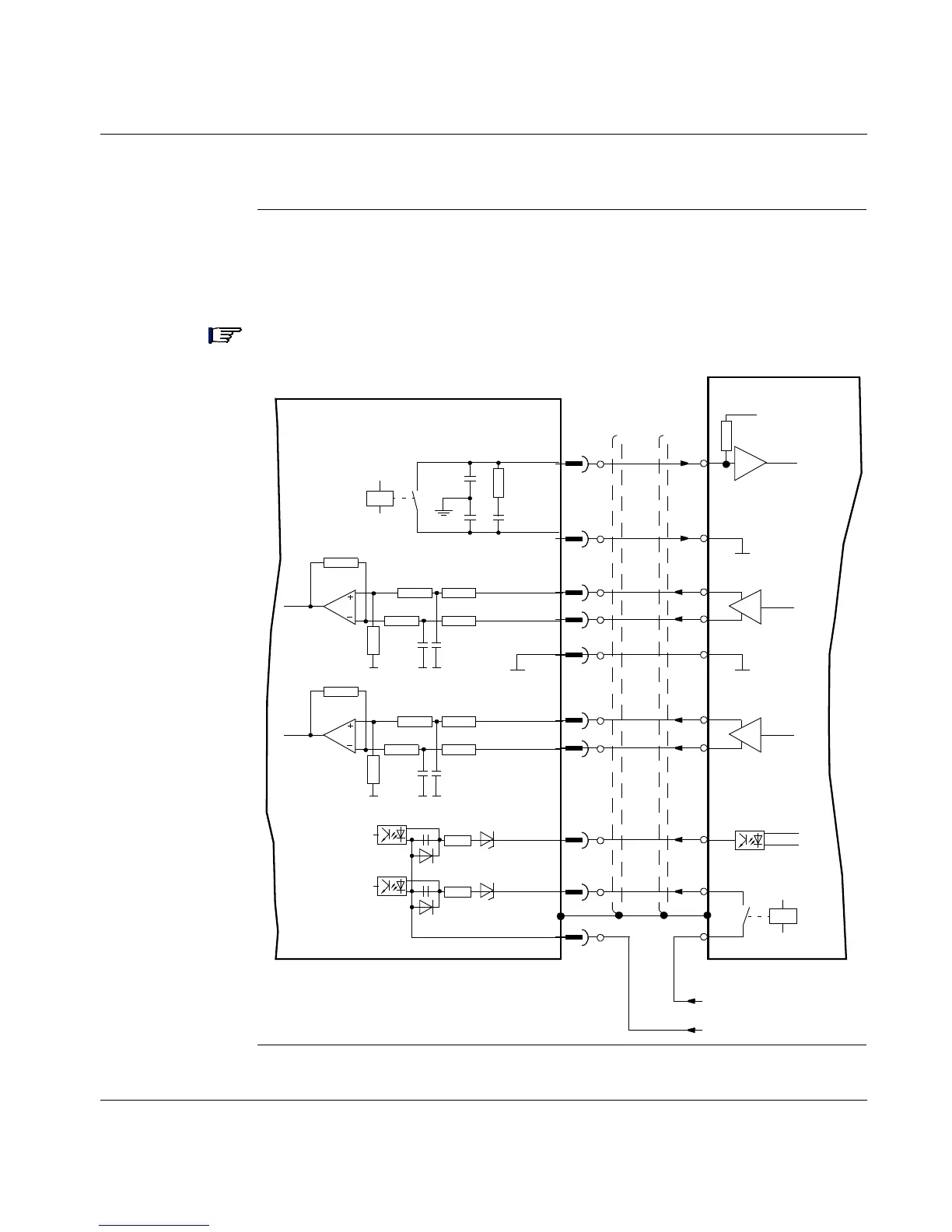
LEXIUM MHDA1004 - Typical Motion Controller Interface Connections; Motion Controller Interface Diagram

Default Icon
204 pages
Print Icon
To Next Page IconTo Next Page
To Previous Page IconTo Previous Page
Loading...
136
Typical Motion Controller Interface Connections
Motion
Controller
Interface
Diagram
The following diagram shows the connections between the 17D drive and a typical
motion controller. (Refer to the list of pre-programmed functions contained in the
UniLink online help.)
Note: The Analog Com must always be connected to the Controller Com as a
ground reference.
10K
10K
10n
Fault Relay RA
LEXIUM 17D
Motion Controller
1K
100n
2
Analog 1 In+
3K3
6V5
10n
10K
10K
Analog 1 In-
10K
10K
10n
Analog 2 In+
10n
10K
10K
Analog 2 In-
3K3
6V5
Input 1
Enable
I/O-Com
3
4
5
6
7
11
15
1
18
1K
+
+
-
24 Vdc
X3
Analog Com
Fault Relay RB
Com

Table of Contents

Related product manuals