70INSTRUMENTSANDCONTROLS
StalkSwitch(Co-Pilot®Only)
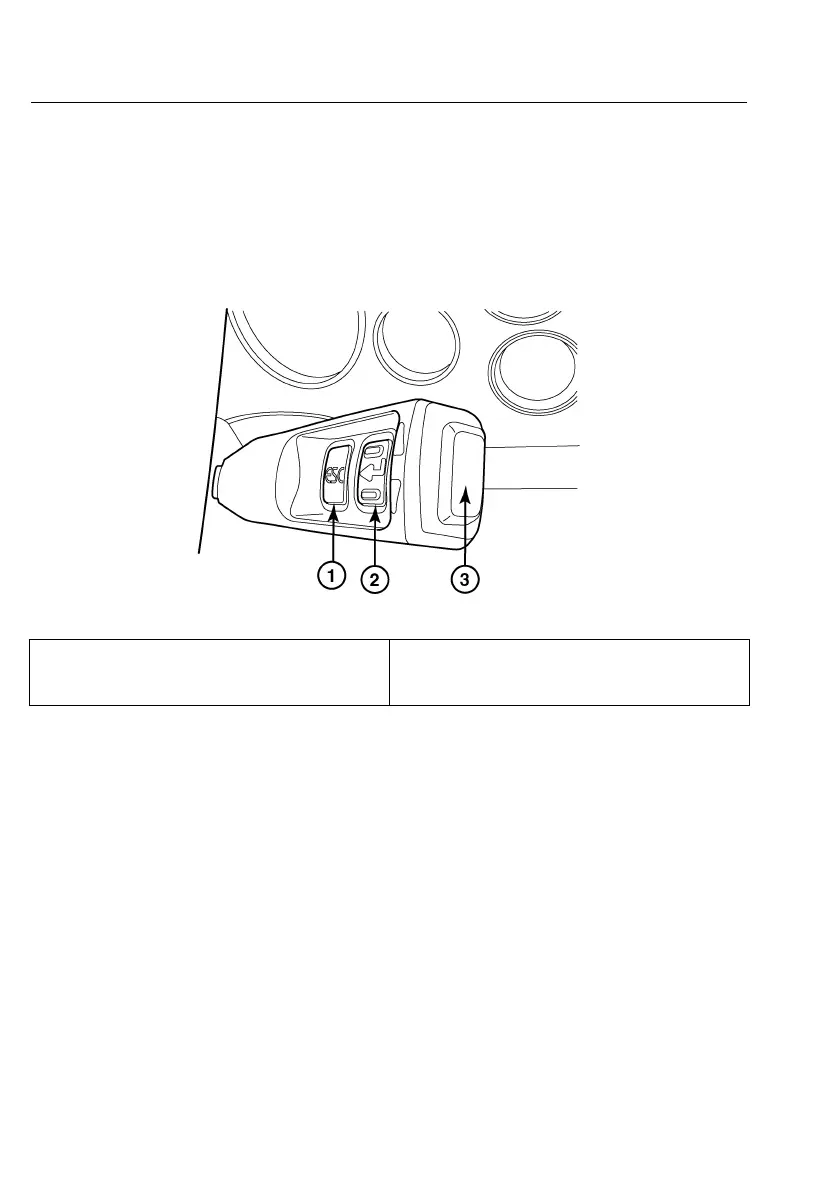
Thestalkswitch(Co-Pilot®only)islocatedontherightsideofthesteeringcolumnand
containsthreedepressiblebuttons:ESC,Enter(↵)andUp&Down.Thestalkswitchis
usedtoaccess,navigate,viewandchangeinformationavailableinthedriverinformation
display(Co-Pilot®display).
Thefollowingillustrationshowsthestalkswitch.
C0032686
1.ESC(Escape)
3.Up&Down
2.↵(Enter)
NavigationofCo-Pilot®Menu
ESCBUTTON
TheESC(Escape)buttononthestalkswitchtakestheCo-Pilot®backtotheprevious
screenorlevelinthemenu.
Note:TheESCbuttondoesnotfunctionatStartUporwhenthevehicleismoving.The
ESCbuttonisusedonlywhenthevehicleisstationary.
ENTER(↵ ↵
↵
)BUTTON
TheEnter(↵)buttononthestalkswitchselectsthehighlightedmenuitemsduringmenu
selection.DuringStartUpandwhenmovingthevehicle,theEnter(↵)buttonisalso
usedtoconrmoracknowledgeapop-upscreen.Sometimes,theEnter(↵)buttontakes
theCo-Pilot®backtothepreviousscreen.



 To Next Page