136 21. View measurements (Automatic operation) – Programming Manual
21.3.
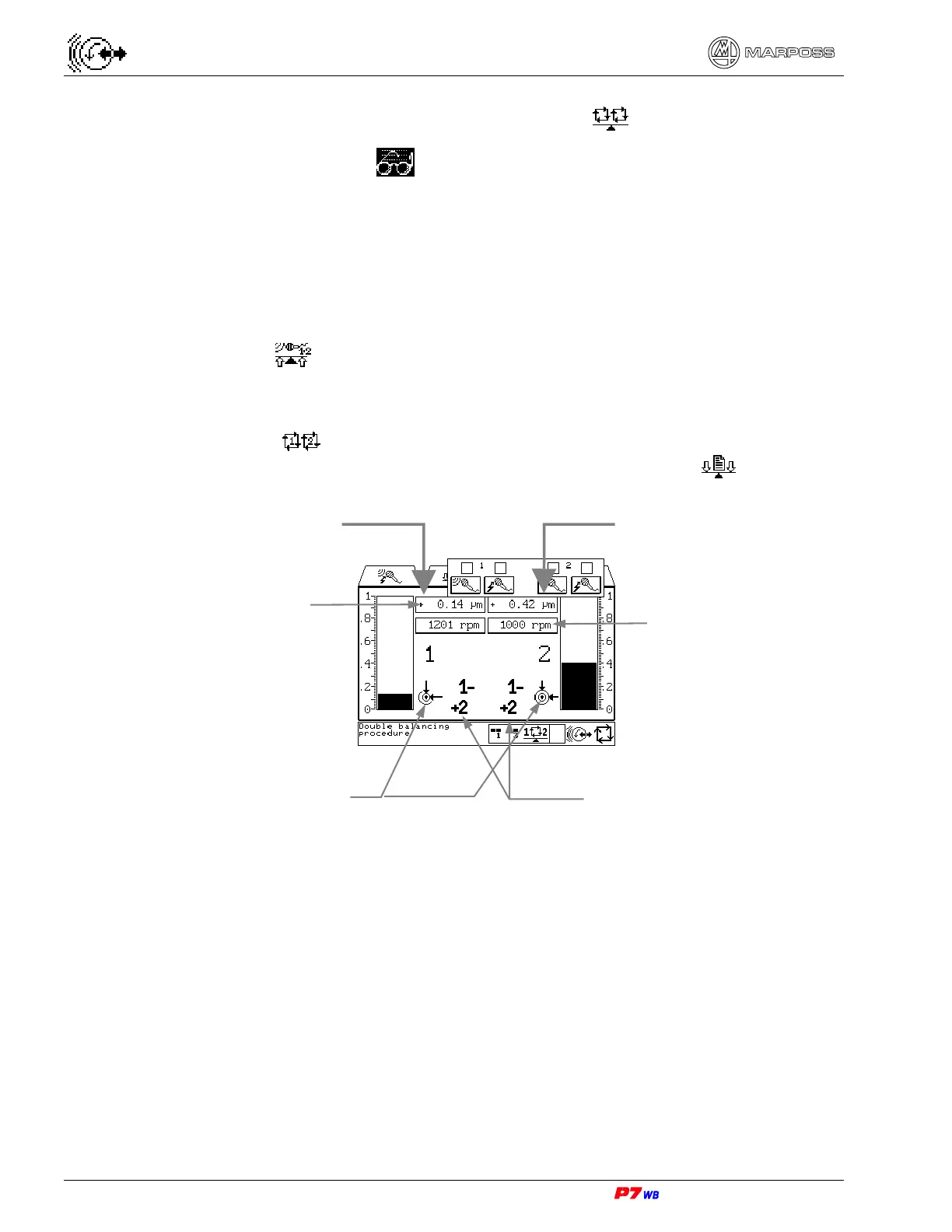
View double automatic balancing cycle
Page C5 of the “View” folder menu map (section 9.1, page 3).
Automatic balancing cycle on two channels simultaneously.
Note: The double automatic balancing procedure can be performed (the page is
displayed) only if:
- P7 system with “Two Channels Simultaneously” balancer card;
- the ”Dual Plane Balancing” software function is enabled (system configuration);
- a two-channel set is selected.
The balancing cycle can be performed in three different ways, depending on how the
relevant datum ( ) is programmed on the page “Parameters for balancing
algorithm” menu map (section 18.4 “Balancing algorithm parameters
”, page 3).
(2) The vibration value can be displayed either as width (unit of measure "micron" or
"inch") or speed (unit of measure "mm/sec" or "inch/sec"). The display mode is
defined upon the application configuration.
(3) In case of balancing cycle on two wheel slides simultaneously, it is advisable that
the wheel rotation speeds are different from each other in a range between 10%
and 20%. This prevents the mutual influence of the rotation of the two wheels
from impairing the correct evolution of the balancing cycle.
Wheel rotation speed (3)
Channel 1
Vibration value (2)
Viewing of balancing
status
Channel 2
Flag of motors movement
during cycle



 To Next Page