EasyManua.ls Logo

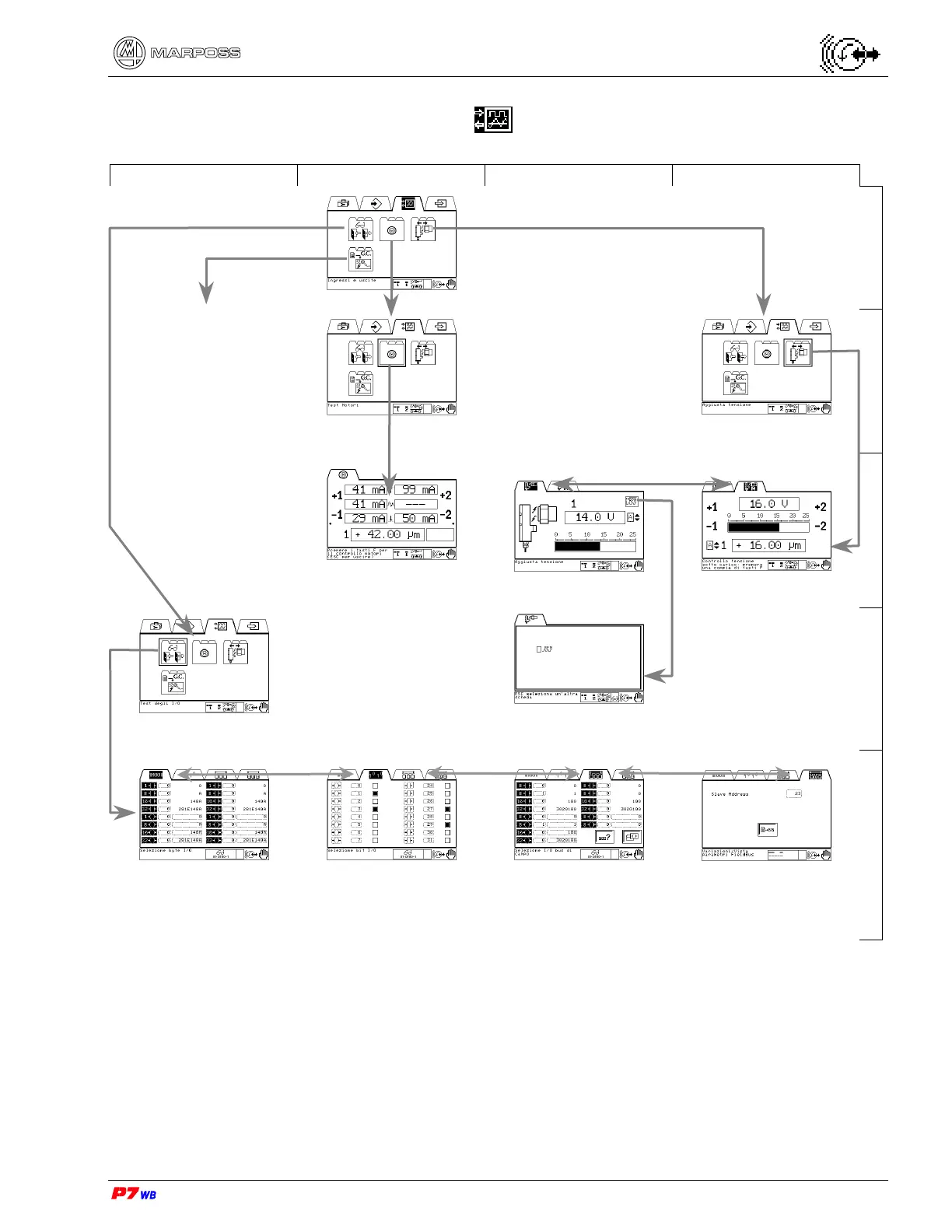
marposs P7WB - Inputs & Outputs Folder Navigation (Manual Mode)

Default Icon
164 pages
Print Icon
To Next Page IconTo Next Page
To Previous Page IconTo Previous Page
Loading...
– Programming Manual 8. Menu maps (Manual mode ) 35
8.3.
“Inputs & Outputs” folder
A B C D
Manual operating mode
1
Gap & Crash
Folder icon present only
if the independent
version of the Gap &
Crash function is present
in the P7. Pls. see the
relevant description in
the section 23, page 3.
Motors test
Voltage setup
(Section 16, page 3)
2
Motors test
(Section 15, page 3)
Receiver supply voltage
(Section 16.1 , page 3)
Check voltage under load
(Section 16.2, page 3)
3
I/O test
(Section 14, page 3)
RPM sensor checking
(Section 16.1.1, page 3)
4
I/O byte test
(Section 14.1, page 3)
I/O bit test
(Section 14.2, page 3)
Fieldbus test (Section 14.3, page 3)
Pages displayed only in case of application with
Fieldbus
5

Table of Contents