– Programming Manual 10. Unit Set-up 55
10.4.
Archive of frequency spectral analysis
Page D7 of the “Utilities” folder menu map (section 8.1, page 3).
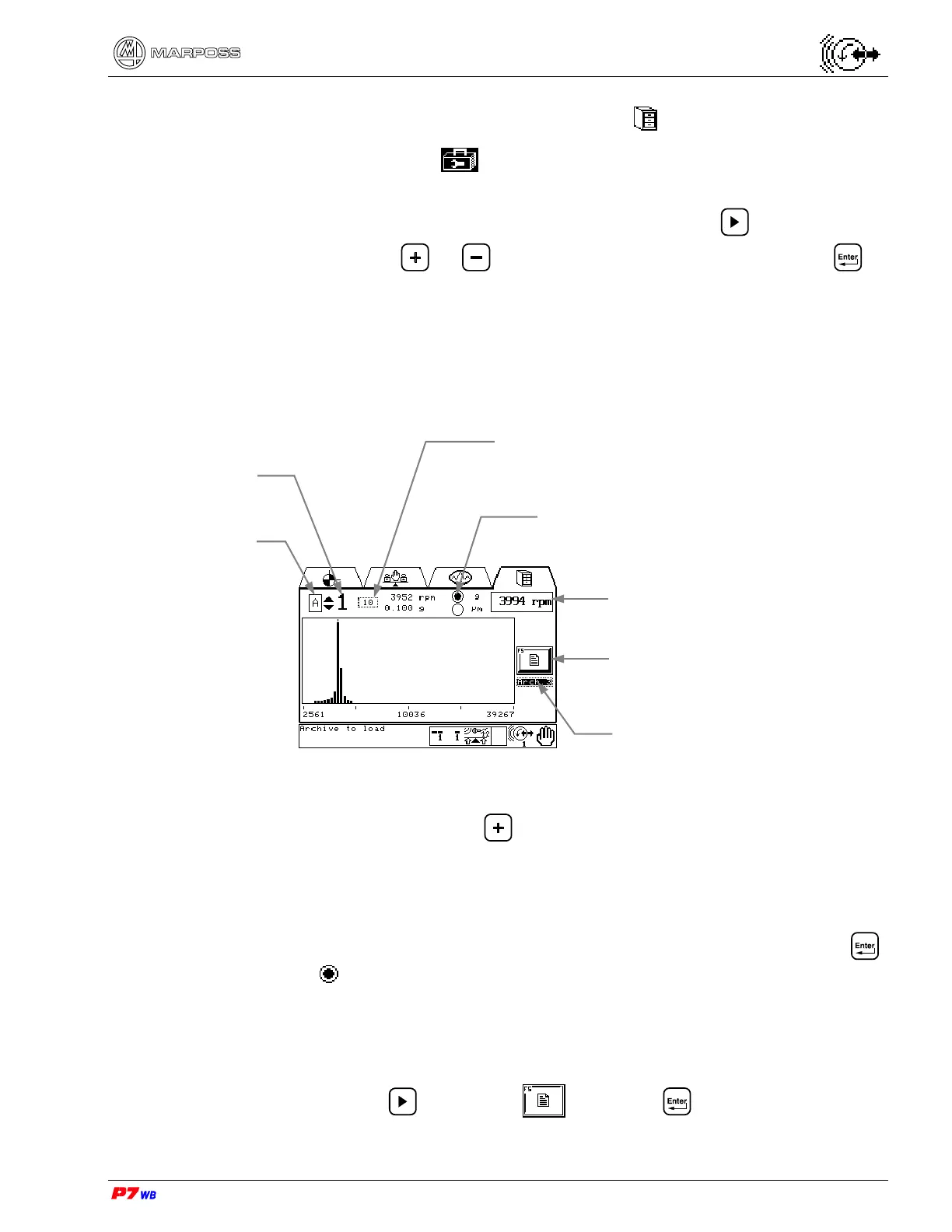
Up to three archives (Arch.1, Arch.2, Arch.3) are available where frequency analysis
acquisitions were previously stored: to select an archive press to highlight the
corresponding field, press or to view the desired archive, then press to
confirm.
A cursor is available to scan each bar X position (rpm) and Y value (“g” or “µm”).
(1) Measurement selection: present only in the applications with two logical channels.
With the field highlighted, press to select the desired measurement (the no.
of the corresponding physical channel is displayed).
(2) Selection of display in Acceleration (g) or Vibration (µm or mm/s).
Move the cursor (identified by a vertical bar) next to “g” or “µm” and press .
The symbol identifies the selected parameter. The type of display can be
selected at any time.
F5 : Archives information / management
Press the F5 key or use to highlight and press : the data stored in the
three archives are displayed.
Measurement
selection (1)
Physical channel no.
Selection of display in acceleration
value (g) or vibration value (µm or
mm/s) (2)
Wheel rotation speed at archive
acquisition time
F5 : Archives information/
management
Selection of archive
Cursor control:
current X plot – rpm
current Y plot “g” or “µm”



 To Next Page