52 10. Unit Set-up – Programming Manual
10.3.
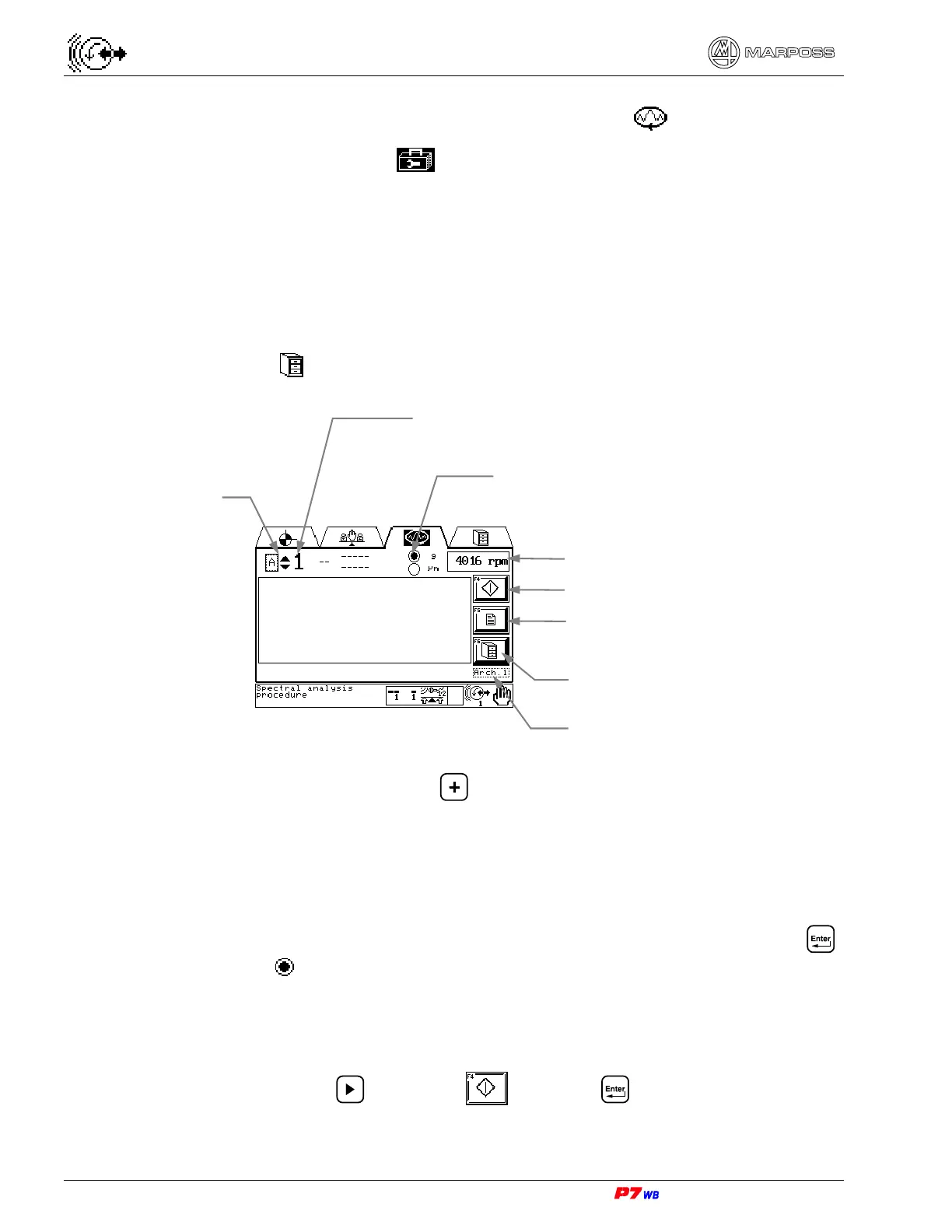
Procedure for frequency spectral analysis
Page C7 of the “Utilities” folder menu map (section 8.1, page 3).
The procedure for frequency spectral analysis makes it possible to gauge the
unbalance due to frequencies different from the wheel rotation ones (noise
frequencies).
The procedure for frequency spectral analysis can be performed in manual mode
only, with single set (channel 1 or channel 2) or with double set (channels 1 and 2).
It is possible to store up to three acquisitions of frequency analysis for channel 1
and/or channel 2 in the special archive (see section 10.4 “Archive of frequency
spectral analysis “, page 3).
(1) Measurement selection: present only in the applications with two logical channels.
With the field highlighted, press to select the desired measurement (the no.
of the corresponding physical channel is displayed).
(2) Selection of display in Acceleration (g) or Vibration (µm or mm/s).
The vibration value can be viewed as width ("micron" or "inches") or as speed
("mm/sec" or "inches/sec"). The display modality is defined upon the application
configuration.
Move the cursor (identified by a vertical bar) next to “g” or “µm” and press .
The symbol identifies the selected parameter. The type of display can be
selected at any time.
F4 : Start/stop frequency analysis acquisition
Press the F4 key or use to highlight and press .
Measurement
selection (1)
Physical channel no.
Selection of display in acceleration
value (g) or vibration value (µm or
mm/s) (2)
Wheel rotation speed
F4 : Acquisition start/stop
F5 : Acquisition programming
F6 : Acquisition save in archive
Selection of archive



 To Next Page