– Programming Manual 10. Unit Set-up 53
Acquisition stops automatically when elaboration is performed or on user request with
the same F4 key .
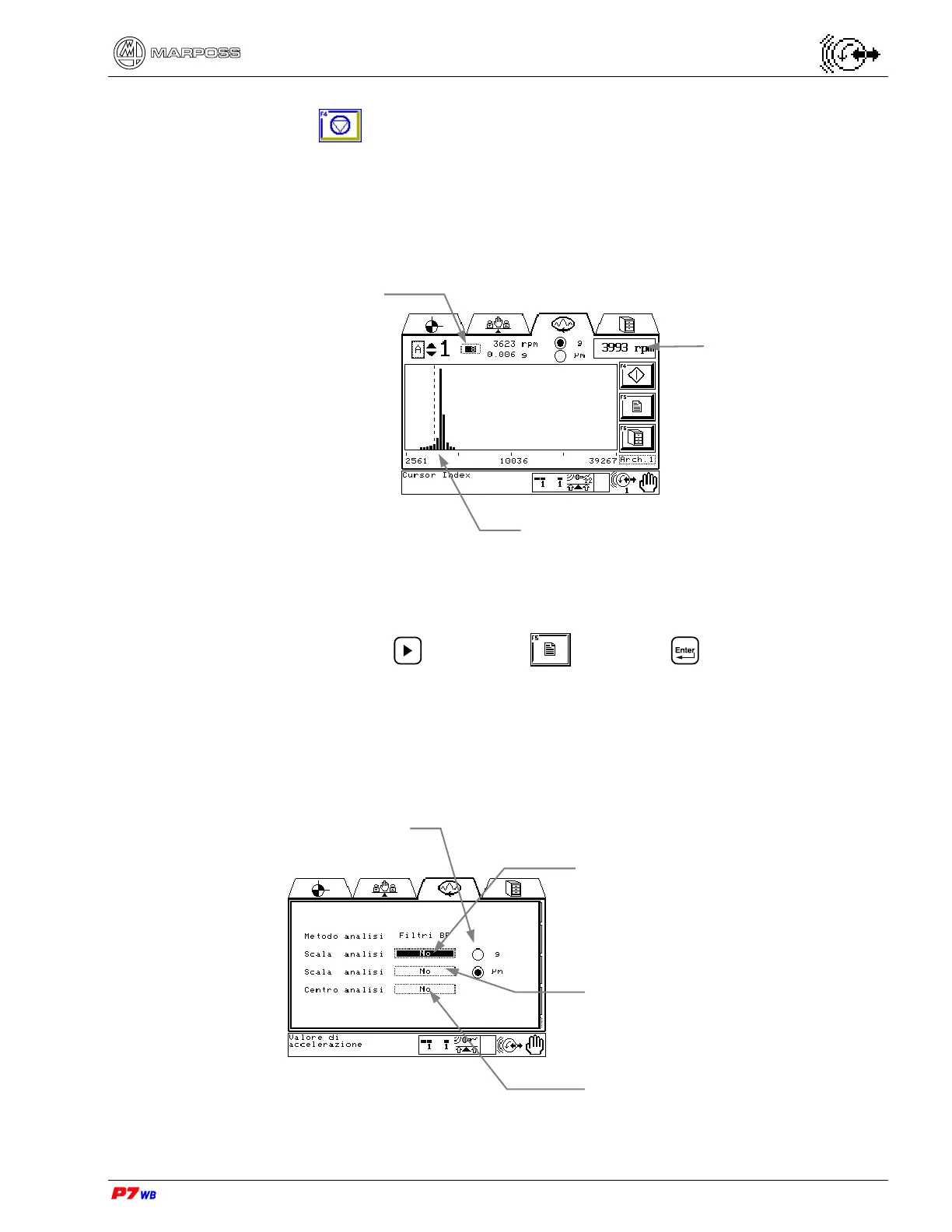
A cursor is available to scan each bar X position (rpm) and the Y value (“g” or “µm”).
The following is an example of frequency analysis acquisition for a wheel speed of
3993 rpm, centered as required at 10000 rpm.
F5 : Programming frequency analysis acquisition
Press the F5 key or use to highlight and press to enter the page for
programming the acquisition where it is possible to parameterize the acquisition. The
programmed data are stored in the currently selected set.
The data are programmed to “No” (disabled) by default.
The following example shows the default values for the selected set:
Wheel rotation speed
Cursor control:
current X plot – rpm
current Y plot “g” or “µm”
Acquisition of low-central-
high limits
Selection of display in acceleration
value (g) or vibration value (µm or
mm/s) (2)
Display of the max. value for Acceleration
(meaningful if “g” is selected): “NO”
means automatic Y plot scaling.
Display of the max. value for Vibration
(meaningful if “µm” is selected): “NO”
means automatic Y plot scaling.
“Rpm” acquisition center: “NO” means
automatic centering on the current wheel
rpm.



 To Next Page