EasyManua.ls Logo

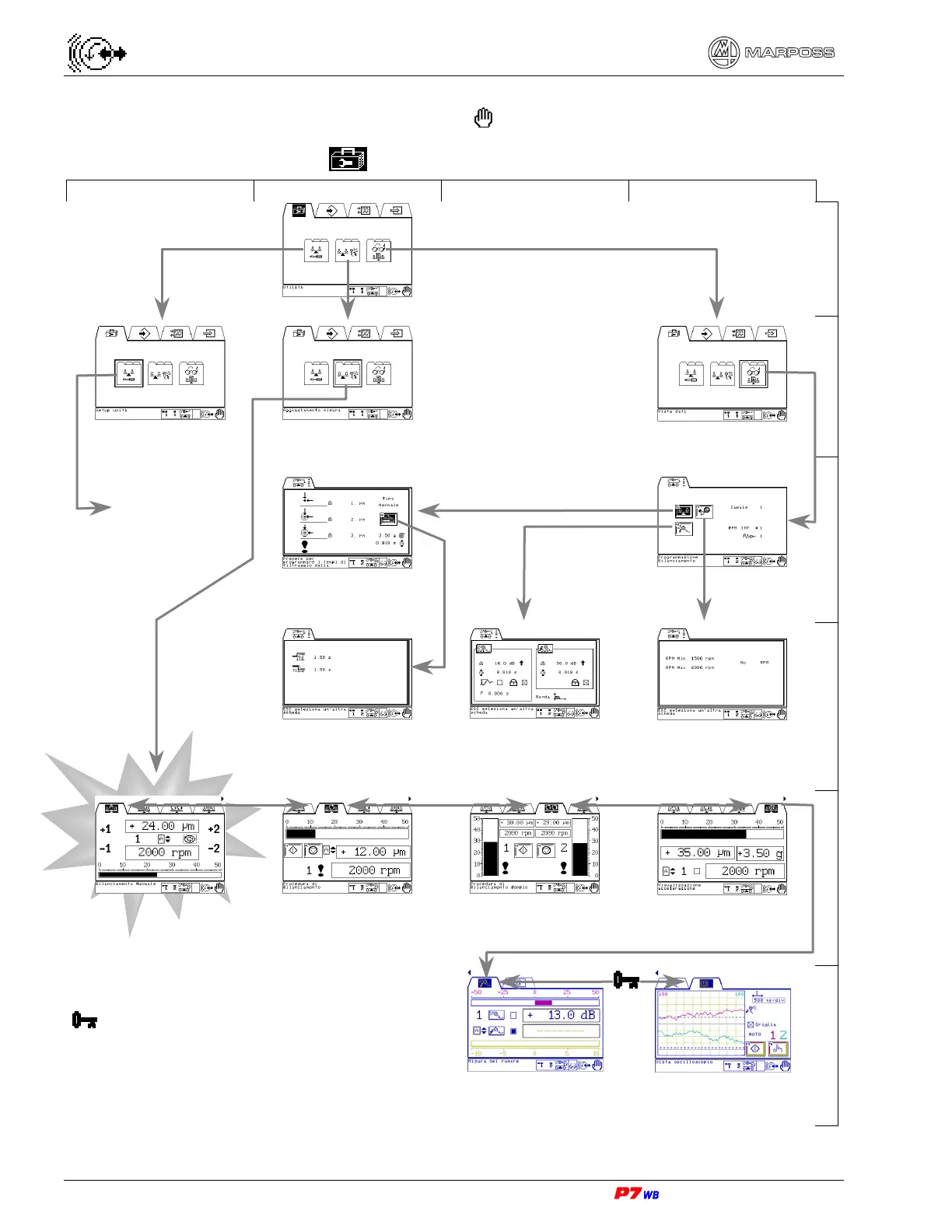
marposs P7WB - Menu Maps (Manual Mode); Utilities Folder Navigation (Manual Mode)

Default Icon
164 pages
Print Icon
To Next Page IconTo Next Page
To Previous Page IconTo Previous Page
Loading...
32 8. Menu maps (Manual mode ) – Programming Manual
8.
MENU MAPS (MANUAL MODE )
8.1.
“Utilities” folder
A B C D
Manual operating mode
1
Unit setup Measure setup
(Section 11, page 3)
View data
(Section 12, page 3)
2
Balancing limits
(Section 12.2, page 3)
3
Asymmetric filter on
vibration signal
(Section 12.2.1, page 3)
Integrated Gap & Crash
control data
(Section 12.3, page 3)
Supervision values
(Section 12.4, page 3)
4
Manual balancing (1)
(Section 11.1, page 3)
Automatic balancing
(Section 11.2, page 3)
Automatic balancing on 2
channels simultaneously
(Section 11.3, page 3)
View Acceleration
(Section 11.4, page 3)
5
Request for **User’s password** (if active)
Noise measurement
(Section 11.5, page 3)
Graphic representation
and dynamic set-up
(Section 11.6, page 3)
6
(1) Default display at the system power on in manual operating mode, or at the Automatic/Manual switching.
See next
page

Table of Contents