92 13. Programming – Programming Manual
13.5.
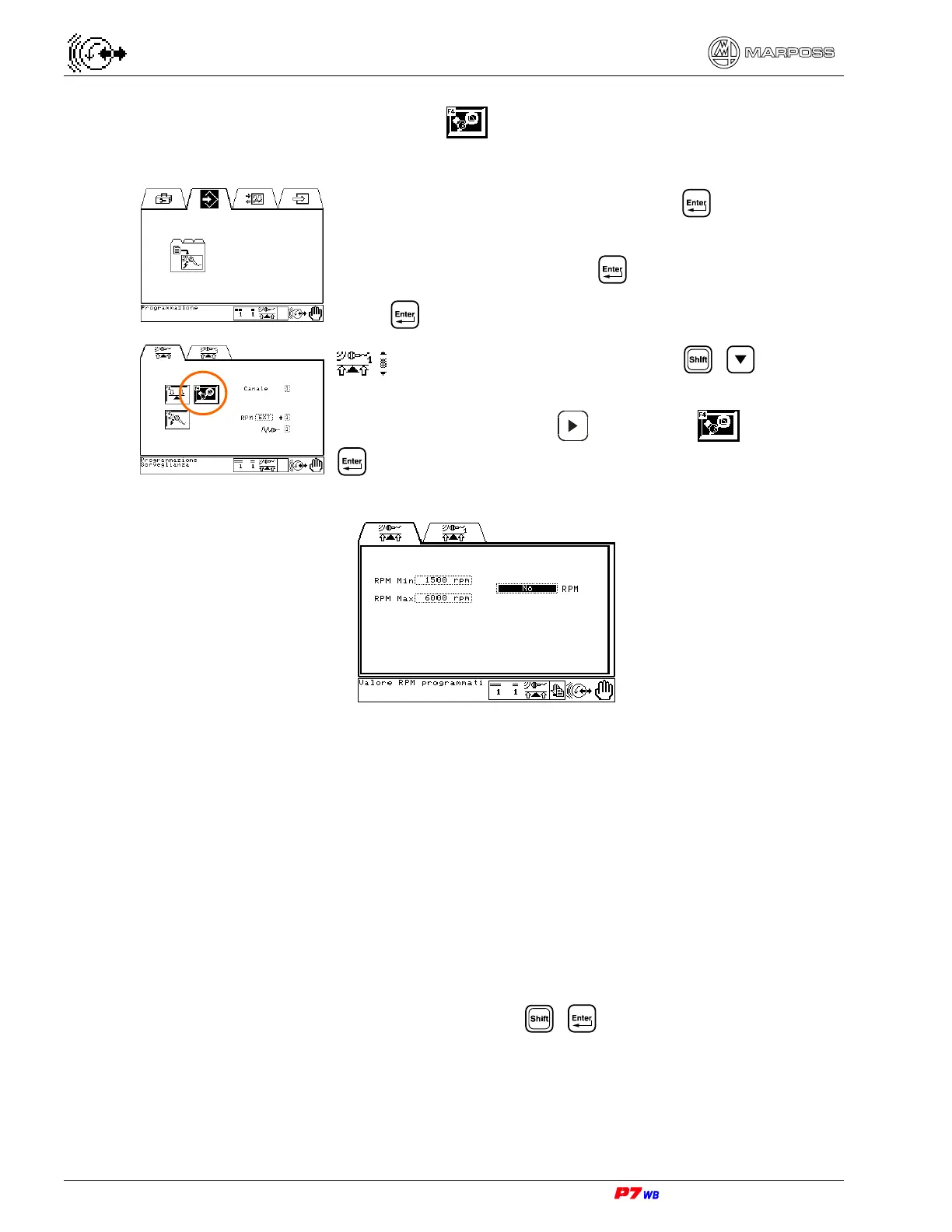
Supervision programming
Select the Programming folder and press .
With **User’s password** active, the password is asked:
• type the password and press .
Press .
Application with 2 channels: press + to select
Channel 1 or Channel 2.
Press function key F4 or to highlight and press
to access the data programming page.
RPM Min – Minimum wheel rotation speed. Datum used to check the wheel rotation
speed. When the speed drops below this value the RPM value flashes in all the
pages where it is present, and the signal "RPM Alarm" is supplied at output.
Setting range for RPM Min: 300 to 20.000 rpm.
RPM Max – Maximum wheel rotation speed. Datum used to check the wheel rotation
speed. When the speed drops below this value the RPM value flashes in all the
pages where it is present, and the signal "RPM Alarm" is supplied at output.
Setting range for RPM Max: 300 to 20.000 rpm.
RPM – Wheel rotation speed in case the rotation speed measuring sensor is not
used. With the RPM field highlighted, press + to enable/disable the datum;
with RPM enabled the RPM Min and RPM Max data are disabled (the wheel
rotation speed is not detected anymore by an external RPM sensor).
Setting range for RPM: 300 to 20.000 rpm.



 To Next Page