– Programming Manual 11. Measurement adjustment 63
11.4.
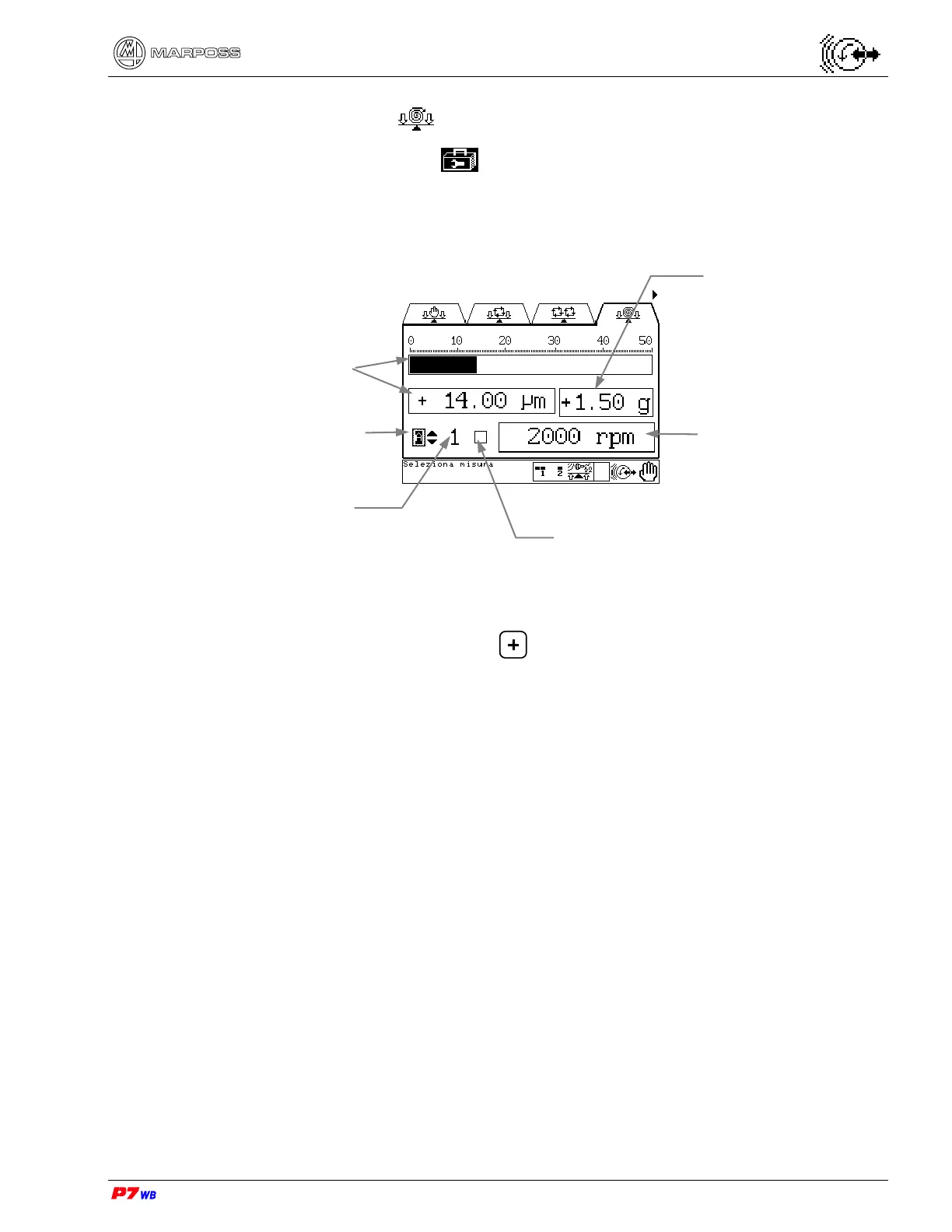
View acceleration
Page D5 of the “Utilities” folder menu map (section 8.1, page 3).
The acceleration value is a signal directly coming from the vibration sensor
(accelerometer): this makes it possible to improve the system reaction in case of an
alarm condition.
(1) Measurement selection: present only in the applications with two logical channels.
With the field highlighted, press to select the desired measurement (the
number of the corresponding physical channel, 1 or 2, is displayed).
(2) The vibration value can be displayed either as width (unit of measure "micron" or
"inch") or speed (unit of measure "mm/sec" or "inch/sec"). The display mode is
defined upon the application configuration.
Acceleration value
Measurement selection
- A or B (1).
Wheel rotation speed
Vibration value (2)
No. of physical channel
Virtual LED: indicates when the
programmed acceleration limit is
exceeded (sec. 13.3).



 To Next Page