154 23. Gap & Crash Function – Programming Manual
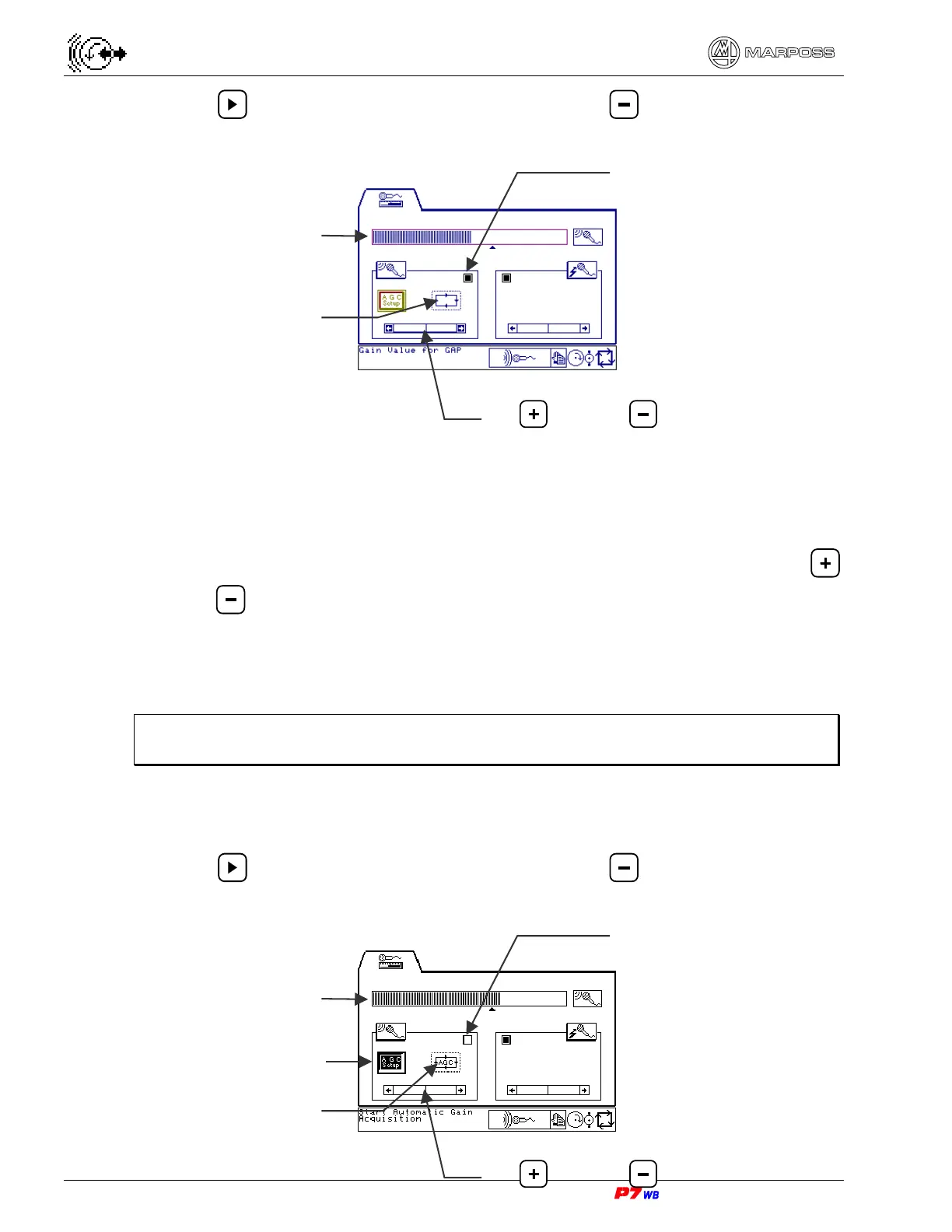
2. Use to highlight the gain adjustment area and to set the gain value to
zero (scroll bar of the scale completely on the left).
3. Bring the wheel almost in contact with the workpiece, or with the reference pin if
the GAP control is used to check position, etc., as in normal working conditions
(wheel spinning at work speed, workpiece rotating, coolant on, etc.).
4. With the gain adjustment area highlighted, adjust the sensitivity with keys
and , bringing the noise display on bargraph slightly below the threshold V
and just before the GAP control LED switches off.
5. To verify the programming perform a few cycles and verify that the GAP control
has triggered at the right time.
Note: If the type of wheel, workpiece, etc. is changed, it might be necessary to
reprogram the system.
Variable and oscillating background noise
1. Select the automatic (variable) gain control procedure.
2. Use to highlight the gain adjustment area and to set the gain value to
zero (scroll bar of the scale completely on the left).
Scroll bar for gain value adjustment
Key
= / Key =
GAP control LED
Fixed gain
Bargraph
Scroll bar for gain value adjustment
Key
= / Key =
GAP control LED
Automatic gain
Bargraph
Start/Stop gain
automatic acquisition


 To Next Page
 Loading...