4. Service Procedures - Machine Adjustments and Calibration
100 Morgana DocuMaster MFC - Service Manual
Warning: Use extreme caution not to touch any live circuits when you operate the
MFC with the hinged rear panel open.
Step Action Information
1 Connect the mains power cord to
the mains input plug on the rear of
the DRV module (see Figure 4.78).
Figure 4.78
2 Set the main input switch to the ON
(I) position.
3 Put a steel rule against the pivot
plate at the rear
of the DRV
module.
(See Figure 4.77).
4 Test the rear guard interlock-
switch.
• Lift the rear guard.
Note: The maximum permitted lift
before the 'rear guard open' error
message is shown on the GUI panel
is 2mm.
5 If the rear guard interlock switch
does not p
ass the test, you must
adjust the rear guard interlock-
switch.
(See Section 4.5.26.2).
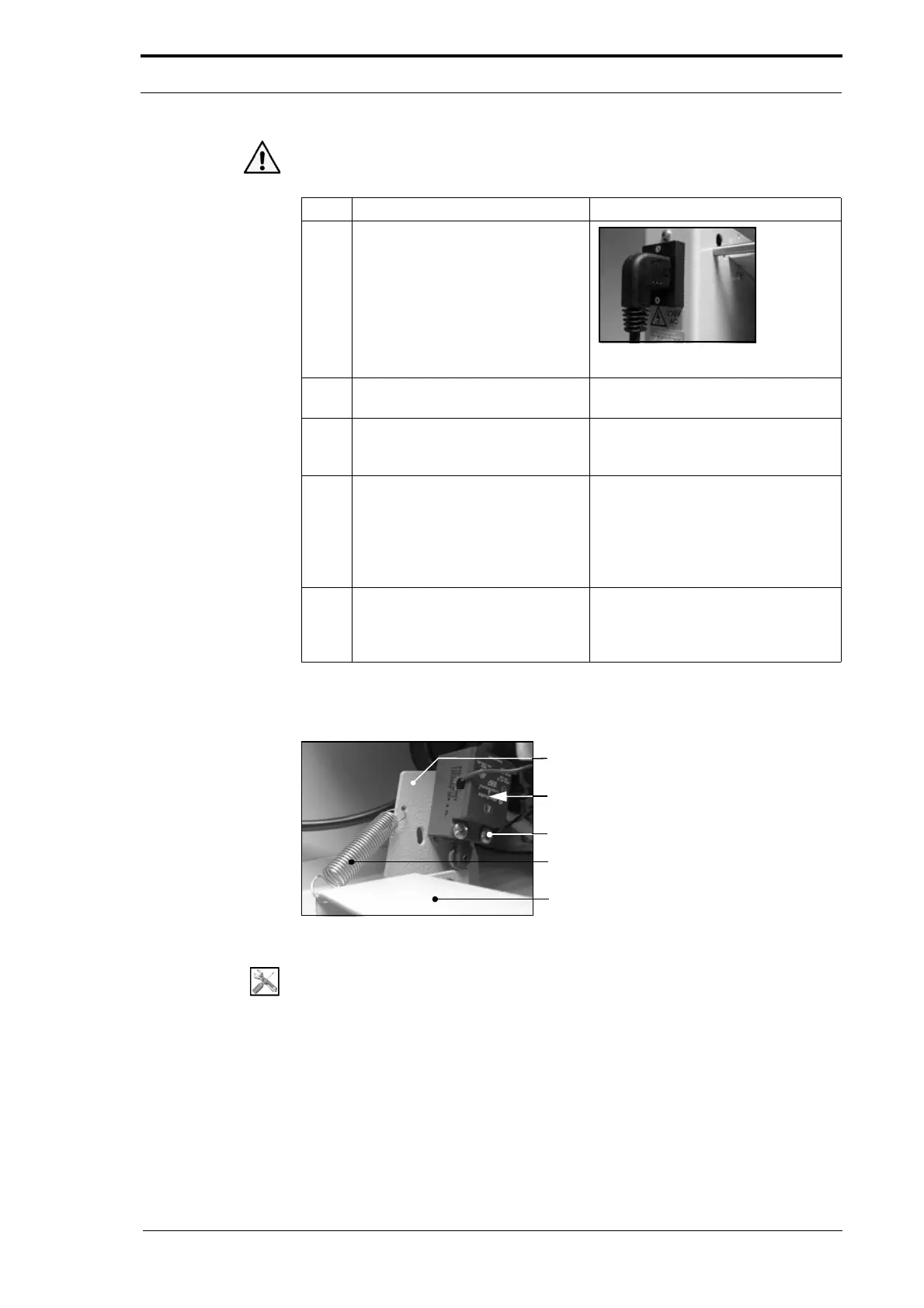
4.5.26.2 Adjust the Rear Guard Interlock Switch
Mounting Bracket
Rear Guard Interlock Switch
Screws (2)
Pivot Return Spring
Pivot Plate
Figure 4.79 The Rear Guard Interlock Switch
Tools:
• Screwdriver: Pozidriv No. 2
• Spanner: 7mm.



 To Next Page