7. Electrical and Control System - Crease Control Software Updates though a PICkit 2 Programmer
244 Morgana DocuMaster MFC - Service Manual
7.8.2 Transfer the Creaser Control Software to the PICkit 2 Programmer
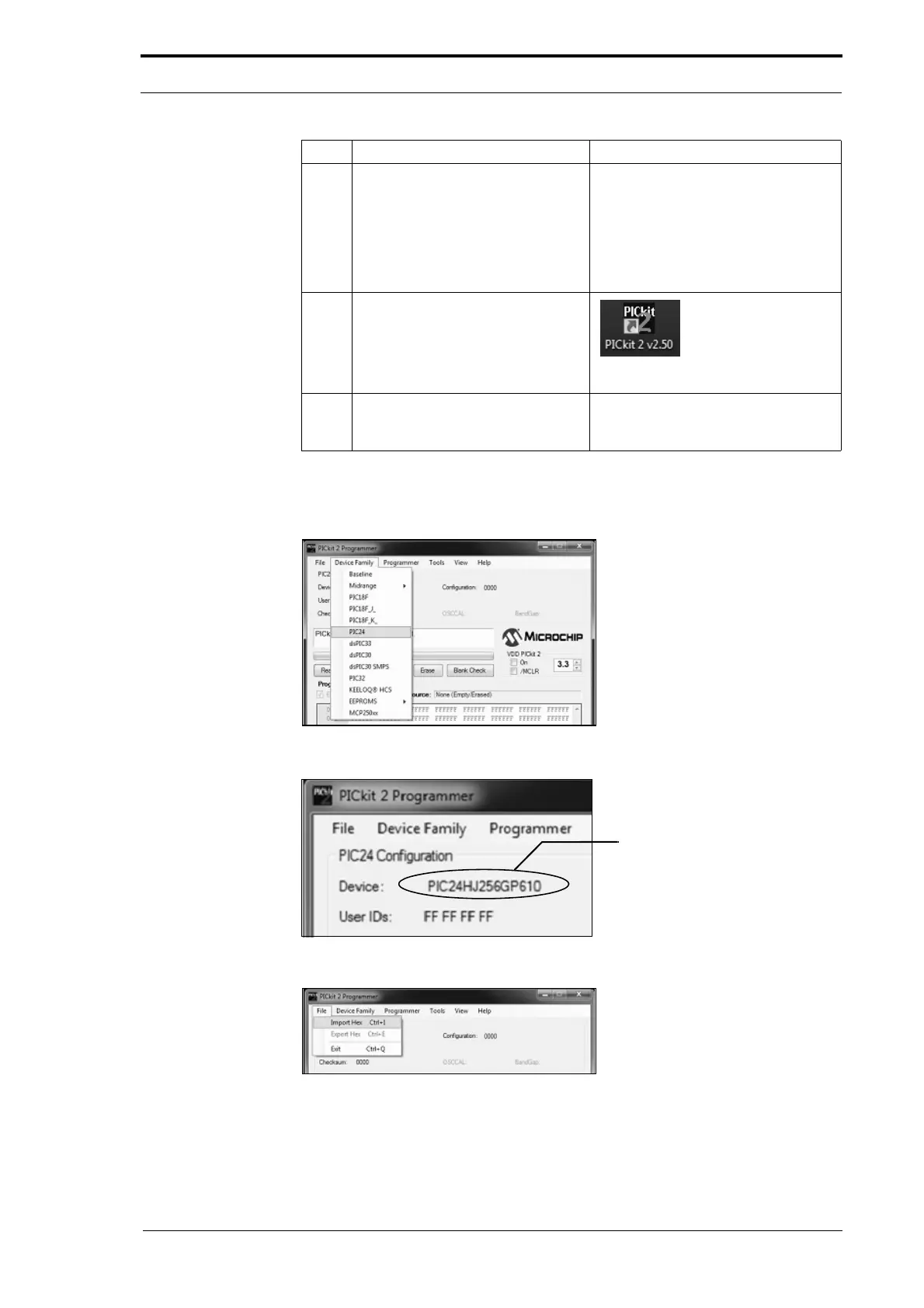
Figure 7.42 Device Family Drop-Down List
Figure 7.43 Configure The Pickit 2 Device
Figure 7.44 File Drop-Down List
3 Connect the PICkit 2 programmer
to the creaser processor PCB.
• Push the programmer onto the 6-
pin plug.
You must connect the programmer so
th
at the white arrow points to the
white dot on the controller PCB (see
Figure 7.39).
4 Click on the PICkit 2 icon to open
the PICkit
2 programmer
application.
Figure 7.41 PICkit 2 Application Icon
5 Make sure that 'PICkit 2 found and
connected’ is shown in the status
message box.
Step Action Information



 To Next Page