DCS Command System User’s Guide
Menu Operations - Advanced
Create TMCC Lash-up: (cont’d)
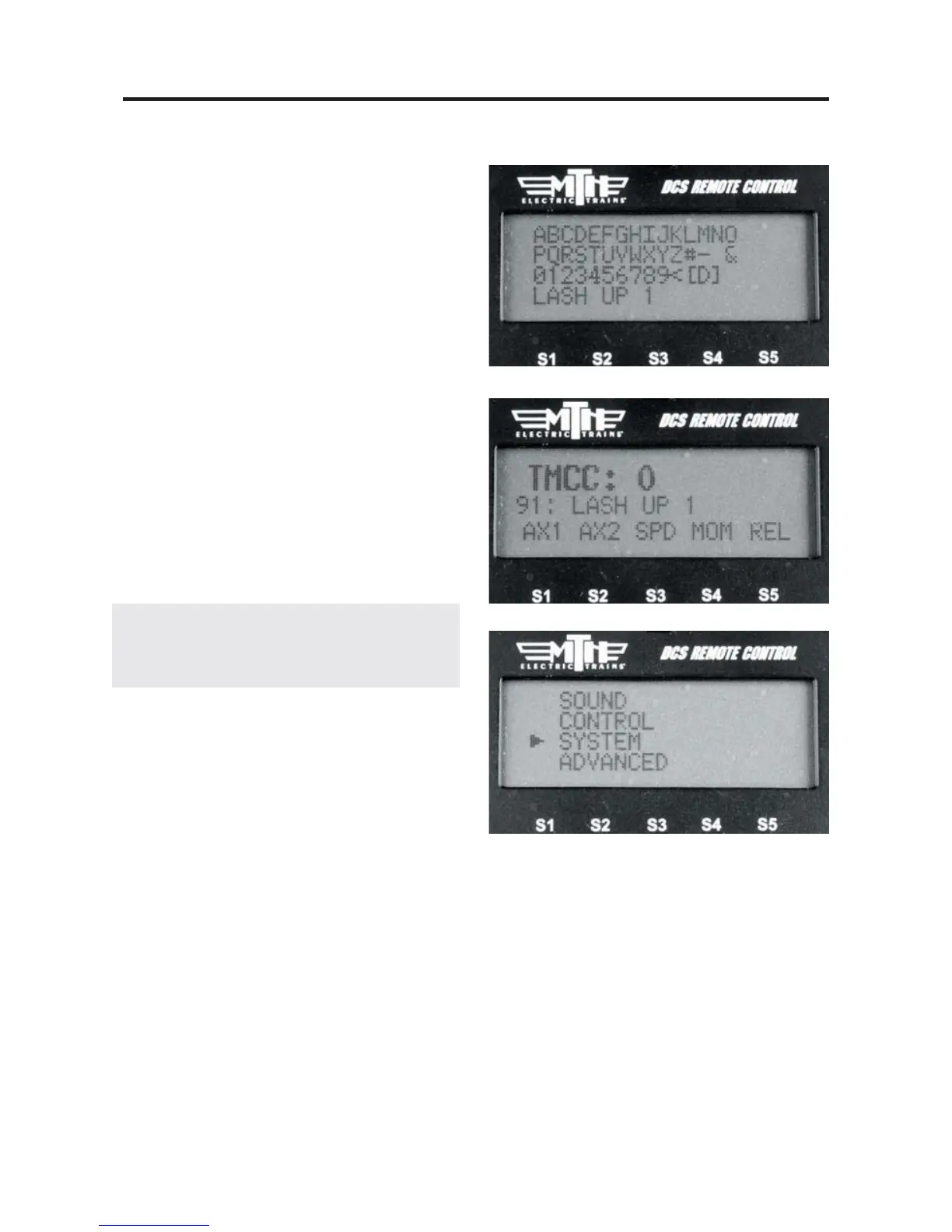
15. Enter the name of the lash-up in 16
characters or less and then select the “D”
character at the end of the list to tell the
remote you're done. If you make a mistake
while entering the lash-up name you can
use the “<” character to backspace and
correct the text.
16. Now that you have completed the
lash-up building process your engines will
power on and then each one will sound it's
horn/whistle three times to signify that it's
received the lash-up data and is ready to
operate. Once all the engines in the lash-
up have sounded their horn/whistle the
new lash-up will appear in your DCS
remote in the INACTIVE ENGINE list.
Note: When TMCC lash-ups are built in the
DCS Remote they are placed at locations 91-99
in the DCS Remote.
17. Press the ENG button and scroll
down to the new lash-up you built and
press the thumbwheel (Select).
18. The new lash-up will be displayed in
the LCD.
Your new TMCC lash-up is now ready to
operate.
19. To delete a TMCC lash-up press the
MENU button (ensure track power is
applied).
20. Select SYSTEM.



 To Next Page