Newtec Proprietary
Confidentiality: Unrestricted
V1.4
48/225
How to Manage the Device M6100 Broadcast Satellite Modulator
9.5.9 Alarms Pane
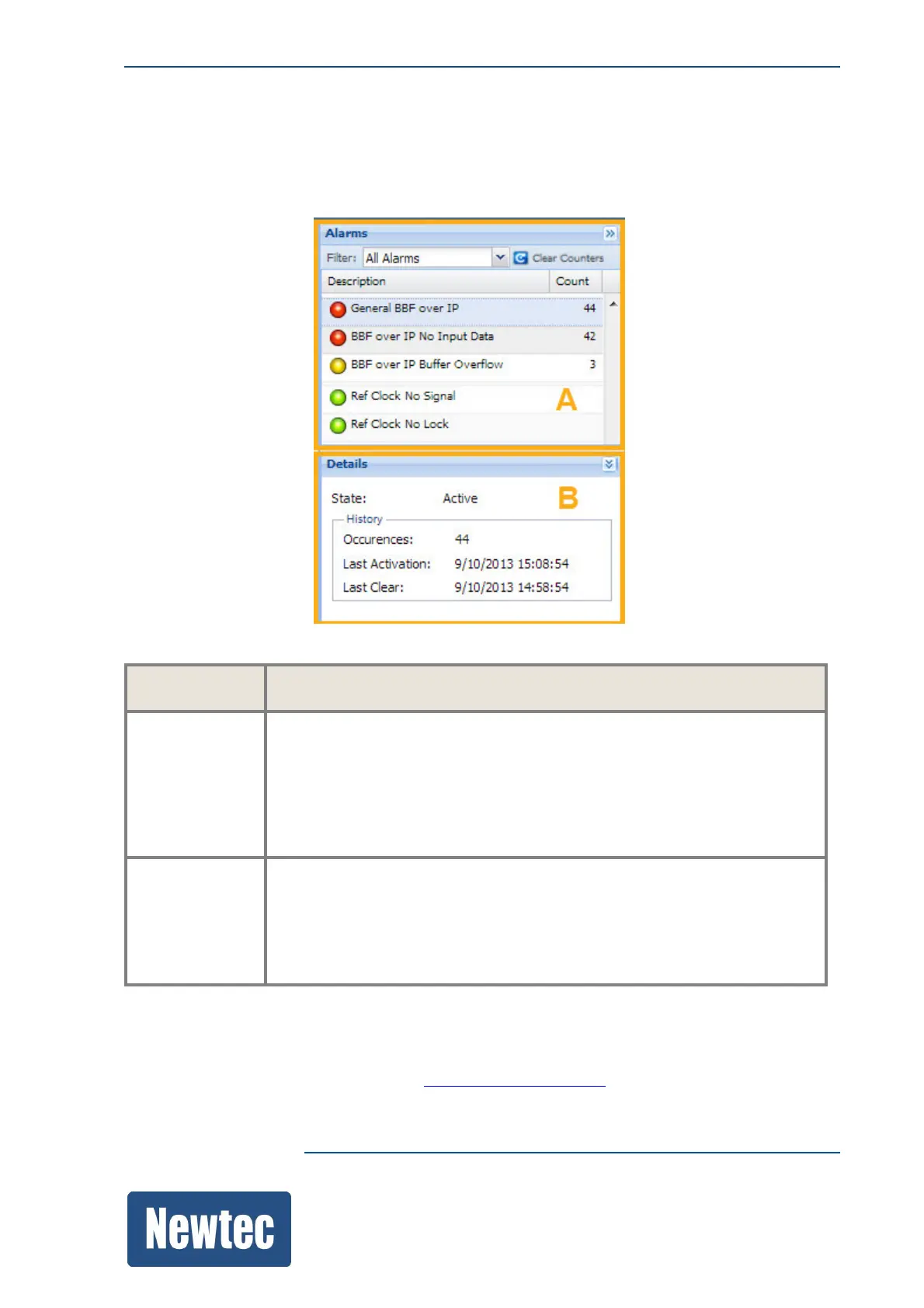
The Alarms pane shows the alarms generated by the device.
Alarms are sorted first by their activity and then by their severity (from critical alarms to warnings.)
The alarm list pane contains the following information:
Pane Description
A This pane displays the alarms.
It is possible to filter on the following alarm information:
• Active
• Active and Memorized
• All Alarms (this displays the complete overview of all possible alarms)
B This pane displays the details on the selected alarm.
• How many times did the alarm occur since the last clear;
• When was the last activation;
• When the alarm was cleared for the last time.
» Click Clear Counters to clear the number of times an alarm was generated.
(Active alarms can be cleared but remain active, the last clear time is updated).
To perform alarm masking, refer to section: AlarmHandling.onpage100



 To Next Page