1-2 CT PC Box Parts
Keyboard Door Bezel
1-, 2-, 3-Cell Color Touch Installation and Service Guide/67-2014 Rev G © 2011 Omnicell, Inc.
Keyboard Door Bezel
Removal Procedure
1. Perform a graceful shut down of the cabinet.
2. Unplug the cabinet power cable from the outlet.
3. Open the keyboard door
.
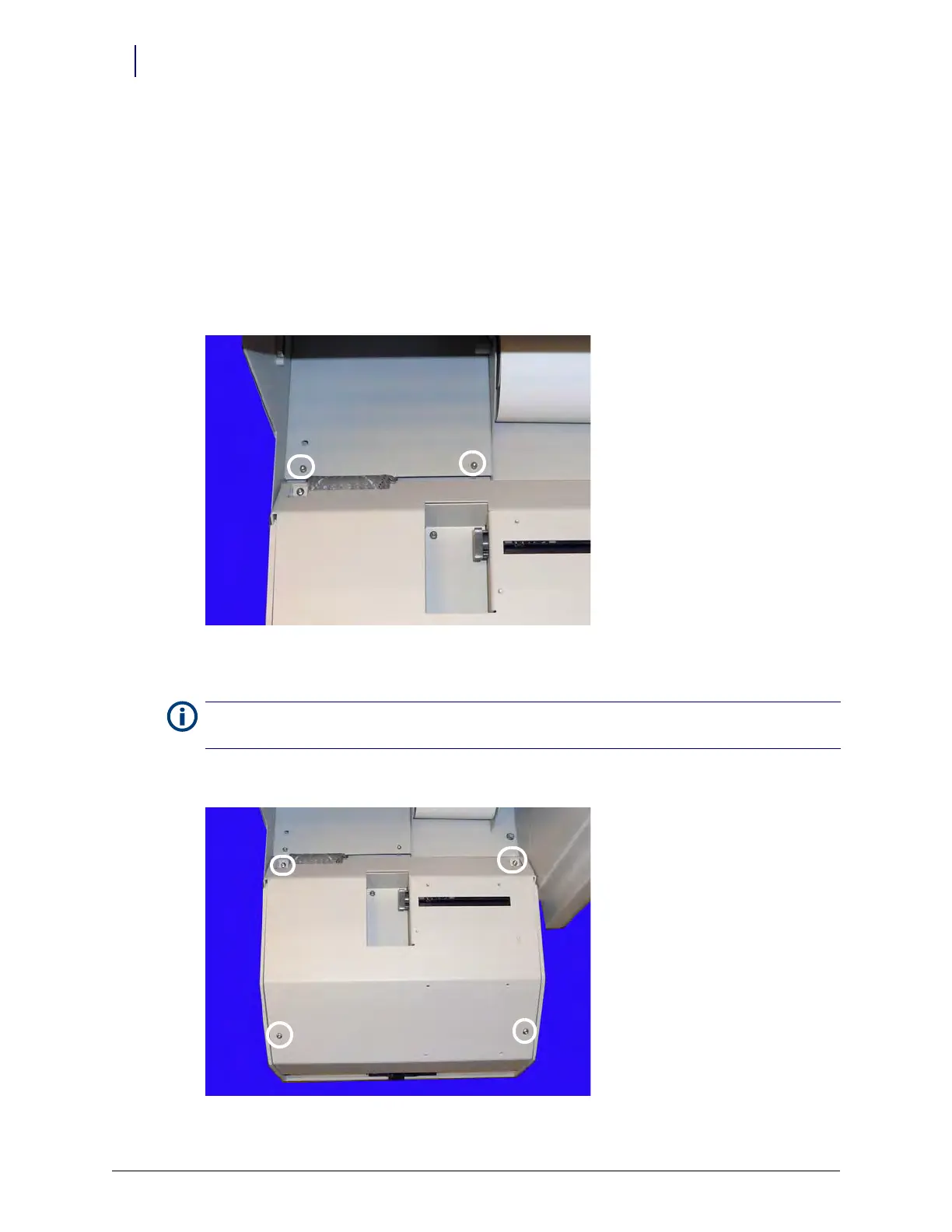
4. Remove the two 4-40 x 3/8 SHC screws from the keyboard cable cover.
Figure 1-2. Remove the screws from the keyboard cable cover
5. Lift up the keyboard cable cover and remove it.
6. Remove the four 4-40 x 3/8 buttonhead screws that secure the rear keyboard door.
Figure 1-3. Remove the four screws securing the rear keyboard door
Note: The cover is held to the back of the keyboard door enclosure by two tabs that slide into slots in the back
of the cover. To remove, lift the front of the cover until the tabs are free from the cover slots and remove.



 To Next Page